Agents
Agents are the core building blocks in Protolink.
Concepts
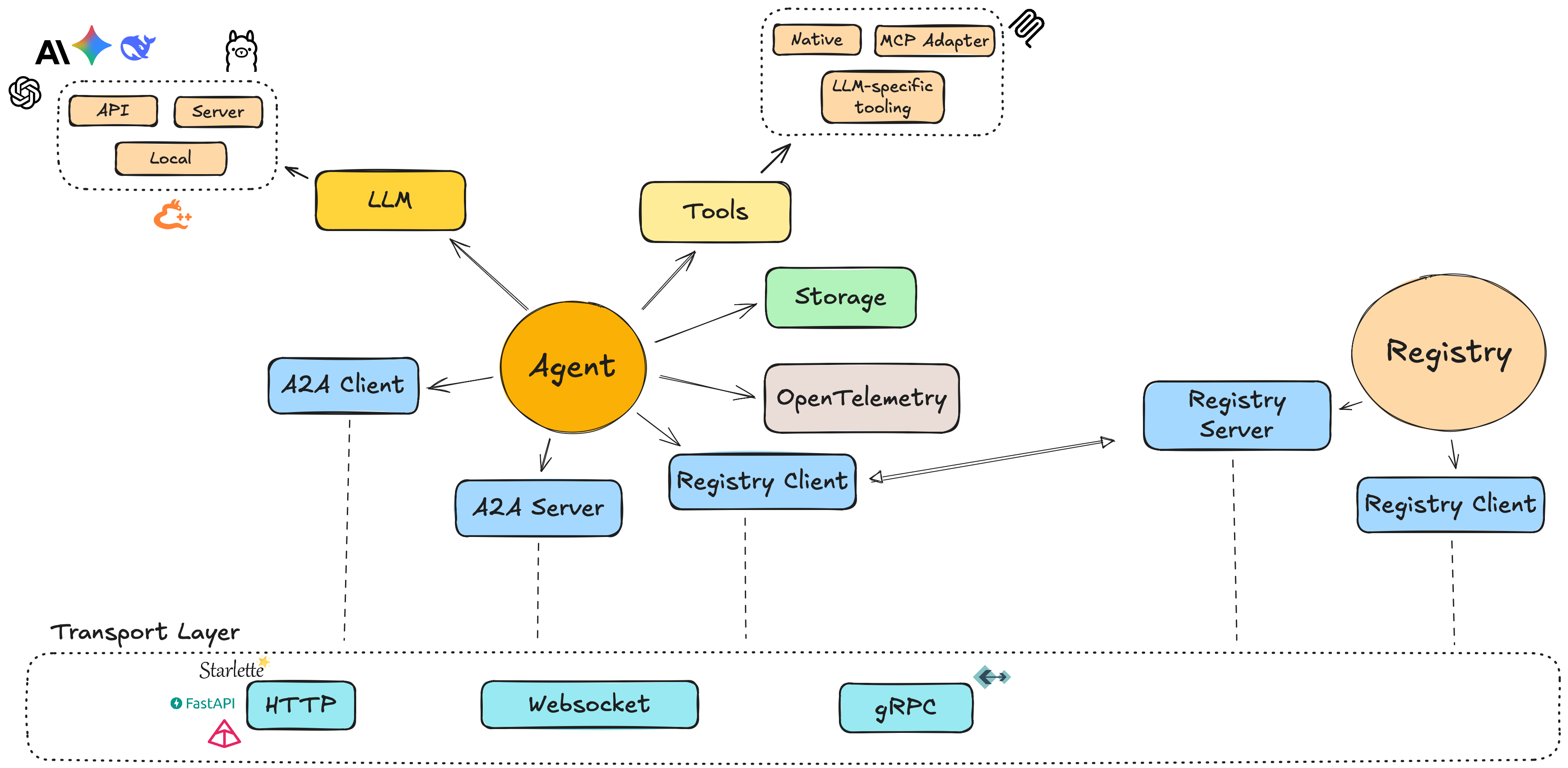
An Agent in Protolink is a unified component that can act as both client and server. This is different from the original A2A spec, which separates client and server concerns.
High‑level ideas:
- Unified model: a single
Agentinstance can send and receive messages. - AgentCard: a small model describing the agent (name, description, metadata).
- Modules:
- LLMs (e.g.
OpenAILLM,AnthropicLLM,LlamaCPPLLM,OllamaLLM). - Tools (native Python functions or MCP‑backed tools).
- LLMs (e.g.
- Transport abstraction: agents communicate over transports such as HTTP, WebSocket, gRPC, or the in‑process runtime transport.
Creating an Agent
A minimal agent consists of three pieces:
- An
AgentCarddescribing the agent. - A
Transportimplementation. - An optional LLM and tools.
Example:
from protolink.agents import Agent
from protolink.models import AgentCard
from protolink.transport import HTTPTransport
from protolink.llms.api import OpenAILLM

# Agent card can be an AgentCard object or a dict for simplicity, both are handled the same way.
# Option 1: Using AgentCard object
agent_card = AgentCard(
    name="example_agent",
    description="A dummy agent",
)

# Option 2: Using dictionary (simpler)
card_dict = {
    "name": "example_agent",
    "description": "A dummy agent",
    "url": "http://localhost:8000"
}

transport = HTTPTransport()
llm = OpenAILLM(model="gpt-5.2")

# Both approaches work
agent = Agent(agent_card, transport, llm)
# OR
agent = Agent(card_dict, transport, llm)
You can then attach tools and start the agent.
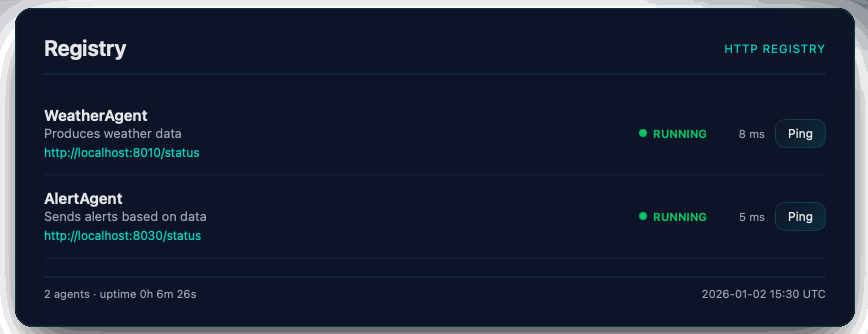
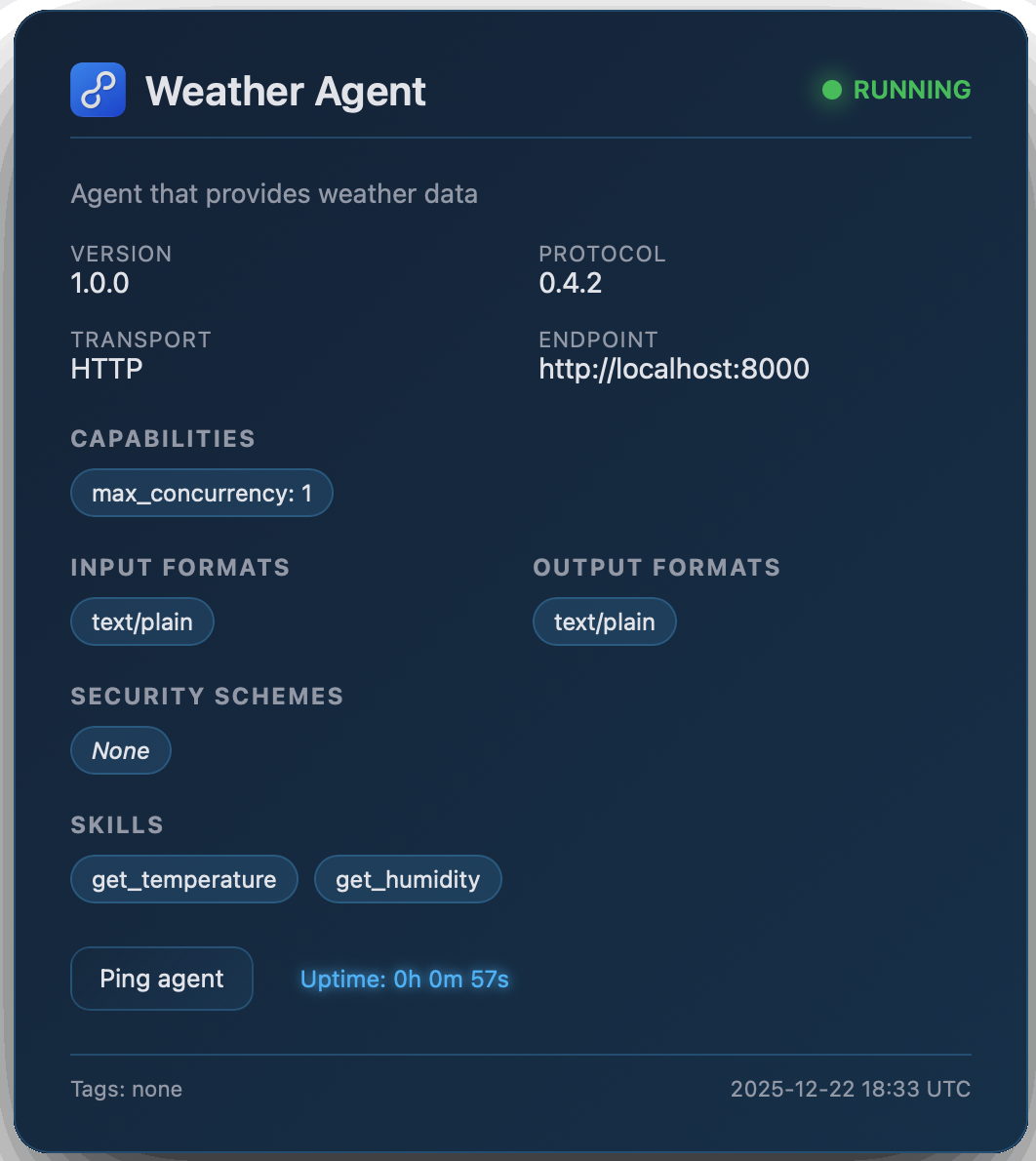
Once the Agent and Registry objects have been initiated, they will automatically expose a web interface at /status where they display the registry and agent's information.
|
|
Agent-to-Agent Communication
Agents communicate over a chosen transport.
Common patterns:
- RuntimeTransport: multiple agents in the same process share an in‑memory transport, which is ideal for local testing and composition.
- HTTPTransport / WebSocketTransport: agents expose HTTP or WebSocket endpoints so that other agents (or external clients) can send requests.
Agent Transport Layers
| Layer | Responsibility |
|---|---|
| Agent | Domain logic (what to do with a Task) |
| AgentServer | Wiring & lifecycle (server orchestration) |
| Transport | Protocol abstraction (HTTP vs WS vs gRPC) |
| Backend | Framework-specific routing (Starlette/FastAPI) |
e.g.
Agent.handle_task() -> AgentServer.set_task_handler() -> Transport.setup_routes() -> Backend creates route
Agent API Reference
This section provides a detailed API reference for the Agent base class in protolink.agents.base. The Agent class is the core component for creating A2A-compatible agents, serving as both client and server.
Unified Agent Model
Unlike the original A2A specification, Protolink's Agent combines client and server functionality in a single class. You can send tasks/messages to other agents while also serving incoming requests.
Constructor
| Parameter | Type | Default | Description |
|---|---|---|---|
card |
AgentCard |
— | Required. The agent's metadata card containing name, description, and other identifying information. |
transport |
Transport ⎪ str ⎪ None |
None |
Optional transport for communication. Can be a Transport instance or a string alias (e.g. "http", "runtime"). If not provided, you must set one later via the transport property. |
registry |
Registry ⎪ RegistryClient ⎪ str ⎪ None |
None |
Optional registry for agent discovery. Can be a Registry instance, RegistryClient, or URL string. |
registry_url |
str ⎪ None |
None |
URL of the registry when using string transport type for registry creation. |
llm |
LLM ⎪ None |
None |
Optional language model instance for the agent to use. |
system_prompt |
str ⎪ None |
None |
Optional complementary text for the system prompt to explain agent logic and role. |
storage |
Storage ⎪ None |
None |
Optional storage instance for agent data persistence. |
skills |
Literal["auto", "fixed"] |
"auto" |
Skills mode - "auto" to automatically detect and add skills, "fixed" to use only the skills defined by the user in the AgentCard. |
override_system_prompt |
bool |
False |
If True, overrides the default system prompt completely with the provided system_prompt. |
verbosity |
Literal[0, 1, 2] |
1 |
Logging verbosity level: 0 = silent (WARNING only), 1 = normal (INFO), 2 = verbose (DEBUG). |
from protolink.agents import Agent
from protolink.models import AgentCard
from protolink.transport import HTTPTransport
from protolink.llms.api import OpenAILLM

url = "http://localhost:8020"
card = AgentCard(name="my_agent", description="Example agent", url=url)
llm = OpenAILLM(model="gpt-4")
transport = HTTPTransport(url=url)

agent = Agent(card=card, transport=transport, llm=llm)
Lifecycle Methods
These methods control the agent's server component lifecycle.
| Name | Parameters | Returns | Description |
|---|---|---|---|
start() |
register: bool = True, blocking: bool = False |
None |
Starts the agent's server. If blocking=True, awaits indefinitely until cancelled. |
stop() |
— | None |
Stops the agent's server component and cleans up resources. |
Blocking Mode
The blocking parameter controls whether start() returns immediately or blocks the event loop:
# Non-blocking (default) - for multi-agent orchestration
await agent1.start()
await agent2.start()
await agent3.start()
# Continue with other logic...

# Blocking - for single-agent servers
asyncio.run(agent.start(blocking=True))  # Runs until Ctrl+C
When to use blocking=True
Use blocking=True when running a single agent as a standalone service. Use the default blocking=False when orchestrating multiple agents or when you need to execute logic after startup.
Transport Management
| Name | Parameters | Returns | Description |
|---|---|---|---|
transport (property) |
Transport ⎪ str ⎪ None |
None |
Gets or sets the transport used by this agent. Setting this initializes the client and server components. |
client (property) |
— | AgentClient ⎪ None |
Returns the client instance for sending requests to other agents, or None if no transport is set. |
server (property) |
— | AgentServer ⎪ None |
Returns the server instance if one is available via the transport. |
Task and Message Handling
Core Task Processing
| Name | Parameters | Returns | Description |
|---|---|---|---|
handle_task() |
task: Task |
Task |
Default task handler. Interprets the Task's Parts (tool calls, inference) and executes them. Can be overridden for custom orchestration. |
handle_task_streaming() |
task: Task |
AsyncIterator |
Optional method for agents that want to emit real-time updates. Default implementation calls handle_task and emits status functionality events. |
execute_task() |
task: Task |
Task |
Core execution method. For infer parts, it delegates to LLM.infer() to run the multi-step reasoning loop. For tool_call parts, it executes the tool directly. |
process() |
message_text: str |
str |
Convenience method for synchronous processing of user text input. Wraps input in a Task and returns response text. |
The Inference Loop Integration
When execute_task() encounters an infer part, it delegates to LLM.infer() with:
- The query: Extracted from the task's message content
- The agent's tools: All registered tools passed as a dictionary
- An agent callback: Enables the LLM to delegate work to other agents
# Simplified view of what happens inside execute_task()
result = await self.llm.infer(
    query=query,
    tools=self.tools,
    agent_callback=self._handle_agent_call  # Enables agent delegation
)
The agent callback (_handle_agent_call) is invoked when the LLM produces an agent_call action. It:
- Resolves the agent name to URL by querying the registry
- Creates a Task with the appropriate message/tool call
- Sends the task to the target agent via
send_task_to() - Returns the result to the inference loop
This enables a coordinator agent to delegate work to specialized agents without manual orchestration.
Agent Delegation Flow
User Query → Coordinator Agent → LLM.infer()
                                    ↓
                               agent_call action
                                    ↓
                           _handle_agent_call()
                                    ↓
                           resolve agent URL
                                    ↓
                           send_task_to(weather_agent)
                                    ↓
                           Weather Agent processes task
                                    ↓
                           Result returned to LLM
                                    ↓
                           LLM produces final response
Communication Methods
| Name | Parameters | Returns | Description |
|---|---|---|---|
send_task_to() |
agent_url: str, task: Task |
Task |
Sends a task to another agent and returns the processed result. |
send_message_to() |
agent_url: str, message: Message |
Message |
Sends a message to another agent and returns the response. |
Skills Management
Skills represent the capabilities that an agent can perform. Skills are stored in the AgentCard and can be automatically detected or added.
Skills Modes
| Mode | Description |
|---|---|
"auto" |
Automatically detects skills from tools and public methods, and adds them to the AgentCard |
"fixed" |
Uses only the skills explicitly defined in the AgentCard |
Skill Detection
When using "auto" mode, the agent detects skills from:
- Tools: Each registered tool becomes a skill
- Public Methods: Optional detection of public methods (controlled by
include_public_methodsparameter)
# Auto-detect skills from tools only
agent = Agent(card, skills="auto")

# Use only skills defined in AgentCard
agent = Agent(card, skills="fixed")
Skills in AgentCard
Skills are persisted in the AgentCard and serialized when the card is exported to JSON:
from protolink.models import AgentCard, AgentSkill

# Create skills manually in AgentCard
card = AgentCard(
    name="weather_agent",
    description="Weather information agent",
    skills=[
        AgentSkill(
            id="get_weather",
            description="Get current weather for a location",
            tags=["weather", "forecast"],
            examples=["What's the weather in New York?"]
        )
    ]
)

# Use fixed mode to only use these skills
agent = Agent(card, skills="fixed")
Tool Management
Tools allow agents to execute external functions and APIs.
| Name | Parameters | Returns | Description |
|---|---|---|---|
add_tool() |
tool: BaseTool |
None |
Registers a tool with the agent and automatically adds it as a skill to the AgentCard. |
tool() |
name: str, description: str |
decorator |
Decorator for registering Python functions as tools (automatically adds as skills). |
call_tool() |
tool_name: str, **kwargs |
Any |
Executes a registered tool by name with provided arguments. |
# Using the decorator approach
@agent.tool("calculate", "Performs basic calculations")
def calculate(operation: str, a: float, b: float) -> float:
    if operation == "add":
        return a + b
    elif operation == "multiply":
        return a * b
    else:
        raise ValueError(f"Unsupported operation: {operation}")

# Direct tool registration
from protolink.tools import BaseTool

class WeatherTool(BaseTool):
    def call(self, location: str) -> dict:
        # Weather API logic here
        return {"temperature": 72, "conditions": "sunny"}

agent.add_tool(WeatherTool())
Registry & Discovery
| Name | Parameters | Returns | Description |
|---|---|---|---|
discover_agents() |
filter_by: dict ⎪ None = None |
list[AgentCard] |
Discover agents in the registry matching the filter criteria. |
register() |
— | None |
Registers this agent in the global registry. |
unregister() |
— | None |
Unregisters this agent from the global registry. |
Utility Methods
| Name | Parameters | Returns | Description |
|---|---|---|---|
get_agent_card() |
as_json: bool = True |
AgentCard ⎪ dict |
Returns the agent's identity card. |
set_llm() |
llm: LLM |
None |
Updates the agent's language model instance. |
get_context_manager() |
— | ContextManager |
Returns the context manager for this agent. |
set_storage() |
storage: Storage |
None |
Sets the Agent's storage instance. |
Storage and Persistence
Protolink provides a storage abstraction to allow agents to persist data across tasks or even standalone.
Core Storage Interface
The Storage base class defines the CRUD interface:
from protolink.storage import Storage

class MyStorage(Storage):
    def save(self, data): ...
    def load(self): ...
    def update(self, data): ...
    def delete(self): ...
SQLite Storage
Protolink includes a built-in SQLiteStorage implementation:
from protolink.storage import SQLiteStorage

storage = SQLiteStorage(db_path="my_agent.db", namespace="main_agent")
agent = Agent(card=card, storage=storage)
Abstract Methods
The Agent class provides a default implementation for handle_task that handles tool use and LLM inference automatically. You generally do not need to implement any abstract methods unless you require custom logic.
handle_task(task: Task) -> Task: Override this if you need custom task processing logic (e.g., conditional execution, routing).
Minimal Agent Implementation
from protolink.agents import Agent
from protolink.models import AgentCard, Task, Message

class EchoAgent(Agent):
    async def handle_task(self, task: Task) -> Task:
        # Echo back all messages
        response_messages = []
        for message in task.messages:
            response_messages.append(
                Message(
                    content=f"Echo: {message.content}",
                    role="assistant"
                )
            )

        return Task(
            messages=response_messages,
            parent_task_id=task.id
        )
Error Handling
The Agent class includes several error handling patterns:
- Missing Transport: Raises
ValueErrorif trying to start without a transport. - Authentication Failures: Returns
401or403responses for invalid auth. - Tool Errors: Tool execution errors are propagated to the caller.
- Task Processing: Errors in
handle_task()are caught and returned as error messages to the sender.