Agents
Agents are the core building blocks in Protolink.
Concepts
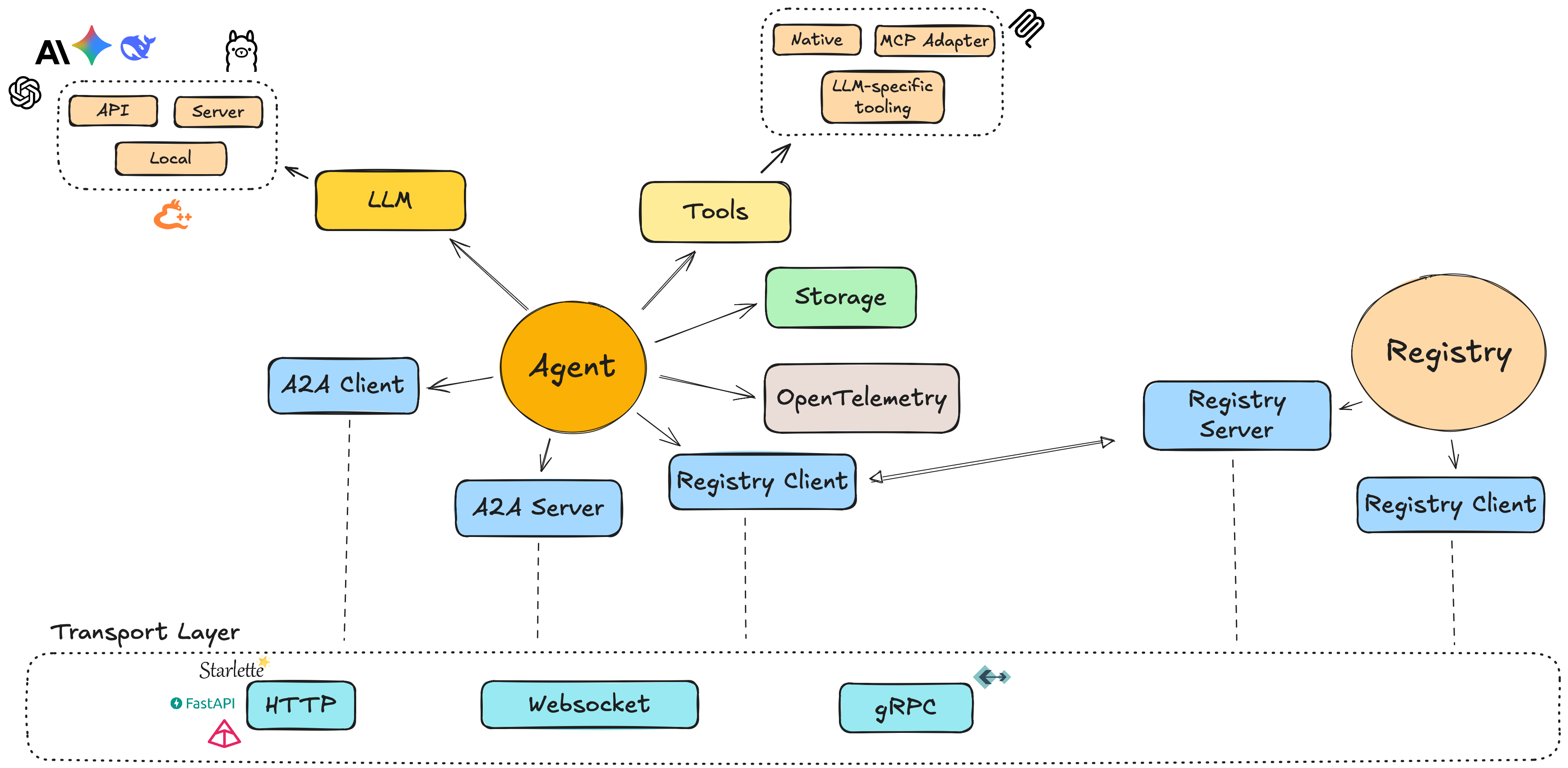
An Agent in Protolink is a unified component that acts as both client and server, unlike Google’s A2A protocol, which separates these concerns.
It is the core building block of Protolink, responsible for managing identity, capabilities, and interactions between agents. The Agent integrates key components such as tools, LLMs, transport, state, storage, telemetry, and logging.
Agents communicate through Tasks, the fundamental unit of work:
- Receive tasks via handle_task()
- Send tasks via call_agent()
Agents also register themselves and discover others via the registry. For inference requests ("infer"), ProtoLink automatically manages the full LLM interaction cycle until the task is resolved.
Each component is pluggable to the agent and can be replaced with your own implementation.
High‑level ideas:
- Unified model: a single
Agentinstance can send and receive messages. - AgentCard: a small model describing the agent (name, description, metadata).
- Modules:
- LLMs (e.g.
OpenAILLM,AnthropicLLM,LlamaCPPLocalLLM,LlamaCPPServerLLM,OllamaLLM). - Tools (native Python functions or MCP‑backed tools).
- Storage (e.g.
InMemoryStorage,SQLiteStorage). - Telemetry (e.g.
LocalTraceTelemetry,LangfuseTelemetry,LangSmithTelemetry). - Logger (e.g.
ConsoleLogger,FileLogger,QuietLogger). - Transport abstraction: agents communicate over transports such as HTTP, SSE JSON-RPC, WebSocket, or the in-process runtime transport. The
grpcalias is reserved for future support.
Creating an Agent
A minimal agent consists of three pieces:
- An
AgentCarddescribing the agent. - A
Transportimplementation. - An optional LLM and tools.
Example:
from protolink.agents import Agent
from protolink.models import AgentCard
from protolink.transport import HTTPTransport
from protolink.llms.api import OpenAILLM

# Agent card can be an AgentCard object or a dict for simplicity, both are handled the same way.
# Option 1: Using AgentCard object
agent_card = AgentCard(
    name="example_agent",
    description="A dummy agent",
    url="http://localhost:8000",
)

# Option 2: Using dictionary (simpler)
card_dict = {
    "name": "example_agent",
    "description": "A dummy agent",
    "url": "http://localhost:8000"
}

transport = HTTPTransport(url="http://localhost:8000")
llm = OpenAILLM(model="gpt-4o-mini")

# Both approaches work
agent = Agent(card=agent_card, transport=transport, llm=llm)
# OR
agent = Agent(card=card_dict, transport=transport, llm=llm)
You can then attach tools and start the agent.
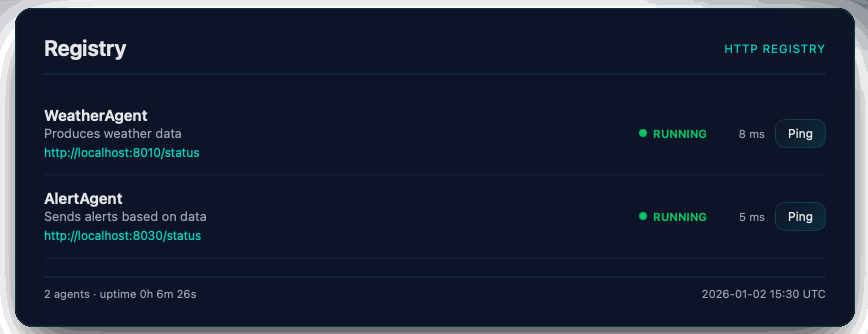
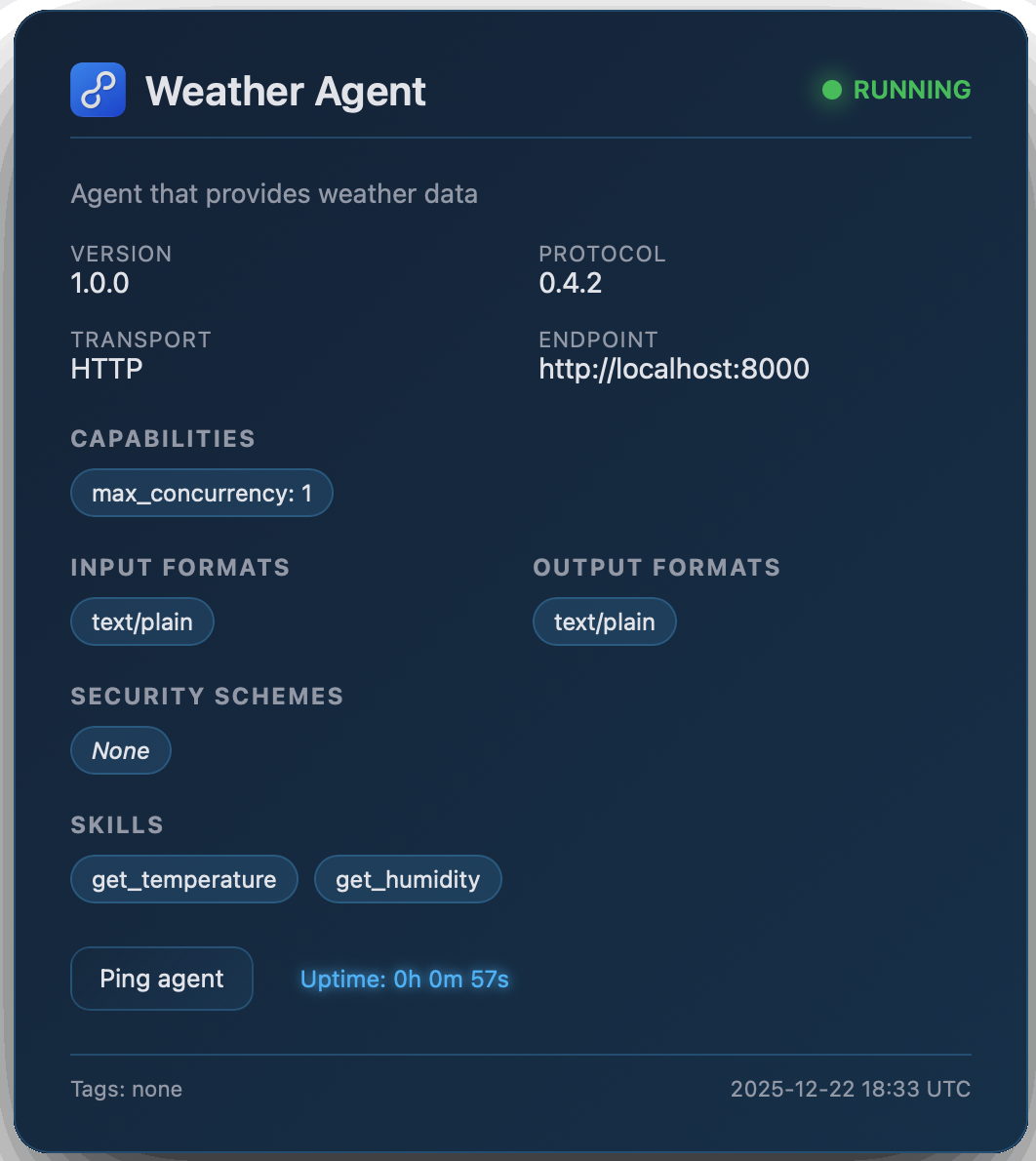
Once the Agent and Registry objects have been initiated, they will automatically expose a web interface at /status where they display the registry and agent's information.
|
|
Agent-to-Agent Communication
Agents communicate over a chosen transport.
Common patterns:
- RuntimeTransport: agents operate dedicated native local transports connected via a globally shared memory registry. This mirrors distributed HTTP environments perfectly, enabling zero network overhead testing workflows while retaining accurate boundaries.
- HTTPTransport / WebSocketTransport / SSEJSONRPCTransport: agents expose network endpoints so that other agents, CLIs, dashboards, or external clients can send requests. Use SSE or WebSocket when you want streamed task events.
Agent Transport Layers
| Layer | Responsibility |
|---|---|
| Agent | Domain logic (what to do with a Task) |
| AgentServer | Wiring & lifecycle (server orchestration) |
| Transport | Protocol abstraction (HTTP, SSE, WS, runtime) |
| Backend | Framework-specific routing (Starlette/FastAPI) |
e.g.
Agent.handle_task() -> AgentServer -> Transport.setup_routes() -> Backend creates route
Agent API Reference
This section provides a detailed API reference for the Agent base class in protolink.agents.base. The Agent class is the core component for creating A2A-compatible agents, serving as both client and server.
Unified Agent Model
Unlike the original A2A specification, Protolink's Agent combines client and server functionality in a single class. You can send tasks/messages to other agents while also serving incoming requests.
Implementation Layout
protolink.agents.base.Agent is the stable public facade. Internally, the agent package keeps the constructor and dependency wiring in base.py, the core task and LLM execution loop in engine.py, reusable behavior chunks in mixins.py, state-request normalization in helpers.py, and the blocking convenience facade in sync.py.
Constructor
| Parameter | Type | Default | Description |
|---|---|---|---|
card |
AgentCard |
— | Required. The agent's metadata card containing name, description, and other identifying information. |
transport |
Transport ⎪ str ⎪ None |
None |
Optional transport for communication. Can be a Transport instance or a string alias (e.g. "http", "runtime"). If not provided, you must set one later via the transport property. |
registry |
Registry ⎪ RegistryClient ⎪ str ⎪ None |
None |
Optional registry for agent discovery. Can be a Registry instance, RegistryClient, or URL string. |
registry_url |
str ⎪ None |
None |
URL of the registry when using string transport type for registry creation. |
llm |
LLM ⎪ None |
None |
Optional language model instance for the agent to use. |
system_prompt |
str ⎪ None |
None |
Optional complementary text for the system prompt to explain agent logic and role. |
storage |
Storage ⎪ None |
None |
Optional storage instance for agent data persistence. |
state |
list[StateMode] ⎪ State ⎪ None |
None |
Optional agent state configuration. Defines which modules (conversation, tools, etc.) should be persistent. |
telemetry |
Telemetry ⎪ None |
None |
Optional telemetry instance for observability and tracing. |
skills |
Literal["auto", "fixed"] |
"auto" |
Skills mode - "auto" to automatically detect and add skills, "fixed" to use only the skills defined by the user in the AgentCard. |
logger |
BaseLogger ⎪ None |
None |
Custom logger instance (e.g. ConsoleLogger, FileLogger, or QuietLogger). |
discovery_ttl |
int |
0 |
Time to live in seconds for caching Agent information discovered from the Registry. Default is 0 (no caching). |
override_system_prompt |
bool |
False |
If True, overrides the default system prompt completely with the provided system_prompt. |
verbosity |
Literal[0, 1, 2] |
1 |
Logging verbosity level: 0 = silent for standard Agent logs, 1 = normal (INFO), 2 = verbose (DEBUG). |
expose_chat |
bool |
True |
Whether the Agent will expose a chat endpoint for interaction with a UI. |
authenticator |
Authenticator ⎪ None |
None |
Optional Authenticator instance for verifying incoming requests to this agent. |
credentials |
str ⎪ None |
None |
Optional credentials string used for authenticating outgoing requests. |
policy |
Policy ⎪ None |
None |
Runtime action policy. Defaults to an allow-by-default CapabilityPolicy. |
approval_handler |
Callable ⎪ None |
None |
Application callback that resolves typed ApprovalRequest checkpoints. |
run_store |
RunStore ⎪ None |
None |
Optional durable task/run store. When provided, the default runtime records task snapshots after direct, server, and streaming execution paths. |
registry_heartbeat_interval |
float ⎪ None |
None |
Optional seconds between registry heartbeat requests after successful registration. Use with a registry TTL to prune dead agents automatically. |
from protolink.agents import Agent
from protolink.models import AgentCard
from protolink.transport import HTTPTransport
from protolink.llms.api import OpenAILLM

url = "http://localhost:8020"
card = AgentCard(name="my_agent", description="Example agent", url=url)
llm = OpenAILLM(model="gpt-4")
transport = HTTPTransport(url=url)

agent = Agent(card=card, transport=transport, llm=llm)
Durable Task Snapshots
Agents remain stateless by default, but production services and CLIs often need a durable record of the task state that was returned to a user. Pass a RunStore implementation to run_store to persist snapshots without changing task execution code.
from protolink import Agent, AgentCard, SQLiteRunStore

store = SQLiteRunStore("runs.db")
agent = Agent(
    AgentCard(name="worker", description="Worker", url="runtime://worker"),
    llm=llm,
    run_store=store,
)
The built-in SQLiteRunStore indexes task ID, state, run ID, session ID, trace ID, and agent name. Applications can implement the same RunStore protocol for Postgres, object storage, or an existing application database. The store is observational: it records completed, failed, canceled, and streamed task snapshots, but active cancellation and live execution still use the process-local task registry.
Lifecycle Methods
These methods control the agent's server component lifecycle.
| Name | Parameters | Returns | Description |
|---|---|---|---|
start() |
register: bool = True, background: bool = False |
None |
Starts the agent runtime. Can run in the main loop or as an isolated background thread. |
stop() |
— | None |
Stops the agent runtime and synchronously cleans up resources. |
Execution Models & Lifecycle
The start() method is the primary entrypoint for running an agent. To provide a "minimal boilerplate" experience, Protolink's lifecycle management automatically isolates the agent's internal async operations when running in the background, making it extremely robust across different environments.
The background Parameter
The background parameter controls the execution mode and event loop isolation:
background=True: Starts the agent in a dedicated background thread with its own isolatedasyncioevent loop. It returns immediately. This is the recommended mode when running agents from Jupyter Notebooks, inside existingasyncioapplications, or when orchestrating multiple agents in a single script.background=False(Default): Takes over the main thread and blocks execution until the agent is stopped (e.g., via Ctrl+C in a terminal). Ideal for standalone agent processes.
Seamless Synchronous Teardown
Because background=True isolates the agent in its own thread, shutting down the agent is incredibly simple. You just call agent.stop().
The stop() method operates synchronously—it tells the background thread to shut down and blocks for a fraction of a second to gracefully close Uvicorn and unregister from the registry. You do not need to await it, and it will never trigger messy CancelledError exceptions in your main event loop.
Common Usage Patterns
1. Standalone Python Script For simple scripts where the agent is the main process, use the default blocking mode:
# This will take over the main thread and block until interrupted
agent.start()
2. Multi-Agent Script If you need to start multiple agents in a single script, run them in the background and gracefully stop them at the end.
agent_a.start(background=True)
agent_b.start(background=True)

# ... interact with agents ...

agent_a.stop()
agent_b.stop()
3. Jupyter Notebooks & Async Apps
Jupyter Notebooks and async frameworks (like FastAPI) already have an active event loop. Using background=True safely isolates the agent from this loop:
async def main():
    agent.start(background=True)  # Spawns isolated thread, safe for async context

    # ... your async app logic ...

    agent.stop()  # Cleanly shuts down the thread without blocking your loop permanently
Graceful Shutdown
Always use agent.stop() to ensure that the agent unregisters from the registry and releases its network ports cleanly. In a standard script, agent.start(background=False) handles KeyboardInterrupt gracefully out of the box.
Transport Management
| Name | Parameters | Returns | Description |
|---|---|---|---|
transport (property) |
Transport ⎪ str ⎪ None |
None |
Gets or sets the transport used by this agent. Setting this initializes the client/server components and updates the agent card's transport and streaming capability. |
client (property) |
— | AgentClient ⎪ None |
Returns the client instance for sending requests to other agents, or None if no transport is set. |
server (property) |
— | AgentServer ⎪ None |
Returns the server instance if one is available via the transport. |
Task and Message Handling
Core Task Processing
| Name | Parameters | Returns | Description |
|---|---|---|---|
run_task() |
task: Task |
Task |
Runs handle_task() inside active-task registration so it can be canceled by task ID. Server routes use this wrapper automatically. |
run_task_streaming() |
task: Task |
AsyncIterator |
Runs the streaming handler inside active-task registration and guarantees a final canceled status event after successful cancellation. |
handle_task() |
task: Task |
Task |
Default task handler. Interprets the Task's Parts (tool calls and inference) and executes them. Can be overridden for custom orchestration. |
handle_task_streaming() |
task: Task |
AsyncIterator |
Streams task status, LLM inference events, tool progress, artifact updates, and final completion for streaming-capable transports. |
execute_task() |
task: Task |
Task |
Core execution method. For infer parts, it delegates to LLM.infer(). For tool_call parts, it executes the tool directly. |
compact_history() |
request: HistoryCompactionRequest |
HistoryCompactionResult |
Control-plane method behind POST /llm/history/compact. Calls llm.compact_history() without exposing compaction to the model prompt. |
describe_state() |
request/session_id |
StateOperationResult |
Control-plane method behind POST /state/describe. Reports enabled stores and optional session state. |
reset_state() |
request/session_id |
StateOperationResult |
Control-plane method behind POST /state/reset. Clears a conversation session or performs a full state reset when no session is supplied. |
compact_state() |
request/session_id |
StateOperationResult |
Control-plane method behind POST /state/compact. Compacts persisted conversation state through the LLM-owned compactor. |
cancel_task() |
task_id | TaskCancellationRequest, reason=None |
Task |
Marks an active task and its RunContext canceled, then interrupts its owning coroutine. |
get_cancellation_token() |
task_id: str |
CancellationToken ⎪ None |
Returns the process-local token for checkpoints in custom long-running handlers. |
active_task_ids |
— | tuple[str, ...] |
Snapshot of task IDs currently registered on this Agent. |
invoke() |
message, part_type="infer", tool_name=None, tool_args=None, session_id="invocation_session_id" |
str |
Async. Convenience method for direct agent invocation. Supports infer and tool_call. Accepts an optional session_id for memory. |
sync.invoke() |
message, part_type="infer", tool_name=None, tool_args=None, session_id="invocation_session_id" |
str |
Synchronous version of invoke(). Useful for testing and simple scripts. |
sync.discover_agents() |
filter_by: dict ⎪ None = None |
list[AgentCard] |
Synchronous version of discover_agents(). |
sync.call_agent() |
agent_url: str, task: Task |
Task |
Synchronous version of call_agent(). |
Task Lifecycle
The default Agent implementation manages Task.state for you:
- Incoming non-terminal tasks move to
TaskState.WORKING. - Successful tool or LLM outputs move the task to
TaskState.COMPLETED. - Error parts, failed tool outputs, or raised exceptions move the task to
TaskState.FAILED. - Status parts requesting more input move the task to
TaskState.INPUT_REQUIRED.
Every successful state change is appended to task.metadata["state_history"]. Streaming handlers emit matching TaskStatusUpdateEvent events and include the final serialized task in the final status event metadata.
Before execution, the default runtime also normalizes RunContext into task.metadata["run_context"]. This gives applications one typed place for session IDs, trace IDs, workspace URIs, permission metadata, budgets, cancellation state, and parent/child agent chains. See Runtime for the full context and event-sink API.
AgentServer routes call run_task() and run_task_streaming(), so fully overridden handlers still receive active-task registration and remote cancellation. Direct application code should also use these wrappers when it invokes a fully custom handler. Prefer calling await self.execute_task(task) inside custom handlers when you only need to wrap or augment the default execution.
Live Task Cancellation
await agent.cancel_task(task.id, reason="Stopped by user") controls work that is currently active on this Agent. It is different from Task.cancel(): the task helper records serializable lifecycle state, while the Agent API also signals a live CancellationToken and cancels the owning asyncio.Task.
The default LLM, tool, streaming, and delegation paths already check this token. A custom CPU loop can retrieve it and add explicit checkpoints:
async def handle_task(self, task: Task) -> Task:
    token = self.get_cancellation_token(task.id)
    for item in application_items:
        if token is not None:
            token.raise_if_cancelled()
        await process(item)
    return task.complete("done")
Only active runs appear in active_task_ids. Wait until task acceptance or a first status event before canceling; completed entries are removed and belong in application storage. Cancellation is best-effort because synchronous functions and external systems may not stop immediately. See Runtime cancellation for the complete contract.
The Inference Loop Integration
When execute_task() encounters an infer part, it delegates to LLM.infer() with:
- The query: Extracted from the task's message content
- The agent's tools: All registered tools passed as a dictionary
- An agent callback: Enables the LLM to delegate work to other agents
- Optional stream observers: Used by
handle_task_streaming()to emittask_llm_streamevents while the finalinfer_outputpart is produced
# Simplified view of what happens inside execute_task()
result = await self.llm.infer(
    query=query,
    tools=self.tools,
    agent_callback=self._handle_agent_call  # Enables agent delegation
)
The agent callback (_handle_agent_call) is invoked when the LLM produces an agent_call action. It:
- Resolves the agent name to URL by querying the registry
- Creates a Task with the appropriate message/tool call
- Sends the task to the target agent via
call_agent() - Returns the result to the inference loop
This enables a coordinator agent to delegate work to specialized agents without manual orchestration.
Agent Delegation Flow
User Query → Coordinator Agent → LLM.infer()
                                    ↓
                               agent_call action
                                    ↓
                           _handle_agent_call()
                                    ↓
                           resolve agent URL
                                    ↓
                           call_agent(weather_agent)
                                    ↓
                           Weather Agent processes task
                                    ↓
                           Result returned to LLM
                                    ↓
                            LLM produces final response
Controlling Agent Delegation
By default, any agent with an LLM can dynamically delegate work to other agents discovered via the registry. However, you can explicitly disable or control delegation using the agent's Capabilities:
delegation: A boolean flag (defaulting toTrue) indicating whether the agent is allowed to delegate tasks to other agents.has_llm: A boolean flag (defaulting toFalse) showing whether the agent has an LLM as a core component.
Disabling Delegation
If you set "delegation": False within the agent's card capabilities:
1. The agent will not query the registry to discover other agents.
2. The agent's prompt builder will not inject other agents' definitions or descriptions into the LLM system instructions.
3. The inference engine's agent_callback is set to None, completely preventing any remote task delegation loops.
Configuration Example
To disable delegation, simply define it in your AgentCard capabilities dictionary:
from protolink.agents import Agent

writer = Agent(
    card={
        "name": "writer",
        "url": "http://localhost:8051",
        "description": "Writes drafts and decides routes.",
        "capabilities": {
            "delegation": False  # Disables A2A delegation completely
        }
    },
    llm=llm,
)
Communication Methods
| Name | Parameters | Returns | Description |
|---|---|---|---|
call_agent() |
agent_url: str, task: Task |
Task |
Sends a task to another agent and returns the processed result. |
send_message_to() |
agent_url: str, message: Message |
Message |
Sends a message to another agent and returns the response. |
Synchronous API (SyncAgent)
Protolink is built on an asynchronous foundation using asyncio, which is essential for handling concurrent agent interactions and streaming responses. However, many development workflows—such as data science notebooks, CLI tools, and simple automation scripts—benefit from a straightforward, blocking API.
The Agent class provides a .sync property, which is an instance of SyncAgent. This class acts as a thin, synchronous wrapper around the agent's core async methods.
Why Use the Sync API?
- Reduced Boilerplate: Eliminates the need for
async/awaitand event loop management in scripts. - Environment Compatibility: Works seamlessly in standard Python environments and legacy codebases that are not yet async-ready.
- Prototyping: Allows for faster iteration when building simple "input-output" agent flows.
How it Works Internally
The SyncAgent class does not re-implement any logic. Instead, it delegates calls to the agent's async methods using asyncio.run(). This ensures that all behavior—including tool execution, state management, and LLM orchestration—remains identical across both APIs.
Event Loop Conflict
The synchronous API is not thread-safe if called from within an active event loop (e.g., inside a FastAPI endpoint or an async function). Doing so will raise a RuntimeError. For async applications, always use the standard await agent.invoke() methods.
Key Sync Methods
| Method | Parameters | Returns | Description |
|---|---|---|---|
agent.sync.invoke() |
message, part_type, ... |
str |
Blocking version of invoke(). Processes a message and returns the text result. |
agent.sync.discover_agents() |
filter_by |
list[AgentCard] |
Blocking version of discover_agents(). Fetches agents from the registry. |
agent.sync.call_agent() |
agent_url, task |
Task |
Blocking version of call_agent(). Sends a task to a remote agent. |
Usage Example
from protolink.agents import Agent
from protolink.models import Task

agent = Agent(
    card={"name": "my-agent", "description": "Runtime demo agent", "url": "runtime://agent"},
    transport="runtime",
)

# Use the .sync property for blocking calls
response = agent.sync.invoke("Hello, agent!")
print(f"Agent said: {response}")

# Discovering other agents synchronously
discovered = agent.sync.discover_agents(filter_by={"name": "weather-agent"})
if discovered:
    target_url = discovered[0].url
    # Call agent synchronously
    task = Task.create_infer("What is the temperature?")
    result = agent.sync.call_agent(target_url, task)
Skills Management
Skills represent the capabilities that an agent can perform. Skills are stored in the AgentCard and can be automatically detected or added.
Skills Modes
| Mode | Description |
|---|---|
"auto" |
Automatically detects skills from tools and public methods, and adds them to the AgentCard |
"fixed" |
Uses only the skills explicitly defined in the AgentCard |
Skill Detection
When using "auto" mode, the agent detects skills from:
- Tools: Each registered tool becomes a skill
- Public Methods: Optional detection of public methods (controlled by
include_public_methodsparameter)
# Auto-detect skills from tools only
agent = Agent(card, skills="auto")

# Use only skills defined in AgentCard
agent = Agent(card, skills="fixed")
Skills in AgentCard
Skills are persisted in the AgentCard and serialized when the card is exported to JSON:
from protolink.models import AgentCard, AgentSkill

# Create skills manually in AgentCard
card = AgentCard(
    name="weather_agent",
    description="Weather information agent",
    skills=[
        AgentSkill(
            id="get_weather",
            description="Get current weather for a location",
            tags=["weather", "forecast"],
            examples=["What's the weather in New York?"]
        )
    ]
)

# Use fixed mode to only use these skills
agent = Agent(card, skills="fixed")
Tool Management
Tools allow agents to execute external functions and APIs.
| Name | Parameters | Returns | Description |
|---|---|---|---|
add_tool() |
tool: BaseTool |
None |
Registers a tool with the agent and automatically adds it as a skill to the AgentCard. |
tool() |
name: str, description: str |
decorator |
Decorator for registering Python functions as tools (automatically adds as skills). |
call_tool() |
tool_name: str, **kwargs |
Any |
Executes a registered tool by name with provided arguments. |
# Using the decorator approach
@agent.tool("calculate", "Performs basic calculations")
def calculate(operation: str, a: float, b: float) -> float:
    if operation == "add":
        return a + b
    elif operation == "multiply":
        return a * b
    else:
        raise ValueError(f"Unsupported operation: {operation}")

# Direct tool registration
from protolink.tools import BaseTool

class WeatherTool(BaseTool):
    def call(self, location: str) -> dict:
        # Weather API logic here
        return {"temperature": 72, "conditions": "sunny"}

agent.add_tool(WeatherTool())
Registry & Discovery
| Name | Parameters | Returns | Description |
|---|---|---|---|
discover_agents() |
filter_by: dict ⎪ None = None |
list[AgentCard] |
Discover agents in the registry matching the filter criteria. |
register() |
— | None |
Registers this agent in the global registry. |
unregister() |
— | None |
Unregisters this agent from the global registry. |
Utility Methods
| Name | Parameters | Returns | Description |
|---|---|---|---|
get_agent_card() |
as_json: bool = True |
AgentCard ⎪ dict |
Returns the agent's identity card. |
get_status() |
output_format: Literal["html", "json"] = "html" |
str |
Returns the agent's status as HTML or JSON. HTML is a rich status page for the agent (displayed at /status). JSON is a machine-readable representation of the agent's status. |
get_chat() |
— | str |
Returns a self-contained chat UI as HTML. Only functional when the agent has an LLM configured (served at /chat). |
handle_chat_message() |
data: dict |
dict |
Processes an incoming chat message via the agent's invoke() method and returns the response. |
llm (property) |
LLM ⎪ None |
None |
Gets or sets the agent's language model. Setting this validates the connection and updates card.capabilities.has_llm automatically. |
storage (property) |
Storage |
None |
Gets or sets the agent's storage instance. Setting this automatically updates the internal SessionManager. |
set_registry() |
registry, registry_url=None |
None |
Configures the agent's connection to a Protolink registry. |
sync (property) |
— | SyncAgent |
Returns a synchronous wrapper around the agent for blocking operations. |
Storage and Persistence
Protolink provides a storage abstraction to allow agents to persist data across tasks or even standalone.
Core Storage Interface
The Storage base class defines the CRUD interface:
from protolink.storage import Storage

class MyStorage(Storage):
    def save(self, data): ...
    def load(self): ...
    def update(self, data): ...
    def delete(self): ...
In-Memory Storage (Default)
Protolink includes a built-in InMemoryStorage which is the default storage backend for all agents. It is a lightweight, RAM-backed dictionary that supports TTL (Time-To-Live) for automatic cleanup.
from protolink.storage import InMemoryStorage

# Default: shared class-level store
storage = InMemoryStorage(namespace="my_agent", ttl=3600)
agent = Agent(card=card, storage=storage)
SQLite Storage
For persistent storage across restarts, use the built-in SQLiteStorage:
from protolink.storage import SQLiteStorage

storage = SQLiteStorage(db_path="my_agent.db", namespace="main_agent")
agent = Agent(card=card, storage=storage)
State Persistence
When an agent is initialized with the state parameter, it tracks internal state across multiple task executions based on a session_id.
-
Activation: Pass a list of state modules to the
Agentconstructor.# Enable conversation history and tool state persistence agent = Agent(card=card, state=["conversation", "tools"]) -
Identification: Include a
session_idin your task metadata. This ID is used to partition the state in the storage.task = Task.create(Message.user("My name is Alice")) task.metadata["session_id"] = "user_123" await agent.execute_task(task) -
Resumption: Subsequent tasks with the same
session_idwill automatically load the previous state (e.g., conversation history) into the execution context.
Supported State Modules
| Module | Description |
|---|---|
conversation |
Persists LLM conversation history between tasks with the same session_id. |
tools |
Provides a storage-backed extension point for tool-specific state. |
task |
Provides a storage-backed extension point for task metadata outside the live Task object. |
flow |
Provides storage-backed flow context; active flow prompts are carried on task.flow_state. |
Session IDs
When using direct invocation methods like invoke() or sync.invoke(), a default session_id of "invocation_session_id" is used if none is provided. This ensures that sequential calls to the same agent instance share history by default when state=["conversation"] is enabled.
If no session_id is provided in the task metadata (for non-invoke calls), the agent falls back to using the task.id, effectively making that specific task stateless unless further responses are sent to it.
Chat Gateway
When an agent is configured with an LLM, Protolink automatically exposes a built-in Chat UI at the /chat endpoint. This provides a browser-based interface for interacting with the agent directly — ideal for development, demos, and quick testing.
How It Works
GET /chat— Serves a self-contained HTML/CSS/JS chat interface. The page is always registered but displays a fallback message if no LLM is configured.POST /chat— Accepts{"message": "...", "session_id": "..."}and returns{"response": "..."}. This endpoint is only registered when the agent has an LLM.
The chat page displays agent metadata (name, description, skills) and LLM configuration (provider, model, temperature) in a sidebar, alongside a modern conversational interface.
Usage
No extra setup is needed — just provide an LLM when creating your agent:
from protolink.agents import Agent
from protolink.llms.api import OpenAILLM

agent = Agent(
    card={"name": "assistant", "description": "A helpful assistant", "url": "http://localhost:8000"},
    transport="http",
    llm=OpenAILLM(model="gpt-4o"),
)

agent.start()
# Chat UI is now available at http://localhost:8000/chat
Chat vs Status
The /status page shows the agent's operational health and metadata. The /chat page provides an interactive conversation interface. Both are served automatically when the agent starts.
YAML Import and Export
Protolink supports exporting an agent's configuration (identity card, capabilities, transport, LLM, security/authenticator, and registered tools) to a YAML file, and importing it back to reconstruct a functional Agent instance.
Exporting an Agent
To serialize and export an agent's configuration:
# Export to a YAML file
agent.to_yaml("agent_config.yaml")

# Get configuration as a YAML string
yaml_str = agent.to_yaml_string()

# Get configuration as a dictionary
config_dict = agent.to_dict()
Importing an Agent
To load and reconstruct an agent from a serialized configuration:
from protolink.agents import Agent

# Reconstruct from a YAML file
agent = Agent.from_yaml("agent_config.yaml")

# Reconstruct from a YAML string
agent = Agent.from_yaml_string(yaml_str)

# Reconstruct from a dictionary
agent = Agent.from_dict(config_dict)
Handling Dependencies and Overrides
- Security & Credentials: Sensitive information like API keys or passwords are not serialized by default. You can pass them as overrides during import:
agent = Agent.from_yaml("agent_config.yaml", credentials="my-secret-key") - Tool Function Paths: Standard Python tools are serialized using their module and function name paths (e.g.
my_module:my_tool_func). When the agent is imported, Protolink dynamically imports the function. If the module cannot be imported (e.g., if loaded in a different environment), Protolink registers a stub tool that returns a clean runtime error when executed rather than crashing initialization. - MCP Tool Adapters: Model Context Protocol (MCP) tool configs are fully serialized. If the MCP dependencies are installed on the target machine, they will be initialized and bound correctly.
Abstract Methods
The Agent class provides a default implementation for handle_task that handles tool use and LLM inference automatically. You generally do not need to implement any abstract methods unless you require custom logic.
handle_task(task: Task) -> Task: Override this if you need custom task processing logic (e.g., conditional execution, routing).
Minimal Agent Implementation
from protolink.agents import Agent
from protolink.models import AgentCard, Task, Message

class EchoAgent(Agent):
    async def handle_task(self, task: Task) -> Task:
        last = task.get_last_part_content()
        return task.complete(f"Echo: {last}")
Error Handling
The Agent class includes several error handling patterns:
- Missing Transport: Raises
ValueErrorif trying to start without a transport. - Authentication Failures: Returns
401or403responses for invalid auth. - Tool Errors: Tool execution errors are propagated to the caller.
- Task Processing: Errors in
handle_task()are caught and returned as error messages to the sender.