Flows
Update 0.5.0 introduces Structured Flows, a new feature that allows you to define complex, structured workflows for your agents. Building on the core Agent-to-Agent (A2A) architecture, flows enable deterministic execution paths such as sequential pipelines, parallel execution, or complex graph structures.
Unlike standard Agents that might rely on LLMs to dynamically map out interactions and routing, flows mandate strict execution paths, ensuring consistent and predictable outcomes for multistep tasks.
🧠 The Logic Behind Flows
In standard Protolink (or many other LLM-based frameworks), an Agent receives a task, analyzes it using an LLM, and decides what to do next—whether that's calling a tool, writing some text, or delegating work to another Agent via an agent_call. While powerful and flexible, this "implicit routing" can sometimes be unpredictable, expensive, or hard to debug for rigid enterprise processes.
Why Structured Flows?
Structured Flows solve this by removing the LLM from the routing equation entirely. With a Flow, you—the developer—explicitly define the state machine. The task will move predictably from Agent A to Agent B, branching only on logical conditions you define in code.
Wait, what actually happens to the Task?
In Protolink, a Flow expects a Task and returns a Task. A Task is essentially a container holding a history of interactions (Messages and Artifacts). When a Flow executes:
- Semantic Context Injection: The Flow orchestrator evaluates the next step in the topology. It pre-builds a context-aware system prompt (e.g., "Your output goes to the Editor") and attaches it to the
Task'sflow_state. - Execution: It sends the
Taskto the current Agent. - Context-Aware Inference: The Agent automatically injects the
flow_stateprompt into its LLM, ensuring it formats its output perfectly for the downstream receiver. It then performs its logic and appends anArtifactto theTask. - Traversal: The Flow retrieves the updated
Taskand passes it to the next Agent. This continues until the flow finishes, returning a highly-enrichedTaskfull of intermediate artifacts.
🧱 Deep Composability & Nesting
Protolink Flows are now fully recursive. This means a step in a Pipeline can be another entirely self-contained Parallel flow, or a Graph node can be a Pipeline.
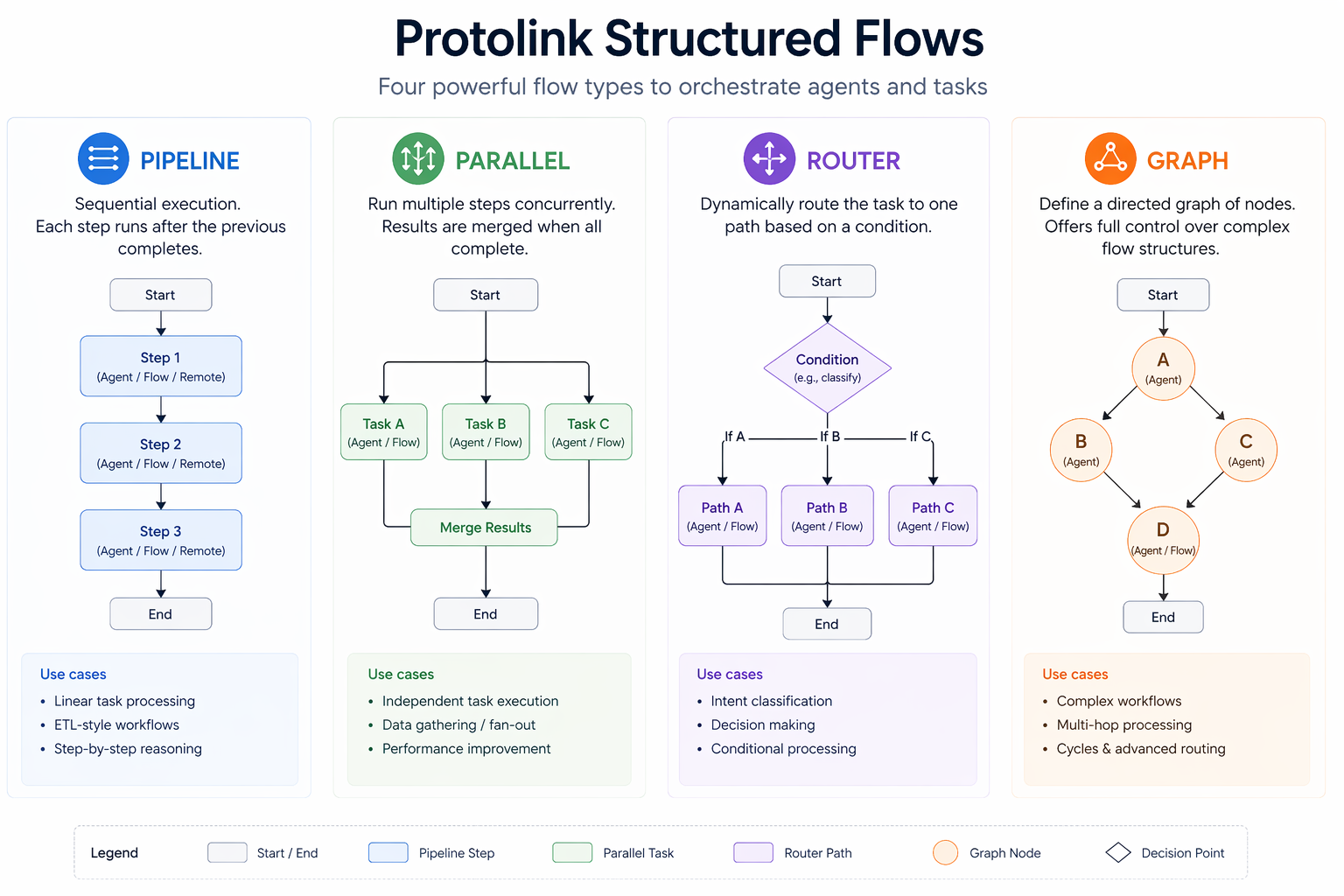
This architectural shift allows you to build extremely complex, hierarchical decision trees using simple, reusable building blocks.
Polymorphic Step Targets
Every flow step or branch now supports three target types interchangeably: * Local Agent Instance: Executes directly within the same process. * URL / Registry Name (string): Dispatches a remote A2A task across the network. * Flow Instance: Seamlessly propagates execution into a nested sub-flow.
⚙️ Execution
You can define a Flow and run it programmatically in your Python script using its .execute(task) method. In this mode, the flow runs exactly once to completion and then your script continues.
This is great for one-off tasks, background jobs, testing, or embedding a structured pipeline inside your own custom Agent classes.
🧩 Core Flow Patterns
All flows can optionally be instantiated with a Registry or RegistryClient so they can discover agents dynamically by their registered name instead of explicitly hardcoded URLs.
1. Pipeline (Sequential)
A pipeline runs a predefined list of agents in sequential order, passing the output of one agent as the input to the next.
pipeline = Pipeline(registry=registry)
pipeline.add_step("researcher").add_step("summarizer")

await pipeline.execute(task)
Fluid API
Pipelines support a fluid API via the .add_step() method, allowing you to chain steps together dynamically during initialization.
2. Parallel Execution
If multiple agents can act independently on the same task without needing each other's output, you can execute them concurrently. Their resulting parts are appended to the task outcome simultaneously.
Semantic Fan-Out Context
When a preceding agent passes its output to a Parallel flow, Protolink's Semantic Context Injection automatically informs the agent that it is broadcasting to a committee of concurrent receivers. The agent is fed the AgentCards for all parallel branches, allowing it to formulate a single comprehensive response optimized for all downstream consumers!
Safe Fan-in
Parallel execution uses ID-based merging. This ensures that the unified task only includes strictly new messages and artifacts from each branch, preventing duplicates even in complex nested structures.
from protolink.flows import Parallel

# Executes Editor and Reviewer at the exact same time
parallel = Parallel(
    branches=["editor", "reviewer"],
    registry=registry
)

task = Task.create(Message.user("Please analyze this draft."))
result = await parallel.execute(task)

for art in result.artifacts:
    print(f"- {art.parts[0].content}")
3. Conditional Routing
A Router allows conditional branching based on LLM decision-making. Instead of hardcoding unpredictable Python if/else statements, the Router injects your routing_prompt into the preceding agent, empowering the LLM itself to choose the correct path.
The preceding agent evaluates its own task context and appends a structured tag (e.g., [ROUTE: quality]) to its final response. The Router safely extracts this tag, cleans the payload, and deterministically forwards the task to the chosen route.
from protolink.flows import Router

router = Router(
    routes={
        "editor": "editor",
        "quality": "quality"
    },
    routing_prompt="If the text is poorly written, route to 'editor'. If it is perfect, route to 'quality'.",
    registry=registry
)

# Place the router in a Pipeline:
pipeline = Pipeline(registry=registry)
pipeline.add_step("writer").add_step(router)

# The 'writer' agent will automatically receive the routing instructions and choose the path!
task = Task.create(Message.user("Write a very short poem."))
await pipeline.execute(task)
4. Graph Flows (State Machines)
For creating highly complex deterministic workflows with loops, complex conditional branching, and a state-machine architecture, you can use the Graph flow.
from protolink.flows import Graph

graph = Graph(registry=registry)

# 1. Add Nodes
graph.add_node("entry", "writer")
graph.add_node("process", "editor")
graph.add_node("final", "quality")

# 2. Add standard edges
graph.add_edge("entry", "process")

# 3. Add conditional routing edges
def review_logic(t: Task) -> str:
    return "approved" # Normally you'd inspect the task artifacts here

graph.add_conditional_edge(
    "process",
    review_logic,
    {"approved": "final", "rejected": "process"} # Loops back on rejection!
)

graph.add_edge("final", "__END__")
graph.set_entry_point("entry")