Agents
Agents are the core building blocks in Protolink.
An Agent is ProtoLink's A2A-first runtime entity. It owns an AgentCard, receives and returns Task objects composed of Message, Part and Artifact primitives and can act as both client and server.
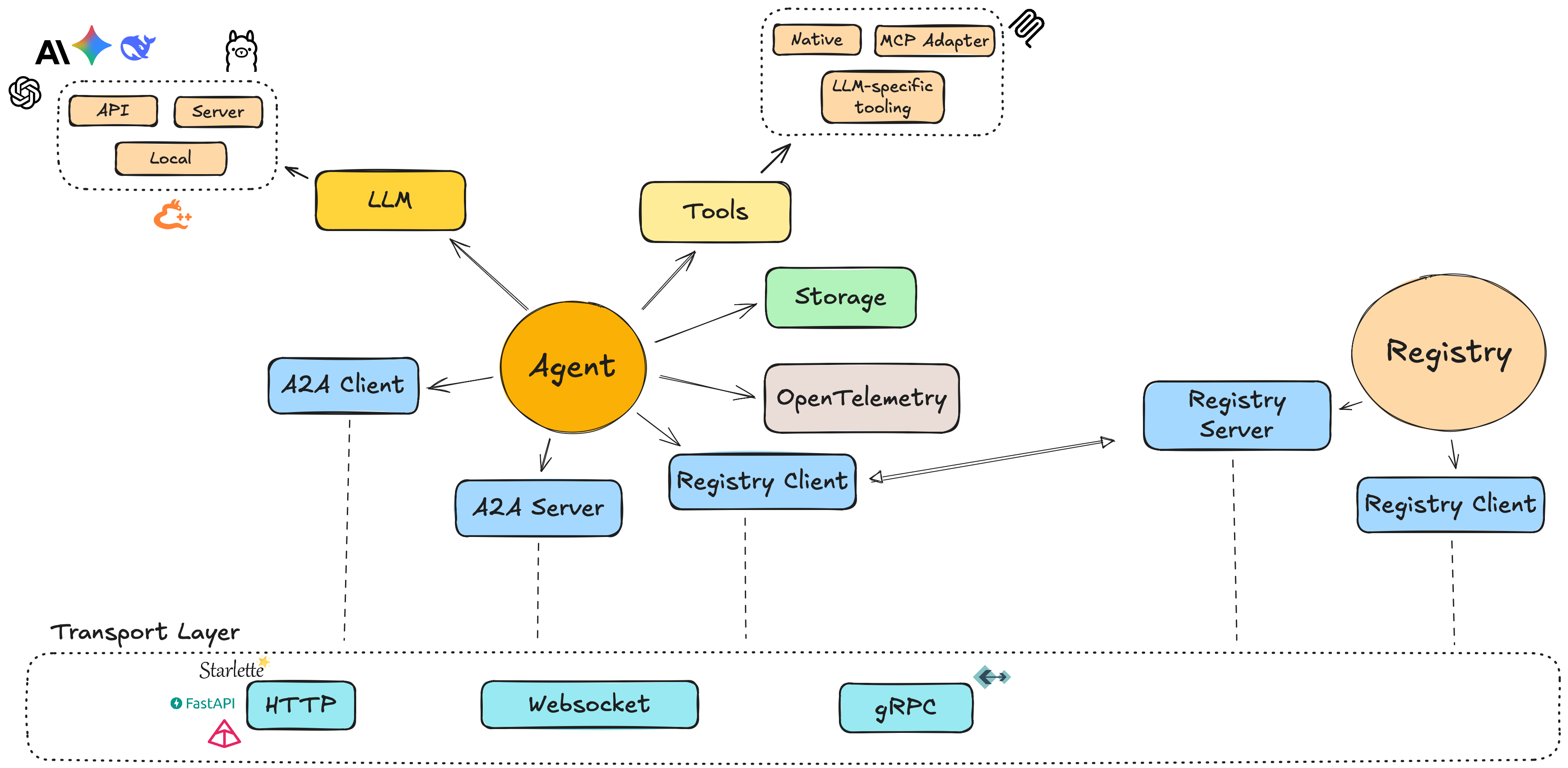
It is the core building block of Protolink, responsible for managing identity, capabilities and interactions between agents. The Agent integrates key components such as tools, LLMs, knowledge and RAG, transport, state, storage, telemetry and logging.
from protolink import Agent

agent = Agent(name="helper", llm="mock")
print(agent.sync.invoke("Hello"))
llm="mock" selects the deterministic offline adapter. Use await agent.invoke(...) inside an async application; compose tools through tools= and network communication through transport=.
Concepts
Agents communicate through Tasks, the fundamental unit of work:
- Receive tasks via
handle_task() - Send tasks via
call_agent()
Agents also register themselves and discover others via the registry. For inference requests ("infer"), ProtoLink automatically manages the full LLM interaction cycle until the task is resolved.
Each component is pluggable to the agent and can be replaced with your own implementation.
High‑level ideas:
- A2A primitives: cards describe agents, tasks carry work and messages, parts and artifacts carry instructions and results.
- Unified model: a single
Agentinstance can send and receive messages. - AgentCard: a small model describing the agent (name, description, metadata).
- Modules:
- LLMs (e.g.
OpenAILLM,AnthropicLLM,LlamaCPPLocalLLM,LlamaCPPServerLLM,OllamaLLM). - Tools (native Python functions or MCP‑backed tools).
- Storage (e.g.
InMemoryStorage,SQLiteStorage). - Telemetry (e.g.
LocalTraceTelemetry,LangfuseTelemetry,LangSmithTelemetry). - Logger (e.g.
ConsoleLogger,FileLogger,QuietLogger).
- LLMs (e.g.
- Transport abstraction: agents communicate over transports such as HTTP, SSE JSON-RPC, WebSocket, gRPC or the in-process runtime transport.
Creating an Agent
A name is enough for an embedded agent. Add a model and typed functions when you need inference and tools:
from protolink import Agent


def add(a: int, b: int) -> int:
    """Add two integers."""
    return a + b


agent = Agent(name="helper", llm="mock", tools=[add])
print(agent.sync.call_tool("add", a=2, b=3))  # 5
This generates a card with description "Agent helper" and URL runtime://helper,
without creating a transport. Set description= or url= to customize the
identity. The llm argument also accepts "provider:model" (for example,
"ollama:qwen3:4b") or a configured LLM object. See LLMs for provider
extras and credentials.
For networking, supply the endpoint explicitly:
agent = Agent(name="helper", transport="http", url="http://127.0.0.1:8000")
Network aliases require a compatible URL scheme and an explicit bind port.
Agent(name="helper", transport="http") raises ValueError before initializing
an LLM. Passing a configured transport instead lets its URL provide the default;
an explicit url= can advertise a different public address. Secure binds need a
configured transport with a TLS certificate and key. Construction does not start
the server. Use transport="runtime" for in-process peers with unique names.
For full identity metadata, pass an AgentCard or dictionary instead of
name=, description= and url=:
from protolink.agents import Agent
from protolink.models import AgentCard
from protolink.transport import HTTPTransport
from protolink.llms.api import OpenAILLM

# Agent card can be an AgentCard object or a dict for simplicity, both are handled the same way.
# Option 1: Using AgentCard object
agent_card = AgentCard(
    name="example_agent",
    description="A dummy agent",
    url="http://localhost:8000",
)

# Option 2: Using dictionary (simpler)
card_dict = {"name": "example_agent", "description": "A dummy agent", "url": "http://localhost:8000"}

transport = HTTPTransport(url="http://localhost:8000")
llm = OpenAILLM(model="gpt-4o-mini")

# Both approaches work
agent = Agent(card=agent_card, transport=transport, llm=llm)
# OR
agent = Agent(card=card_dict, transport=transport, llm=llm)
You can then attach tools and start the agent.
For automatic tool-protocol selection, pass a configured LLM rather than a bare model alias:
from protolink import Agent, create_llm

agent = Agent(
    name="helper",
    llm=create_llm("ollama:qwen3:4b", base_url="http://localhost:11434", tool_calling="auto"),
)
ProtoLink uses advertised native-tool support where available and otherwise chooses its portable JSON action protocol.
Explicit tool_calling="native" or "json" provides control. Both paths validate actions, preserve completed tool
observations during correction and enforce the current run's budgets. See action acquisition
for capability caching, provider behavior and malformed-response recovery.
Tools can raise ToolRejectedError for requests rejected before making changes. The same model receives correction
feedback within max_tool_corrections (two corrective turns by default), using the current run's budgets and history.
See recoverable tool validation for the no-change guarantee, error
codes, valid-ID feedback and outcome reporting. Ordinary tool exceptions remain execution failures.
Convenience methods
Start with invoke or ask, then add budget=RunBudget(...) or context=RunContext(...).
start_run(prompt_or_task)returns aRunHandlefor chunks, events, reports and cancellation.add_tools(iterable)registers collections;await add_mcp(...)discovers selected MCP tools.peer(target)binds a remote agent andinvoke_typed(prompt, ResponseModel)validates structured answers.
See Progressive control for signatures, examples, precedence and failure behavior.
For optional Assistant, CodeAssistant and EchoAgent classes, see Built-in Agents.
For reusable capabilities to register on any Agent, see Built-in Tools.
Local specialists and durable execution
Configure subagents=[specialist] for owned local children and durability="runs.sqlite" for restartable default-loop execution. Both are optional. See local subagents for limits and background work and durable execution for approvals, input, resume() and uncertain outcomes.
subagent_limits=SubagentLimits(...) supplies deeper control. execution_version="1" identifies your application tool contract; increment it when executable behavior changes. durability also accepts a SQLiteDurableStore or a custom DurableStore.
Model context and run controls
For model-input preparation, enable context_policy="auto" or configure a ContextPolicy. hooks=[AgentHooks(...)] adds before-model, after-tool and before-completion callbacks to the default loop. RoutedLLM selects and falls back between model adapters without replaying tools. Use evaluate() to compare the resulting behavior on reference cases and RunManager to operate durable executions through your application configuration.
Agent-to-Agent Communication
Agents communicate over a chosen transport.
Agent(..., transport="http", a2a=True) adds A2A 1.0 inbound and outbound translation without changing handle_task(Task) or removing the native ProtoLink endpoints. The default a2a=False preserves the previous native-only behavior.
Common patterns:
- RuntimeTransport: agents operate dedicated native local transports connected via a globally shared memory registry. This mirrors distributed HTTP environments perfectly, enabling zero network overhead testing workflows while retaining accurate boundaries.
- HTTPTransport / SSEJSONRPCTransport: agents expose normal HTTP endpoints so other agents, CLIs, dashboards, browser pages or external clients can send requests. SSE adds streamed task events over
text/event-stream. - WebSocketTransport: agents expose the same endpoint specs over JSON frames on a WebSocket connection. Use this for streamed task events and long-lived clients rather than direct browser page URLs.
Agent Transport Layers
| Layer | Responsibility |
|---|---|
| Agent | Domain logic (what to do with a Task) |
| AgentServer | Wiring & lifecycle (server orchestration) |
| Transport | Protocol abstraction (HTTP, SSE, WS, runtime) |
| Backend | Framework-specific routing (Starlette/FastAPI) |
e.g.
Agent.handle_task() -> AgentServer -> Transport.setup_routes() -> Backend creates route
Agent API Reference
This section provides a detailed API reference for the Agent base class in protolink.agents.base. It is the core component for creating pluggable, A2A-based agents while combining client, server, execution and runtime modules in one facade. HTTP agents can opt into the dedicated A2A 1.0 adapters described in A2A compatibility.
Protolink's Agent combines client and server functionality in a single class. You can send tasks and messages to peers while also serving incoming requests; protocol-specific translation remains at the server boundary.
The public facade for identity, lifecycle, transport wiring, task execution, tools, knowledge retrieval, LLM inference, state, policy, telemetry and registry discovery.
protolink.agents.AgentAgent(card, transport, llm)start() / stop()handle_task()call_agent()Constructor
Agent
Agent(
  card: AgentCard | dict[str, Any] | None = None,
  transport: TransportType | Transport | None = None,
  registry: TransportType | Registry | RegistryClient | None = None,
  registry_url: str | None = None,
  llm: LLM | str | None = None,
  system_prompt: str | None = None,
  storage: Storage | None = None,
  state: list[StateMode] | State | None = None,
  telemetry: Telemetry | None = None,
  skills: Literal["auto", "fixed"] = "auto",
  logger: BaseLogger | None = None,
  discovery_ttl: int = 0,
  *,
  name: str | None = None,
  description: str | None = None,
  url: str | None = None,
  tools: Iterable[BaseTool | Callable[..., Any]] | None = None,
  override_system_prompt: bool = False,
  verbosity: Literal[0, 1, 2] = 1,
  expose_chat: bool = True,
  a2a: bool = False,
  authenticator: Authenticator | None = None,
  credentials: str | None = None,
  policy: Policy | None = None,
  approval_handler: ApprovalHandlerLike | None = None,
  run_store: Any | None = None,
  registry_heartbeat_interval: float | None = None,
  knowledge: Knowledge | Retriever | Sequence[Knowledge | Retriever] | None = None,
  retrieval: Literal["auto", "always", "required"] = "auto",
  subagents: Iterable[Agent] | None = None,
  subagent_limits: SubagentLimits | None = None,
  durability: DurableStore | str | Path | None = None,
  execution_version: str = "1",
  context_policy: ContextPolicy | Literal["auto"] | None = None,
  hooks: Iterable[AgentHooks | Callable[[ModelRequest], Any]] | None = None,
)Create the stable Agent facade and wire its identity, execution engine, communication clients, server routes, state, tools, policy and observability dependencies. Construction does not start a server or register the card; call start() or register() explicitly when those side effects are wanted.
Parameters
cardAgentCard | dict[str, Any] | Nonedefault: NoneExplicit identity and capability metadata. Dictionaries are normalized with
AgentCard.from_dict(). Provide either a card or the identity shorthand below. Existing card-based transport behavior is preserved.namestr | Nonedefault: NoneRequired non-empty name when
cardis omitted. Generates a card; cannot be combined with an explicit card.descriptionstr | Nonedefault: NoneDescription for a generated card, defaulting to
"Agent <name>". Cannot be combined with an explicit card.urlstr | Nonedefault: NoneAdvertised URL for a generated card. Without a transport or with the runtime alias, defaults to
runtime://<URL-encoded name>. Network aliases require a URL with a matching scheme, explicit port and no path prefix. A configured transport supplies its own URL when omitted and permits a separate public address when supplied. Cannot be combined with an explicit card.toolsIterable[BaseTool | Callable[..., Any]] | Nonedefault: NoneInitial functions or tool instances registered through
add_tools(), preserving schemas, policy metadata and skill registration. Registration does not execute the tools.transportTransportType | Transport | Nonedefault: NoneInbound and outbound communication layer. A registered alias such as
"http","runtime","websocket"or"grpc"creates a transport with defaults derived fromcard.url. A concrete instance preserves its TLS, retry, limits, keepalive, metrics and ownership configuration.Nonecreates a local facade with no client or server.registryTransportType | Registry | RegistryClient | Nonedefault: NoneOptional discovery connection. A
Registrycontributes its client, aRegistryClientis used directly and a transport alias creates a default client atregistry_url. Without one, discovery returns an empty list and registration methods are no-ops.registry_urlstr | Nonedefault: NoneRegistry address used only when
registryis a transport alias. Put advanced TLS and capacity settings on a configured registry transport and pass itsRegistryClientinstead.llmLLM | str | Nonedefault: NoneOptional language model used for explicit
inferparts. Strings usecreate_llm()and accept provider aliases orprovider:model. Pass an object for custom parameters, credentials or server URLs. Assignment callsllm.validate_connection()and uses its result to updatecard.capabilities.has_llm. Depending on the adapter, validation may contact a provider or local server during Agent construction. The request contract is separate:supports_inferenceis derived from the configured model, so a temporary connection failure does not advertise an otherwise valid inference request as unsupported.system_promptstr | Nonedefault: NoneAgent-specific role and behavior instructions appended to ProtoLink's runtime prompt. Tool, delegation, flow and action instructions are compiled separately. Set
override_system_prompt=Trueonly when the supplied text should replace that built-in blueprint.storageStorage | Nonedefault: NonePersistence backend shared by the Agent and its
Stateobject.Nonecreates anInMemoryStoragenamespace based oncard.name.statelist[StateMode] | State | Nonedefault: NonePersistent-state configuration. A list enables selected stores such as
"conversation","tools","task"and"flow"; aStateinstance is adopted directly.Noneis intentionally stateless even though an in-memory storage object still exists.telemetryTelemetry | Nonedefault: NoneObserver receiving task, tool, LLM and inference events. The setter binds the telemetry object back to this Agent.
skillsLiteral["auto", "fixed"]default: "auto""auto"advertises skills inferred from registered tools while retaining card-defined skills."fixed"leaves the card's declared skill list under application control.loggerBaseLogger | Nonedefault: NoneLogging implementation. When omitted, ProtoLink creates a namespaced
ConsoleLoggerwhose level followsverbosity.discovery_ttlintdefault: 0Seconds to cache registry discovery results per filter. Zero disables caching, so every discovery request reaches the registry.
override_system_promptbooldefault: FalseReplace the generated runtime prompt with
system_promptinstead of treating it as complementary instructions. This can remove built-in action guidance, so use it only when the replacement prompt defines the complete contract.verbosityLiteral[0, 1, 2]default: 1Default Agent log level:
0suppresses ordinary Agent logs,1emits informational lifecycle messages and2enables debug detail. A suppliedloggerowns its own level.expose_chatbooldefault: TrueAllow the built-in chat handler and browser page when an LLM and HTTP-compatible server are available. It does not create an LLM or transport.
a2abooldefault: FalseEnable the A2A 1.0 translation boundary. The current setter requires the exact HTTP transport; native ProtoLink endpoints remain available. Agent-originated A2A calls enforce same-origin advertised interfaces.
authenticatorAuthenticator | Nonedefault: NoneVerifier for incoming transport requests. Authentication is enforced at the server boundary before task execution.
credentialsstr | Nonedefault: NoneCredential value attached by the outbound client. Treat serialized configurations containing it as sensitive.
policyPolicy | Nonedefault: NoneRuntime policy evaluated before tools, state mutation, history compaction and other concrete actions.
Noneinstalls an allow-by-defaultCapabilityPolicy, while tool- or run-level capability restrictions can still narrow access.approval_handlerApprovalHandlerLike | Nonedefault: NoneSynchronous or asynchronous application callback used to resolve typed approval checkpoints requested by policy.
run_storeAny | Nonedefault: NoneOptional object implementing the run-store protocol. The engine writes terminal and streamed task snapshots to it; the store is observational and does not replace the process-local active-task registry.
subagentsIterable[Agent] | Nonedefault: NoneOwned local child roster with isolated conversation state, inherited policies and shared root budgets. See Local subagents.
subagent_limitsSubagentLimits | Nonedefault: NoneConfigure maximum child depth, total launches, concurrency and optional background execution.
durabilityDurableStore | str | Path | Nonedefault: NonePrivate execution checkpoints for the default loop. A path creates a SQLite store; reconnect the same application to resume approvals, questions and committed-action boundaries.
execution_versionstrdefault: "1"Application execution-contract identifier. Increment when tool, hook, selector or other executable behavior changes.
context_policyContextPolicy | Literal["auto"] | Nonedefault: NoneOpt into deterministic per-request context preparation and scoped retrieval of oversized observations. Configure explicit bounds with ContextPolicy.
hooksIterable[AgentHooks | Callable] | Nonedefault: NoneOrdered synchronous/asynchronous lifecycle callbacks. Bare functions run before model steps; AgentHooks names before-model, after-tool and before-completion stages.
registry_heartbeat_intervalfloat | Nonedefault: NoneSeconds between heartbeats after successful registration.
Nonedisables the loop. Values below0.1are clamped to 0.1 seconds.knowledgeKnowledge | Retriever | Sequence[Knowledge | Retriever] | Nonedefault: NoneOne knowledge source, a structural retriever or a sequence of sources. Each source becomes a typed
search_<name>tool available to the inference loop. Plain retrievers are wrapped as knowledge named"knowledge"; wrap them inKnowledgeto provide a specific name, description, result limit or reranker.retrievalLiteral["auto", "always", "required"]default: "auto"Default retrieval behavior for infer tasks.
"auto"lets the model choose a knowledge tool,"always"retrieves before the first model call and"required"additionally raisesKnowledgeNotFoundErrorwhen no selected source can provide a usable passage inside the bounded model context. Per-task metadata may strengthen this mode but cannot weaken it.
The constructor creates default storage, logger, policy, state and sync facades and may construct transport clients and routes. LLM connection validation can perform I/O. Attaching knowledge creates retrieval tools and capability metadata, but staged knowledge sources remain lazy until ready() or the first search. Construction does not bind Agent server ports, register the card or begin heartbeats until lifecycle methods run.
from protolink.agents import Agent
from protolink.models import AgentCard
from protolink.transport import HTTPTransport
from protolink.llms.api import OpenAILLM

url = "http://localhost:8020"
card = AgentCard(name="my_agent", description="Example agent", url=url)
llm = OpenAILLM(model="gpt-4")
transport = HTTPTransport(url=url)

agent = Agent(card=card, transport=transport, llm=llm)
Tool Management
Tools give agents explicit callable capabilities. ProtoLink supports opt-in built-ins, native Python functions, custom BaseTool implementations and MCP adapters.
Agent.add_tool
add_tool(tool: BaseTool | Callable[..., Any]) -> NoneRegister a Python callable or an existing tool and synchronize its public skill advertisement. Plain callables are wrapped with Tool.from_callable(), inferring their name, cleaned docstring and schemas. Synchronous functions, asynchronous functions, bound methods and callable objects are supported.
Parameters
toolBaseTool | Callable[..., Any]required- A Python callable or a tool carrying its own name, description, schemas and tags. Existing native, built-in, MCP and custom tools are retained unchanged, including their policy metadata. Replacing an existing runtime name also replaces its generated skill; an independently card-defined skill with the same ID is preserved on the first registration. Tools belonging to attached knowledge sources cannot be replaced.
Raises
TypeError | ValueError- The argument is not callable, callable inspection or metadata inference fails, or the name would replace an attached knowledge tool.
def add(a: int, b: int) -> int:
    """Add two integers."""
    return a + b


agent.add_tool(add)
print(agent.sync.call_tool("add", a=2, b=3))  # 5
Register the same function on another agent with other_agent.add_tool(add). For explicit metadata such as a public name, tags or capabilities, pass Tool.from_callable(add, ...) to add_tool().
Agent.tool
tool(
  name: str | ToolCallableT | None = None,
  description: str | None = None,
  input_schema: dict[str, Any] | None = None,
  output_schema: dict[str, Any] | None = None,
  tags: list[str] | None = None,
  examples: list[Any] | None = None,
  capabilities: list[str] | tuple[str, ...] | set[str] | None = None,
  action_builder: ActionBuilder | None = None,
) -> ToolCallableT | Callable[[ToolCallableT], ToolCallableT]Wrap a Python callable as a ProtoLink Tool, register it immediately and preserve the original callable and its type signature. Use @agent.tool or @agent.tool() for inferred metadata; explicit keyword and positional forms remain supported. ToolCallableT represents the decorated callable's type.
Parameters
namestr | ToolCallableT | Nonedefault: None- Stable public identifier, inferred from the function name when omitted. Bare decoration passes the callable here automatically.
descriptionstr | Nonedefault: None- Purpose statement used in prompts and skill discovery. Omission uses the cleaned function docstring, or
Call <name>.when absent. input_schemadict[str, Any] | Nonedefault: None- Optional JSON Schema used to validate keyword arguments before authorization.
output_schemadict[str, Any] | Nonedefault: None- Descriptive return schema advertised with the tool.
tagslist[str] | Nonedefault: None- Discovery and presentation labels.
exampleslist[Any] | Nonedefault: None- Representative invocations copied to the generated Agent skill.
capabilitieslist[str] | tuple[str, ...] | set[str] | Nonedefault: None- Permission capabilities that policy must authorize immediately before execution.
action_builderActionBuilder | Nonedefault: None- Hook that can enrich the concrete
RunActionwith preview artifacts or metadata before approval.
Returns
function or decoratorToolCallableT | Callable[[ToolCallableT], ToolCallableT]- Bare decoration returns the unchanged function; configured decoration returns a decorator that registers and returns it. Ordinary calls to that function bypass Agent validation and policy.
agent.add_tool(func) on each agent that needs it. Use Tool.from_callable(func, ...) to share a tool definition with explicit metadata overrides.# Using the decorator approach
@agent.tool("calculate", "Performs basic calculations")
def calculate(operation: str, a: float, b: float) -> float:
if operation == "add":
return a + b
elif operation == "multiply":
return a * b
else:
raise ValueError(f"Unsupported operation: {operation}")
# Direct registration of built-in Tool instances
from protolink.tools import current_datetime, web_search
agent.add_tool(current_datetime())
agent.add_tool(web_search()) # Brave by default; calls may select engine="duckduckgo".
Built-ins are never enabled automatically. Registered built-ins follow the same validation, policy, telemetry, cancellation and skill-advertising path as native tools. See Built-in Tools for the complete catalog, configuration and access boundaries.
Agent.call_tool
async call_tool(
  tool_name: str,
  **kwargs,
) -> AnyValidate, authorize and execute a registered tool with a fresh RunContext associated with this Agent.
Parameters
tool_namestrrequired- Registered key in
agent.tools. **kwargsAny- Arguments validated against the tool schema, then passed to its callable after policy authorization.
Returns
resultAny- Raw tool result; unlike task execution, this method does not wrap success or failure in a
tool_outputPart.
Raises
ValueError- The named tool is not registered.
validation, policy, approval, or tool error- Direct calls propagate these errors to the caller.
Agent.call_tool_in_context
async call_tool_in_context(
  tool_name: str,
  context: RunContext,
  **kwargs: Any,
) -> AnyExecute a tool while preserving an application-supplied RunContext. Use this form in deterministic flows and custom runtimes so permissions, trace IDs, budgets, workspace metadata and cancellation state participate in authorization.
Parameters
tool_namestrrequired- Registered key in
agent.tools. An unknown name raisesValueErrorbefore authorization. contextRunContextrequired- Existing typed run context supplied unchanged to tool-action preparation and policy authorization.
**kwargsAny- Tool keyword arguments. The runtime validates supported schemas, authorizes the prepared action and invokes the tool with the authorized argument mapping, which may differ from the original mapping.
Agent.authorize_action
async authorize_action(
  action: RunAction,
  context: RunContext | None = None,
) -> ActionAuthorizationEvaluate a fully prepared runtime action without executing its side effect. Custom orchestration can use the same policy and approval checkpoint as built-in tools.
Parameters
actionRunActionrequired- Concrete operation, payload, capabilities, description and preview artifacts to evaluate.
contextRunContext | Nonedefault: None- Active run context; omission creates a fresh context containing this Agent in its chain.
Returns
authorizationActionAuthorization- Approved action, potentially with policy- or approver-modified payload.
authorization.action, not an earlier copy of the action. Policies and approvers may narrow or replace arguments during authorization.Knowledge Management
Knowledge sources are specialized read-only tools. Attaching one keeps
agent.knowledge, agent.tools, advertised skills and Agent Card capability
metadata synchronized. See the complete
Retrieval-Augmented Generation guide for ingestion and retrieval.
Agent.add_knowledge
add_knowledge(
  knowledge: Knowledge | Retriever,
) -> KnowledgeAttach one knowledge source and register its generated
search_<name> tool.
Parameters
knowledgeKnowledge | Retrieverrequired- A configured facade or structural retriever. A plain retriever is wrapped with the default name
"knowledge".
Returns
knowledgeKnowledge- The normalized attached facade.
Raises
ValueError- The knowledge name is already attached or its generated tool name conflicts with an existing tool.
card.capabilities.rag and card.capabilities.tool_calling to true.Agent.retriever
retriever(
  *,
  name: str = "knowledge",
  description: str | None = None,
  default_k: int = 5,
)Adapt and attach a synchronous or asynchronous application search function as
retrieval-only knowledge. The callable receives query and, when
its signature accepts them, k and where.
Skills Management
Skills represent the capabilities that an agent can perform. Skills are stored in the AgentCard and can be automatically detected or added.
Skills Modes
| Mode | Description |
|---|---|
"auto" | Automatically detects skills from tools and public methods and adds them to the AgentCard |
"fixed" | Uses only the skills explicitly defined in the AgentCard |
Skill Detection
When using "auto" mode, the agent detects skills from:
- Tools: Each registered tool becomes a skill when it is added.
- Card declarations: Existing
AgentCard.skillsare retained.
The internal detector can describe public methods, but the public Agent(..., skills="auto") path intentionally calls it with public-method detection disabled. This keeps infrastructure methods such as lifecycle and registry controls out of the advertised skill list.
# Auto-detect skills from tools only
agent = Agent(card, skills="auto")

# Use only skills defined in AgentCard
agent = Agent(card, skills="fixed")
Skills in AgentCard
Skills are persisted in the AgentCard and serialized when the card is exported to JSON:
from protolink.models import AgentCard, AgentSkill

# Create skills manually in AgentCard
card = AgentCard(
    name="weather_agent",
    description="Weather information agent",
    skills=[
        AgentSkill(
            id="get_weather",
            description="Get current weather for a location",
            tags=["weather", "forecast"],
            examples=["What's the weather in New York?"],
        )
    ],
)

# Use fixed mode to only use these skills
agent = Agent(card, skills="fixed")
Task and Message Handling
Use invoke() for a response value and ask() for a retrieved answer with evidence. The lower-level task methods expose lifecycle state, artifacts and streaming events.
Agent.invoke
async invoke(
  message: str,
  part_type: Literal["tool_call", "infer"] = "infer",
  tool_name: str | None = None,
  tool_args: dict[str, Any] | None = None,
  session_id: str | None = None,
  *,
  budget: RunBudget | None = None,
  context: RunContext | None = None,
) -> AnyCreate a one-step task, process it through run_task(), check its status and return only the final response part's content. This includes active-task registration, cancellation and configured persistence for custom handlers.
Parameters
messagestrrequired- User prompt for inference. In tool-call mode it is not used as the tool argument payload.
part_typeLiteral["tool_call", "infer"]default: "infer"- Choose an LLM inference part or an explicit registered-tool call.
tool_namestr | Nonedefault: None- Registered tool name in tool-call mode. Omission becomes an empty name, producing a failed task and
TaskExecutionError. tool_argsdict[str, Any] | Nonedefault: None- Keyword arguments encoded into the tool-call part.
session_idstr | Nonedefault: None- Explicit conversation partition. Otherwise use the context session or
invocation_session_id. budgetRunBudget | Nonedefault: None- Copied run limits overriding the supplied context budget.
contextRunContext | Nonedefault: None- Copied tracing, permission and run controls; explicit session and budget take precedence.
Returns
responseAny- Final response part content, including
ToolOutputfor explicit tool calls. Empty strings, zero, false and empty containers are preserved. Returns"No response generated"only when there is no new response part or its content isNone.
Raises
ValueError- An unsupported
part_typewas supplied. TaskExecutionError- The returned task is failed or canceled. The exception's
taskattribute retains its state, outputs and metadata. execution error- Exceptions raised by a handler, provider, policy, or other runtime component propagate with their original types.
call_tool() for a known tool's raw return value. Use run_task() or the client API when callers need task state, artifacts, run context, or structured error information.Agent.ask
async ask(
  question: str,
  *,
  knowledge: str | list[str] | tuple[str, ...] | None = None,
  k: int | None = None,
  where: dict[str, Any] | None = None,
  citations: bool = True,
  session_id: str | None = None,
  budget: RunBudget | None = None,
  context: RunContext | None = None,
) -> RAGAnswerRun deterministic retrieve-then-answer through run_task() and the Agent's normal task,
policy, cancellation, telemetry, history, budget and inference boundaries.
Unlike invoke() in automatic mode, this method always searches
before the first model call.
Parameters
questionstrrequired- Non-empty user question used as both the retrieval query and original inference request.
knowledgestr | list[str] | tuple[str, ...] | Nonedefault: None- Attached knowledge name or names. Omission searches every attached source.
kint | Nonedefault: None- Maximum hits per selected source. Omission uses each source's
default_k. wheredict[str, Any] | Nonedefault: None- Metadata filter passed to every selected source.
citationsbooldefault: True- Request bracketed evidence labels and retain structured Citation values. When false, hits are still returned but
RAGAnswer.citationsis empty. session_idstr | Nonedefault: None- Explicit conversation partition. Otherwise use the context session or
ask_session_id. budgetRunBudget | Nonedefault: None- Copied run limits overriding the supplied context budget.
contextRunContext | Nonedefault: None- Copied tracing, permission and run controls; explicit session and budget take precedence.
Returns
answerRAGAnswer- Final model text together with the original query, normalized hits and optional structured citations.
Raises
RuntimeError- No knowledge source is attached.
ValueError | TypeError- The question, selected names, result count, or filters are invalid.
TaskExecutionError- The returned task is failed or canceled. Inspect
exception.taskfor its complete details. retrieval or inference error- Raised search, policy, budget, provider and handler exceptions keep their original types.
Core Task Processing
Use these methods when you need the complete Task, streamed lifecycle events, or a custom handler boundary.
Task Lifecycle
The default Agent implementation manages Task.state for you:
- Incoming non-terminal tasks move to
TaskState.WORKING. - Successful tool or LLM outputs move the task to
TaskState.COMPLETED. - Error parts, failed tool outputs, or raised exceptions move the task to
TaskState.FAILED. - Status parts requesting more input move the task to
TaskState.INPUT_REQUIRED.
Every successful state change is appended to task.metadata["state_history"]. Streaming handlers emit matching TaskStatusUpdateEvent events and include the final serialized task in the final status event metadata.
Before execution, the default runtime also normalizes RunContext into task.metadata["run_context"]. This gives applications one typed place for session IDs, trace IDs, workspace URIs, permission metadata, budgets, cancellation state and parent/child agent chains. See Runtime for the full context and event-sink API.
AgentServer routes call run_task() and run_task_streaming(), so fully overridden handlers still receive active-task registration and remote cancellation. Direct application code should also use these wrappers when it invokes a fully custom handler. Prefer calling await self.execute_task(task) inside custom handlers when you only need to wrap or augment the default execution.
Agent.run_task
async run_task(task: Task) -> TaskRun the configured handle_task() implementation inside the live-execution registry. Server routes, invoke() and ask() use this wrapper so even a completely overridden handler remains discoverable through active_task_ids and cancellable by task ID. Use it directly when your application needs the full task.
Parameters
taskTaskrequired- The mutable protocol task to execute. Terminal tasks are returned immediately without registering a new execution.
Returns
taskTask- The handler result. Successful, failed and canceled snapshots are offered to
run_storewhen configured. Returned failed or canceled states do not automatically raise; calltask.raise_for_status()for that check. Exceptions raised by the handler still propagate unchanged.
cancel_task() is converted into a returned task in the canceled state. External coroutine cancellation is also persisted as canceled but asyncio.CancelledError is re-raised to its caller.Agent.run_task_streaming
run_task_streaming(task: Task) -> AsyncIterator[Any]Stream the configured handler under the same active-task registration used by non-streaming server routes. This outer wrapper gives custom streaming handlers the runtime's cancellation and snapshot guarantees.
Parameters
taskTaskrequired- Task whose status and outputs are streamed. A terminal task yields one final status event and stops.
Yields
eventAny- Typed task status, progress, LLM, artifact, or error events produced by
handle_task_streaming().
TaskStatusUpdateEvent whose state is canceled and whose metadata includes the serialized task and reason.Agent.handle_task
async handle_task(task: Task) -> TaskProvide the default task-handler boundary. It normalizes a RunContext, emits best-effort telemetry start/end hooks and delegates deterministic execution to execute_task(). Telemetry failures are logged once per hook and cannot alter the task outcome. Override this method for application-specific routing or orchestration, not merely to add a tool or LLM.
Parameters
taskTaskrequired- Task to process. Only explicit executable parts are acted upon; ordinary native text does not implicitly trigger inference.
Returns
taskTask- Updated task returned by the execution engine or custom handler.
run_task(). Direct callers of a fully custom handler should use that wrapper too, or call execute_task() inside the override to retain the standard engine.Agent.handle_task_streaming
handle_task_streaming(task: Task) -> AsyncIterator[Any]Execute a task while emitting its lifecycle as typed events. The default stream begins with a working-state transition, relays tool and LLM progress, emits artifact updates and finishes with a terminal status containing the complete task.
Parameters
taskTaskrequired- Task to mutate as streamed work completes.
Yields
eventTaskStatusUpdateEvent | TaskProgressEvent | TaskLLMStreamEvent | TaskArtifactUpdateEvent | TaskErrorEvent- Provider-neutral events suitable for SSE, WebSocket, runtime, gRPC, or direct consumers.
TaskErrorEvent followed by a final failed status event. Consumers should use the final status metadata as the authoritative task snapshot.tool_result and agent_call_result events, client-visible TaskLLMStreamEvent.metadata retains correlation fields and sets result_omitted=true but does not carry the internal result. Ordinary tool observations can remain in private LLM history and configured telemetry. Generated knowledge-tool passages are stricter: raw evidence is available only to the active model loop, then replaced in persistent history and observability with an omission receipt and bounded search statistics.Agent.execute_task
async execute_task(task: Task) -> TaskExecute one deterministic step from the most recently appended message or artifact. tool_call parts invoke registered tools, infer parts enter the LLM loop and authenticated inbound A2A text is translated to inference by the default engine. Other part types are left inert.
Parameters
taskTaskrequired- The same mutable Task instance receives outputs, artifacts, state transitions and normalized run-context metadata.
Returns
taskTask- The input object after execution. Success completes it, error output fails it and an explicit input-required status pauses it.
action_result receipt is retained because it contains the observation of a completed side effect.BudgetEnforcer is shared by explicit tool parts and every iteration or retry inside all infer parts. Inline nested tasks use their own scope and restore the parent budget afterward.run_store after each completed top-level part. Successful tools or delegations selected inside LLM.infer() additionally create and immediately snapshot an Artifact(kind="action_result") JSON receipt with completion status, action ID and source/kind/step metadata. Internal results are deliberately omitted from this client-visible artifact. Ordinary tool observations remain private to model history; generated knowledge evidence is also scrubbed from persistent history and telemetry after the active loop. Later failure, cancellation, or budget exhaustion therefore preserves evidence of completed side effects without exposing internal result data.Artifact(kind="action_rejection"), with status, code, phase and action ID where available. These artifacts never count as completed effects. tool_rejected events normalize to action.rejected; their structured correction feedback is intentionally visible to observers, so tools should avoid private details.The Inference Loop Integration
The Agent owns the runtime around each model decision. A turn proposes final, tool_call or agent_call; ProtoLink
validates the request, authorizes executable work and returns its result to the model. Correctable requests return
feedback to the same conversation, preserving completed work. The loop continues until a final answer, an explicit
pause or a stopping condition. See the complete inference cycle for a worked
example covering tool-name mistakes, delegation modes and correction limits.
When execute_task() encounters an infer part, it delegates to LLM.infer() with:
- The query: Extracted from the task's message content
- Knowledge retrieval: Deterministic pre-retrieval for
"always"or"required"(with knowledge tools suppressed afterward to avoid duplicate reads), while"auto"exposes each source as an ordinary search tool - The agent's tools: All registered tools passed as a dictionary
- Validated discovered Agents: Registry-advertised targets, excluding this Agent and names already in the ancestor chain
- An agent callback: Enables delegation only when at least one valid target was discovered
- Runtime controls: Policy authorization, cancellation, the normalized
RunContextand the task-scoped budget enforcer - Optional stream observers: Used by
handle_task_streaming()to emittask_llm_streamevents while the finalinfer_outputpart is produced
# Simplified view of what happens inside execute_task()
result = await self.llm.infer(
    query=query,
    tools=self.tools,
    agent_callback=dispatch_discovered_agent,
    agent_cards=discovered_cards,
    cancellation_token=token,
    run_context=context,
    budget_enforcer=task_budget,
)
Registry discovery is a best-effort prompt affordance. If discovery fails, local LLM and tool work continues without delegation targets. Existing custom LLM.infer() overrides keep working: Agent supplies budget_enforcer only when the override explicitly accepts it or **kwargs.
The inference loop validates a model-produced agent_call against the advertised cards before invoking the
agent callback (_handle_agent_call). The callback checks the target again at dispatch. Together they:
- Require an advertised name from the local roster or Registry, and reject a model-produced URL
- Reject self-delegation and ancestor-cycle targets before dispatch
- Validate the request contract:
inferrequires that the target has not declared inference unsupported;tool_callrequires an advertised tool ID and valid arguments. Registry targets are rechecked using the normal discovery cache before task creation or tool-budget reservation. - Authorize the operation and enforce budgets, then create a child Task and RunContext with the infer or tool-call part
- Run the child locally or send the task to a discovered target via
call_agent() - Validate the returned Task state and return output only from a genuinely
completedtask. Item IDs distinguish new output from the outbound request, supporting both full-task and response-only transport shapes. A correlated single-tool rejection with an explicit no-change guarantee becomes bounded correction feedback. Other remotefailed,canceled, non-terminal, empty-completion andinput-requiredresponses are propagated explicitly instead of echoing the child request as a successful result.
For example, a model-selected tool_call for planner is rejected if the Planner advertises no tools. Feedback tells
the same coordinator to use action="infer" with a prompt, preserving completed reads and other observations.
Conversely, a tools-only coder rejects infer before dispatch and suggests one of its advertised tools or another
agent. ProtoLink returns guidance; the model chooses the corrected action.
The existing max_tool_corrections allowance applies; no extra configuration is required. See
delegation capability checks for custom callbacks, schema validation and recovery limits.
This enables a coordinator agent to delegate work to specialized agents without manual orchestration.
User query → Coordinator LLM proposes agent_call
                         ↓
              Validate target and request
                         ↓
           ┌─────────────┴─────────────┐
        Rejected                     Valid
           ↓                           ↓
     No child starts           Policy and budgets
           ↓                           ↓
     Correction feedback         Child executes
           ↓                           ↓
        Same LLM ←──────────── Result observation
           ↓
    Next action or final answer
Controlling Agent Delegation
By default, any agent with an LLM can dynamically delegate work to other agents discovered via the registry. However, you can explicitly disable or control delegation using the agent's Capabilities:
delegation: A boolean flag (defaulting toTrue) indicating whether the agent is allowed to delegate tasks to other agents.has_llm: A boolean flag (defaulting toFalse) showing whether the agent has an LLM as a core component.supports_inference: Whether the target accepts aninferrequest. A standard Agent derives this automatically: a configured LLM meansTrue, a tools-only Agent meansFalse. An explicit declaration takes precedence.
Custom prompt handlers
Inference support describes the accepted request, rather than requiring a particular implementation. A deterministic handler can accept prompts without a model:
from protolink import Agent, AgentCard, Task


class PromptHandler(Agent):
    async def handle_task(self, task: Task) -> Task:
        """Answer a prompt using application logic."""
        return task.complete("Handled by the application.")


handler = PromptHandler(
    card=AgentCard(
        name="handler",
        description="Handles prompts with application logic",
        url="runtime://handler",
        capabilities={"supports_inference": True},
    ),
)
This declaration does not install a model or implement the handler. EchoAgent already advertises support for its
deterministic prompt echo. An undeclared custom handler, legacy card or external card keeps None (unknown) support;
ProtoLink leaves such requests to that handler for compatibility. Declare True or False to make the contract
explicit. The flag is ProtoLink-native metadata; it does not extend the standard A2A capability schema.
Replacing agent.llm refreshes automatic support. agent.to_dict() preserves the original declaration (None for
automatic detection), while agent.get_agent_card() publishes the current derived capability for discovery.
Disabling Delegation
If you set "delegation": False within the agent's card capabilities:
- The agent will not query the registry to discover other agents.
- The agent's prompt builder will not inject other agents' definitions or descriptions into the LLM system instructions.
- The inference engine's
agent_callbackis set toNone, completely preventing any remote task delegation loops.
Configuration Example
To disable delegation, simply define it in your AgentCard capabilities dictionary:
from protolink.agents import Agent

writer = Agent(
    card={
        "name": "writer",
        "url": "http://localhost:8051",
        "description": "Writes drafts and decides routes.",
        "capabilities": {
            "delegation": False  # Disables A2A delegation completely
        },
    },
    llm=llm,
)
Live Task Cancellation
await agent.cancel_task(task.id, reason="Stopped by user") controls work that is currently active on this Agent. It is different from Task.cancel(): the task helper records serializable lifecycle state, while the Agent API also signals a live CancellationToken and cancels the owning asyncio.Task.
The default LLM, tool, streaming and delegation paths already check this token. A custom CPU loop can retrieve it and add explicit checkpoints:
async def handle_task(self, task: Task) -> Task:
    token = self.get_cancellation_token(task.id)
    for item in application_items:
        if token is not None:
            token.raise_if_cancelled()
        await process(item)
    return task.complete("done")
Only active runs appear in active_task_ids. Wait until task acceptance or a first status event before canceling; completed entries are removed and belong in application storage. Cancellation is best-effort because synchronous functions and external systems may not stop immediately. See Runtime cancellation for the complete contract.
Agent.cancel_task
async cancel_task(
  request: str | TaskCancellationRequest,
  reason: str | None = None,
) -> TaskRequest best-effort cancellation of work currently registered on this process. The runtime marks both Task and RunContext cancellation state, signals the cooperative token and interrupts the owning coroutine at its next await point.
Parameters
requeststr | TaskCancellationRequestrequired- Active task ID or typed request. A typed request can carry its own reason.
reasonstr | Nonedefault: None- Human-readable reason. When supplied alongside a typed request, this explicit value takes precedence.
Returns
taskTask- The active task after transition to
canceled.
Raises
TaskNotFoundError- No active execution with that ID exists on this Agent.
TaskNotCancelableError- The task has already reached a terminal state.
raise_if_cancelled() at safe checkpoints.Agent.get_cancellation_token
get_cancellation_token(task_id: str) -> CancellationToken | NoneReturn the process-local cooperative token for an active task.
Parameters
task_idstrrequired- Task ID currently visible in
active_task_ids.
Returns
tokenCancellationToken | None- Live token, or
Noneafter completion or before registration. Tokens are never serialized into protocol objects.
Agent.active_task_ids
active_task_ids: tuple[str, ...]Return an immutable snapshot of task IDs currently registered for live execution. Completed tasks disappear immediately; query a configured run store for historical snapshots.
Synchronous API (SyncAgent)
Protolink uses asyncio for concurrent agent interactions and streaming. CLI tools and ordinary Python scripts can use the blocking .sync facade without managing an event loop.
The Agent class provides a .sync property, which is an instance of SyncAgent. This class acts as a thin, synchronous wrapper around the agent's core async methods.
Why Use the Sync API?
- Reduced Boilerplate: Eliminates the need for
async/awaitand event loop management in scripts. - Environment Compatibility: Works seamlessly in standard Python environments and legacy codebases that are not yet async-ready.
- Prototyping: Allows for faster iteration when building simple "input-output" agent flows.
How it Works Internally
The SyncAgent class does not re-implement any logic. Instead, it delegates calls to the agent's async methods using asyncio.run(). This ensures that all behavior, including tool execution, state management and LLM orchestration, remains identical across both APIs.
Every SyncAgent method checks for an active event loop before creating a coroutine. Inside an async function, a FastAPI endpoint, or a notebook with an active loop, it raises RuntimeError with the corresponding await agent.method(...) alternative. Use that async method directly; this is an event-loop restriction, not a thread-safety guarantee.
Agent.sync
sync: SyncAgentPer-instance blocking facade created during Agent construction. It is an ordinary attribute rather than a class property and it delegates to this exact Agent instance.
Key Sync Methods
The sync facade exposes blocking equivalents with the same parameter and return contracts:
SyncAgent.invoke
invoke(
  message: str,
  part_type: Literal["tool_call", "infer"] = "infer",
  tool_name: str | None = None,
  tool_args: dict[str, Any] | None = None,
  session_id: str | None = None,
  *,
  budget: RunBudget | None = None,
  context: RunContext | None = None,
) -> AnyBlocking form of Agent.invoke(). Arguments, final-part content and TaskExecutionError behavior match the async method; the wrapper runs the coroutine with asyncio.run().
Parameters
messagestrrequired- User prompt used to create an infer Part. In tool-call mode the wrapper still forwards it, but the underlying Agent builds the tool Part from
tool_nameandtool_args. part_typeLiteral["tool_call", "infer"]default: "infer"- Select direct inference or an explicit tool call. Other values are rejected by
Agent.invoke(). tool_namestr | Nonedefault: None- Registered tool name for tool-call mode. Omission produces a failed tool-not-found task and raises
TaskExecutionError. tool_argsdict[str, Any] | Nonedefault: None- Keyword arguments placed in the generated tool-call Part.
Noneand an empty mapping are normalized to an empty argument mapping. session_idstr | Nonedefault: None- Explicit conversation partition. Otherwise use the context session or
invocation_session_id. budgetRunBudget | Nonedefault: None- Copied run limits overriding the supplied context budget.
contextRunContext | Nonedefault: None- Copied tracing, permission and run controls; explicit session and budget take precedence.
SyncAgent.ask
ask(
  question: str,
  *,
  knowledge: str | list[str] | tuple[str, ...] | None = None,
  k: int | None = None,
  where: dict[str, Any] | None = None,
  citations: bool = True,
  session_id: str | None = None,
  budget: RunBudget | None = None,
  context: RunContext | None = None,
) -> RAGAnswerBlocking form of Agent.ask() with the same retrieval, filter,
citation, return and TaskExecutionError contract. The wrapper uses asyncio.run() and
must not be called from an active event loop.
SyncAgent.call_tool
call_tool(tool_name: str, **kwargs: Any) -> AnyBlocking form of Agent.call_tool(). Validates arguments, applies policy and approvals and returns the raw tool value, including None. Validation, authorization and tool exceptions propagate unchanged. It does not create a task or its lifecycle records; use run_task() when those are needed.
SyncAgent.run_task
run_task(task: Task) -> TaskBlocking form of Agent.run_task(). Runs the handler under active-task registration and configured run persistence, returning the complete task. Returned failed and canceled states remain available for inspection; call result.raise_for_status() to raise TaskExecutionError for either. Exceptions raised by execution still propagate.
SyncAgent.discover_agents
discover_agents(
  filter_by: dict[str, Any] | None = None,
) -> list[AgentCard]Blocking registry discovery with the Agent's normal TTL cache and empty-list behavior when no registry is configured.
Parameters
filter_bydict[str, Any] | Nonedefault: None- Optional nested card-field criteria forwarded to registry discovery.
SyncAgent.call_agent
call_agent(
  agent_url: str,
  task: Task,
  *,
  protocol: Literal["auto", "protolink", "a2a"] = "auto",
) -> TaskBlocking form of Agent.call_agent(), including context propagation and protocol selection.
Parameters
agent_urlstrrequired- Reachable peer URL or runtime URI forwarded unchanged to the Agent client.
taskTaskrequired- Mutable task envelope sent to the peer after the Agent ensures its run context.
protocolLiteral["auto", "protolink", "a2a"]default: "auto"- Keyword-only protocol selector.
"auto"prefers the native ProtoLink contract and discovers an A2A-only boundary when configured; the other values force one protocol.
SyncAgent.cancel_task
cancel_task(
  task_id: str,
  reason: str | None = None,
) -> TaskBlocking form of local live-task cancellation.
Parameters
task_idstrrequired- ID of an execution currently registered on the wrapped Agent. Unlike the async method, this facade does not accept a
TaskCancellationRequest. reasonstr | Nonedefault: None- Optional human-readable cancellation reason propagated to the task state and serialized RunContext.
Usage Example
from protolink import Agent, AgentCard, Task

agent = Agent(
    card=AgentCard(name="calculator", description="Adds numbers", url="runtime://calculator"),
    transport="runtime",
    verbosity=0,
)


@agent.tool
def add(a: int, b: int) -> int:
    """Add two integers."""
    return a + b


print(agent.sync.call_tool("add", a=2, b=3))  # 5

task = Task.create_tool_call(tool_name="add", args={"a": 2, "b": 3})
result = agent.sync.run_task(task).raise_for_status()
print(result.state.value)  # completed
Storage and Persistence
Protolink provides a storage abstraction to allow agents to persist data across tasks or even standalone.
Core Storage Interface
The Storage base class defines the CRUD interface:
from protolink.storage import Storage


class MyStorage(Storage):
    def save(self, data): ...
    def load(self): ...
    def update(self, data): ...
    def delete(self): ...
In-Memory Storage (Default)
Protolink includes a built-in InMemoryStorage which is the default storage backend for all agents. It is a lightweight, RAM-backed dictionary that supports TTL (Time-To-Live) for automatic cleanup.
from protolink.storage import InMemoryStorage

# Default: shared class-level store
storage = InMemoryStorage(namespace="my_agent", ttl=3600)
agent = Agent(card=card, storage=storage)
SQLite Storage
For persistent storage across restarts, use the built-in SQLiteStorage:
from protolink.storage import SQLiteStorage

storage = SQLiteStorage(db_path="my_agent.db", namespace="main_agent")
agent = Agent(card=card, storage=storage)
Durable Task Snapshots
Agents remain stateless by default, but production services and CLIs often need a durable record of the task state that was returned to a user. Pass a RunStore implementation to run_store to persist snapshots without changing task execution code.
from protolink import Agent, AgentCard, SQLiteRunStore

store = SQLiteRunStore("runs.db")
agent = Agent(
    AgentCard(name="worker", description="Worker", url="runtime://worker"),
    llm=llm,
    run_store=store,
)
The built-in SQLiteRunStore indexes task ID, state, run ID, session ID, trace ID and agent name. Applications can implement the same RunStore protocol for Postgres, object storage, or an existing application database. The store is observational: it records completed, failed, canceled and streamed task snapshots, but active cancellation and live execution still use the process-local task registry.
For checkpoints that resume execution after a restart, configure durability= instead; see durable execution.
State Persistence
When an agent is initialized with the state parameter, it tracks internal state across multiple task executions based on a session_id.
-
Activation: Pass a list of state modules to the
Agentconstructor.# Enable conversation history and tool state persistenceagent = Agent(card=card, state=["conversation", "tools"]) -
Identification: Include a
session_idin your task metadata. This ID is used to partition the state in the storage.task = Task.create(Message.user("My name is Alice"))task.metadata["session_id"] = "user_123"await agent.execute_task(task) -
Resumption: Subsequent tasks with the same
session_idwill automatically load the previous state (e.g., conversation history) into the execution context.
Supported State Modules
| Module | Description |
|---|---|
conversation | Persists LLM conversation history between tasks with the same session_id. |
tools | Provides a storage-backed extension point for tool-specific state. |
task | Provides a storage-backed extension point for task metadata outside the live Task object. |
flow | Provides storage-backed flow context; active flow prompts are carried on task.flow_state. |
When neither an explicit session nor a context session is supplied, invoke() and sync.invoke() use "invocation_session_id"; ask() and sync.ask() use "ask_session_id". Each method reuses its default conversation when state=["conversation"] is enabled. Pass an explicit session_id for every independent conversation, especially in applications serving multiple users. Use the same explicit ID across invoke() and ask() when they should share history.
If no session_id is provided in the task metadata (for non-invoke calls), the agent falls back to using the task.id, effectively making that specific task stateless unless further responses are sent to it.
Agent.describe_state
async describe_state(
  request: str | StateOperationRequest | dict[str, Any] | None = None,
  *,
  session_id: str | None = None,
  stores: tuple[str, ...] | list[str] | None = None,
  include_data: bool | None = None,
) -> StateOperationResultInspect enabled persistent-state stores without mutating them. A string request is shorthand for a session ID; explicit keyword arguments override values supplied in a request object or dictionary.
Parameters
requeststr | StateOperationRequest | dict[str, Any] | Nonedefault: None- Optional normalized state-operation request or session-ID shorthand.
session_idstr | Nonedefault: None- Limit session-aware reports, especially conversation history, to one logical session.
storestuple[str, ...] | list[str] | Nonedefault: None- Store names to report.
Noneasks the State implementation for its normal scope. include_databool | Nonedefault: None- Whether reports may include stored data in addition to existence and counts; omitted preserves any request value.
Returns
resultStateOperationResult- A structured per-store report, including disabled or missing stores rather than hiding them.
state.describe. Although read-only, policy may still redact, replace, approve, or deny the concrete request.Agent.reset_state
async reset_state(
  request: str | StateOperationRequest | dict[str, Any] | None = None,
  *,
  session_id: str | None = None,
  stores: tuple[str, ...] | list[str] | None = None,
) -> StateOperationResultClear persistent Agent state through an authorized control-plane action. Supplying a session ID precisely clears that conversation session; omitting it performs a namespace-level reset of all enabled stores.
Parameters
requeststr | StateOperationRequest | dict[str, Any] | Nonedefault: None- Request object, dictionary, session-ID shorthand, or default full-reset request.
session_idstr | Nonedefault: None- Conversation session to clear. This is the safer, narrower form for user-facing reset controls.
storestuple[str, ...] | list[str] | Nonedefault: None- Requested store selection. Partial namespace-wide resets may be rejected because the current storage abstraction resets by namespace.
Returns
resultStateOperationResult- Structured reset, missing-store and error reports.
state.reset authorization and mutates persisted data. Use a session_id whenever the intent is to forget one conversation rather than the Agent namespace.Agent.compact_state
async compact_state(
  request: str | StateOperationRequest | dict[str, Any] | None = None,
  *,
  session_id: str | None = None,
  strategy: HistoryCompactionStrategy | None = None,
  max_messages: int | None = None,
  max_tokens: int | None = None,
  preserve_recent: int | None = None,
  summary_max_tokens: int | None = None,
) -> StateOperationResultLoad one persisted conversation, compact it with the LLM-owned history compactor, save the replacement history and return before/after state metadata.
Parameters
requeststr | StateOperationRequest | dict[str, Any] | Nonedefault: None- Base state-operation request or session shorthand.
session_idstr | Nonedefault: None- Required logical conversation session. If absent, the method returns a structured error result rather than raising.
strategyHistoryCompactionStrategy | Nonedefault: None- Recent-message, token-budget, or summary strategy.
Nonepreserves the request/default strategy. max_messagesint | Nonedefault: None- Maximum retained messages for message-count compaction.
max_tokensint | Nonedefault: None- Estimated history-token budget for token compaction.
preserve_recentint | Nonedefault: None- Recent messages protected when older context is summarized.
summary_max_tokensint | Nonedefault: None- Maximum tokens requested for the generated summary.
Returns
resultStateOperationResult- A report showing whether conversation state existed, whether it was compacted and nested compaction counts.
result.errors; policy denial still raises through the authorization layer.Agent.compact_history
async compact_history(
  request: HistoryCompactionRequest | dict[str, Any] | None = None,
) -> HistoryCompactionResultCompact the Agent LLM's current or persisted session history through the control plane. The operation is deliberately outside task inference, so it is never advertised to the model and consumes no inference step.
Parameters
requestHistoryCompactionRequest | dict[str, Any] | Nonedefault: None- Compaction strategy, limits and optional session ID.
NoneusesHistoryCompactionRequestdefaults. Dictionaries are validated throughfrom_dict().
Returns
resultHistoryCompactionResult- Before/after counts, estimated tokens, strategy and summary metadata.
Raises
RuntimeError- The Agent has no LLM.
TypeError- The request or an authorized replacement payload has the wrong shape.
policy error- The
llm.history.compactcapability is denied or requires unavailable approval.
Lifecycle Methods
These methods control the agent's server component lifecycle.
Execution Models & Lifecycle
The start() method is the primary entrypoint for running an agent. To provide a "minimal boilerplate" experience, Protolink's lifecycle management automatically isolates the agent's internal async operations when running in the background, making it extremely robust across different environments.
The background Parameter
The background parameter controls the execution mode and event loop isolation:
background=True: Starts the agent in a dedicated background thread with its own isolatedasyncioevent loop. It returns immediately. This is the recommended mode when running agents from Jupyter Notebooks, inside existingasyncioapplications, or when orchestrating multiple agents in a single script.background=False(Default): Takes over the main thread and blocks execution until the agent is stopped (e.g., via Ctrl+C in a terminal). Ideal for standalone agent processes.
Seamless Synchronous Teardown
Because background=True isolates the agent in its own thread, shutting down the agent is incredibly simple. You just call agent.stop().
The stop() method operates synchronously, it tells the background thread to shut down and blocks for a fraction of a second to gracefully close Uvicorn and unregister from the registry. You do not need to await it and it will never trigger messy CancelledError exceptions in your main event loop.
Common Usage Patterns
1. Standalone Python Script For simple scripts where the agent is the main process, use the default blocking mode:
# This will take over the main thread and block until interrupted
agent.start()
2. Multi-Agent Script If you need to start multiple agents in a single script, run them in the background and gracefully stop them at the end.
agent_a.start(background=True)
agent_b.start(background=True)

# ... interact with agents ...

agent_a.stop()
agent_b.stop()
3. Jupyter Notebooks & Async Apps
Jupyter Notebooks and async frameworks (like FastAPI) already have an active event loop. Using background=True safely isolates the agent from this loop:
async def main():
    agent.start(background=True)  # Spawns isolated thread, safe for async context

    # ... your async app logic ...

    agent.stop()  # Cleanly shuts down the thread without blocking your loop permanently
Always use agent.stop() to ensure that the agent unregisters from the registry and releases its network ports cleanly. In a standard script, agent.start(background=False) handles KeyboardInterrupt gracefully out of the box.
Agent.start
start(
  *,
  register: bool = True,
  background: bool = False,
) -> NoneStart the configured server, optionally register the Agent and keep its lifecycle alive. This is a synchronous entry point even though the underlying server and registry operations are asynchronous.
Parameters
registerbooldefault: TrueRegister
cardwith the configured registry after server startup. If registration fails with a connection error, the server remains running but is not discoverable. With no registry client, this flag has no effect.backgroundbooldefault: FalseWhen
False, run the lifecycle withasyncio.run()and block the calling thread. WhenTrue, create a non-daemon thread and a dedicated event loop, wait for startup readiness, then return to the caller.
Returns
NoneNoneBackground mode returns after readiness or the ten-second startup wait. Blocking mode returns only after shutdown.
Raises
startup errorServer startup failures, including address conflicts, propagate to the caller. Background mode captures the exception in its thread and re-raises it after readiness synchronization.
Calling start(background=False) inside an already-running event loop blocks that loop. Use background=True from notebooks, ASGI applications and other async hosts.
Agent.stop
stop() -> NoneRequest graceful shutdown of an Agent started in background mode and synchronously wait for its lifecycle thread to exit. Cancellation of the private lifecycle task triggers registry unregistration, heartbeat cleanup and server shutdown.
Returns
NoneNoneReturns after the background thread exits or after the ten-second join timeout.
Repeated calls are safe. stop() is designed around the background lifecycle; normal blocking mode is ordinarily stopped by interrupting the process lifecycle.
Transport Management
Configure the transport used by the Agent client and server, then inspect the facades created around it. Server startup and shutdown are handled by the lifecycle methods above.
Simple and Advanced Transports
The Agent API uses progressive control. Pass a registered transport name when defaults are sufficient:
agent = Agent(card=card, transport="http", llm=llm)
This is the prototyping path: ProtoLink creates an HTTPTransport from card.url, applies safe default limits, collects local metrics and leaves retries disabled.
For TLS, resource policies, retries, or protocol-specific constructor options, build the transport explicitly:
from protolink import Agent, AgentCard, RetryPolicy, TLSConfig, TransportConfig, TransportLimits
from protolink.transport import GRPCTransport

card = AgentCard(
    name="production-agent",
    description="Production task worker",
    url="grpcs://agent.internal:9443",
)
transport_config = TransportConfig(
    limits=TransportLimits(
        max_request_bytes=8 * 1024 * 1024,
        max_response_bytes=8 * 1024 * 1024,
        max_concurrent_requests=200,
        max_concurrent_streams=50,
    ),
    retry=RetryPolicy(max_attempts=3),
    shutdown_timeout=10.0,
)
transport = GRPCTransport(
    url=card.url,
    tls=TLSConfig(
        certfile="certs/agent.pem",
        keyfile="certs/agent-key.pem",
        cafile="certs/ca.pem",
    ),
    config=transport_config,
)

agent = Agent(
    card=card,
    transport=transport,
)
Agent deliberately does not duplicate tls= or transport_config= arguments. TLS, limits, retries, keepalive and connection ownership belong to the transport. This keeps the common Agent constructor small and lets the Agent transport and Registry transport use independent certificates and capacity policies.
An Agent uses its concrete transport in both directions: its server receives tasks from peers and its client sends tasks to peers. Inspect that instance through agent.transport; its config, capabilities, metrics and health() surfaces are documented in the transport reference.
For an advanced Registry connection, construct its transport separately and wrap it in RegistryClient. Passing registry="http" remains the simple default path.
Agent.transport
transport: Transport | NoneRead or replace the communication transport used for both outbound client calls and inbound server routes.
Setter value
transportTransportType | TransportrequiredA registered transport alias or configured transport instance. Setting an alias creates a transport from
card.url. Setting a value rebuilds the associatedAgentClientandAgentServer, then updates the card's transport and streaming capability metadata. Although the setter annotation includesNone, the implementation rejects it withValueError; construct the Agent without a transport instead of assigningNone.
Reassigning this property configures objects and routes but does not start the new server. Avoid swapping transports while an Agent is serving; stop it first so connection ownership and open ports remain deterministic.
The card advertises streaming when the selected transport supports it, except when the Agent overrides only
handle_task(). Such a worker must also implement handle_task_streaming() to advertise
streaming. Model-driven delegation uses the advertised capability to preserve custom request/response handlers.
Agent.a2a
a2a: boolReport whether the optional A2A 1.0 compatibility boundary was enabled at construction. This is a configuration flag, not a live peer-capability probe.
Agent.client
client: AgentClient | NoneReturn the outbound client built around the current transport. It is None when no transport is configured; high-level methods such as call_agent() raise rather than silently ignoring that condition.
Agent.server
server: AgentServer | NoneReturn the inbound server facade created for the current transport, or None when that transport has no server implementation. Runtime and network transports can expose the same logical endpoint specifications through different backends.
Registry & Discovery
Register this Agent for discovery, query matching peer cards, or replace the registry client. Automatic registration and heartbeats are managed by the Agent lifecycle.
Agent.discover_agents
async discover_agents(
  filter_by: dict[str, Any] | None = None,
) -> list[AgentCard]Query the configured registry for matching cards. Results are cached per stringified filter only when discovery_ttl is greater than zero.
Parameters
filter_bydict[str, Any] | Nonedefault: None- Optional registry-side card criteria, including nested fields such as
{"capabilities.streaming": true}.
Returns
cardslist[AgentCard]- Matching cards, or an empty list when no registry client is configured.
Agent.register / Agent.unregister
async register() -> None
async unregister() -> NoneRegister this Agent's current card or remove its URL from the configured registry. Both methods return silently when no registry client exists. Manual register() does not start the automatic heartbeat loop; lifecycle startup owns heartbeat scheduling.
Agent.set_registry
set_registry(
  registry: TransportType | Registry | RegistryClient | None,
  registry_url: str | None = None,
) -> NoneReplace the Agent's discovery client. Passing None disables discovery; a Registry or RegistryClient is adopted; a transport alias constructs a client for registry_url.
Parameters
registryTransportType | Registry | RegistryClient | Nonerequired- Required selection value. A Registry contributes its client, a RegistryClient is retained directly and a transport alias constructs a new client. A falsey value clears
registry_clientand logs an error; an unsupported truthy object also clears it. registry_urlstr | Nonedefault: None- Registry endpoint used only when
registryis a transport alias. If omitted for an alias, the method logs an error and returns without replacing the existing registry client.
register(), or start the Agent with lifecycle registration enabled.Communication Methods
Send tasks or standalone messages through the configured client. Registry discovery supplies peer addresses; the protocol argument selects the native ProtoLink or A2A boundary.
Agent.call_agent
async call_agent(
  agent_url: str,
  task: Task,
  *,
  protocol: Literal["auto", "protolink", "a2a"] = "auto",
  event_sink: EventSink | None = None,
) -> TaskSend a complete Task to a peer through this Agent's configured client. Before dispatch, ProtoLink ensures that the task carries a RunContext. A delegated child keeps its prepared agent chain; standalone calls include the sending agent.
Parameters
event_sinkEventSink | Nonedefault: None- Optional observer with async
emit(RunEvent). A native peer advertising streaming on a capable transport delivers worker events while executing. Other peers use the normal task response. Observer failures do not invalidate effects. A failed or incomplete stream is never resubmitted. Model-driven delegation supplies its own sink to collect parent evidence automatically. agent_urlstrrequired- Reachable peer URL or runtime URI.
taskTaskrequired- Mutable Task envelope to send. Transport serialization does not strip its native metadata when ProtoLink protocol is used.
protocolLiteral["auto", "protolink", "a2a"]default: "auto""auto"preserves the richer native contract and discovers A2A-only peers when A2A is enabled. The other values force one boundary.
Returns
taskTask- Peer response task with its updated lifecycle and outputs.
Raises
RuntimeError- This Agent has no configured transport/client, or a delegated stream ends without its terminal task. A missing terminal task leaves remote effects unknown.
transport or protocol error- Connection, authentication, translation and peer errors propagate from
AgentClient.
Agent.send_message_to
async send_message_to(
  agent_url: str,
  message: Message,
  *,
  protocol: Literal["auto", "protolink", "a2a"] = "auto",
) -> MessageSend a standalone Message to a peer and return its response message. Use call_agent() when lifecycle state, artifacts, metadata, cancellation, or structured-flow context matters.
Parameters
agent_urlstrrequired- Reachable peer address.
messageMessagerequired- Role and parts to send.
protocolLiteral["auto", "protolink", "a2a"]default: "auto"- Same protocol-selection rules as
call_agent().
Returns
messageMessage- Response decoded from the peer.
Raises
RuntimeError- No transport/client is configured.
agent = Agent(card=card, transport="http", a2a=True)

# Preserve the richer native contract when the peer supports it; otherwise use A2A.
result = await agent.call_agent(peer_url, task, protocol="auto")

# Select the protocol explicitly when the peer protocol is known.
result = await agent.call_agent(peer_url, task, protocol="a2a")
Agent-originated A2A calls require the advertised JSON-RPC interface to share the discovered Agent Card's origin. This secure policy is intentionally fixed on the compact Agent facade. Applications that explicitly trust a split-origin deployment can construct an AgentClient(..., a2a_allow_cross_origin=True) for that outbound integration.
At the A2A boundary, a standard user text part remains a ProtoLink Part(type="text") for custom handlers. The default Agent engine recognizes task.metadata["a2a_inbound"] and treats that text as an inference request when an LLM is configured. A ProtoLink infer prompt becomes standard A2A user text outbound. Standard text, data, file and URI content can be translated. ProtoLink-specific tool_call parts, structured-flow state, runtime context and native control endpoints are not portable A2A contracts; keep protocol="protolink" when a peer needs those details.
Chat Gateway
When an agent is configured with an LLM and uses an HTTP-compatible transport, Protolink automatically exposes a built-in Chat UI at the /chat endpoint. This provides a browser-based interface for interacting with the agent directly, ideal for development, demos and quick testing.
How It Works
GET /chat- Serves a self-contained HTML/CSS/JS chat interface on HTTP-compatible transports. The endpoint is part of the agent route set and displays a fallback message if no LLM is configured or chat exposure is disabled.POST /chat- Accepts{"message": "...", "session_id": "..."}and returns{"response": "..."}. The endpoint is registered only when the agent has an LLM and the handler returns an error if chat exposure is disabled.
The chat page displays agent metadata (name, description, skills) and LLM configuration (provider, model, temperature) in a sidebar, alongside a modern conversational interface.
Usage
No extra setup is needed, just provide an LLM when creating your agent:
from protolink.agents import Agent
from protolink.llms.api import OpenAILLM

agent = Agent(
    card={"name": "assistant", "description": "A helpful assistant", "url": "http://localhost:8000"},
    transport="http",
    llm=OpenAILLM(model="gpt-4o"),
)

agent.start()
# Chat UI is now available at http://localhost:8000/chat
The /status page shows the agent's operational health and metadata. The /chat page provides an interactive conversation interface. Both are served automatically by HTTP-compatible agent transports when the agent starts.
Browser Pages
When served through an HTTP-compatible transport ("http", "sse", "json-rpc", or "sse-json-rpc"), the Agent and Registry also expose browser pages for local inspection:
- Registry status:
GET <registry-url>/status - Agent status:
GET <agent-url>/status - Agent chat:
GET <agent-url>/chatfor a browser UI, plusPOST <agent-url>/chatfor chat messages when the agent has an LLM
These pages are generated by the built-in status and chat renderers and are mounted from the same server endpoint specs as the JSON APIs. WebSocketTransport and RuntimeTransport keep the same logical endpoint definitions for Protolink clients, but they do not serve normal browser HTML pages directly.
If the agent is registered, run protolink dashboard --registry-url http://localhost:9000 --open to inspect its card, health and chat support.
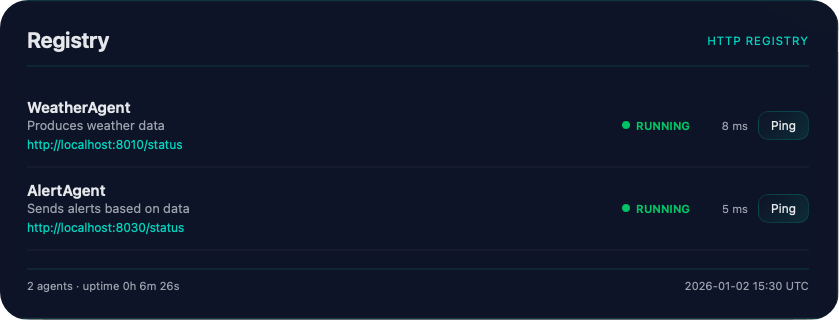
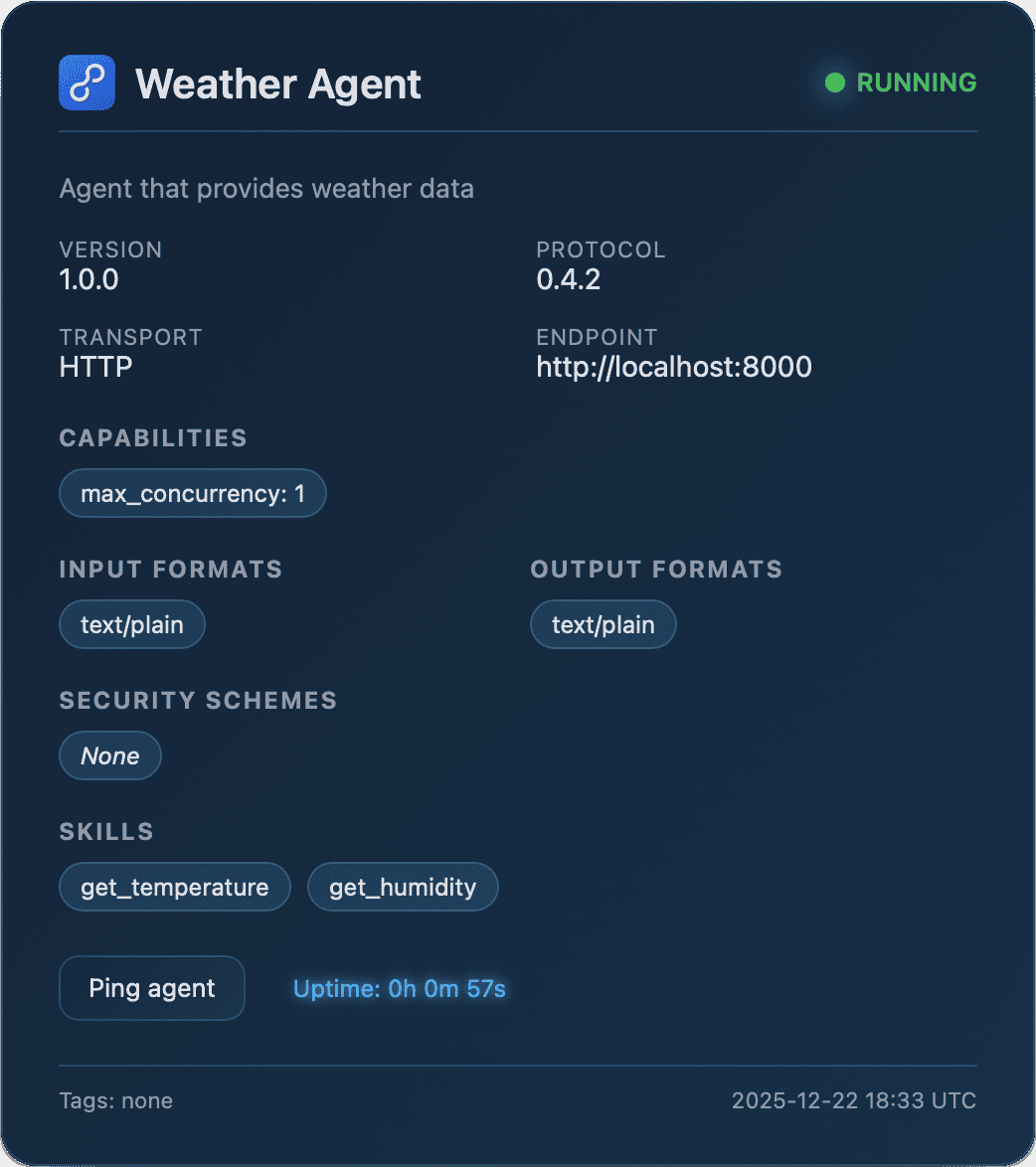
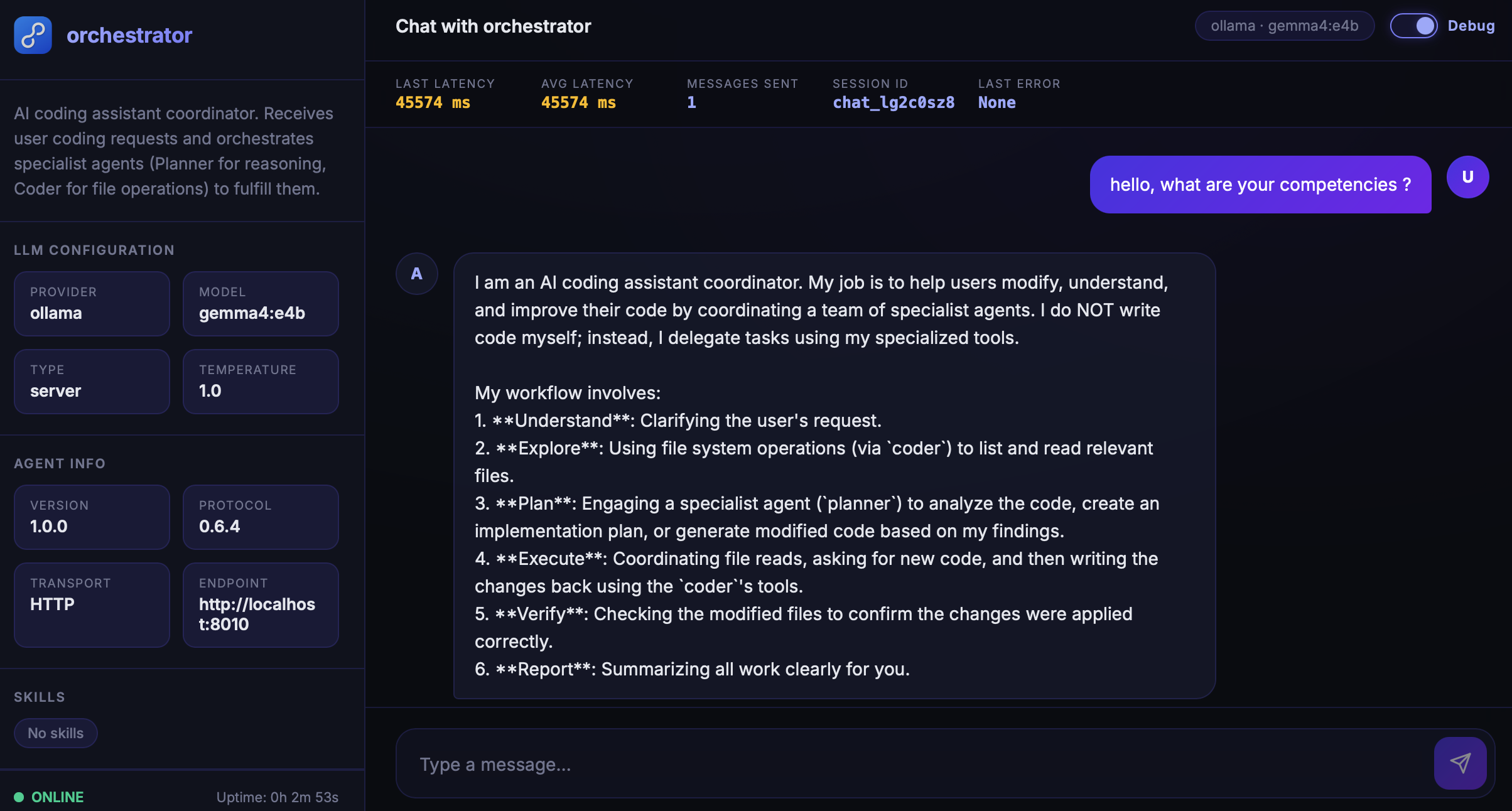
Agent.get_status / Agent.get_chat
get_status(
  output_format: Literal["html", "json"] = "html",
) -> str
get_chat() -> strRender the built-in operational status or chat page. HTML mode and get_chat() return self-contained browser markup. Despite the "json" format name, the current get_status("json") implementation returns str(card.to_dict()), which is a Python dictionary representation rather than guaranteed valid JSON. The chat renderer displays a fallback when no LLM is configured, while POST chat handling requires an LLM and enabled exposure.
Parameters
output_formatLiteral["html", "json"]default: "html"- Format used only by
get_status(). HTML renders the operational page; JSON returns the string form of the card dictionary. Any other runtime value raisesValueError.get_chat()takes no arguments.
Agent.handle_chat_message
async handle_chat_message(
  data: dict[str, Any],
) -> dict[str, str]Validate an incoming chat payload, invoke the Agent with its message and session ID and return a response dictionary. The server route controls whether this handler is exposed.
Parameters
datadict[str, Any]required- Mapping containing
messageand optionallysession_id. A missing or falsey message returns an error mapping; the session defaults to"chat_default". The handler also returns error mappings when no LLM is configured, chat exposure is disabled, or invocation raises.
Utility Methods
Inspect the Agent identity and replace model or storage dependencies through the public facade.
Agent.get_agent_card
get_agent_card(*, as_json: bool = True) -> AgentCard | dict[str, Any]Return the live identity card or its serializable dictionary representation. as_json=True returns a dictionary despite the historical parameter name; it does not return a JSON string.
Parameters
as_jsonbooldefault: True- Keyword-only representation switch. True calls
card.to_dict(); false returns the Agent's liveAgentCardobject rather than a defensive copy.
Agent.llm / Agent.storage
llm: LLM | None
storage: StorageThe llm setter calls validate_connection() and updates card.capabilities.has_llm from that result. The storage setter updates the existing State object's storage reference so future persistence follows the replacement backend; the annotation expects Storage, but the setter performs no runtime type check.
The setter also refreshes automatic supports_inference from model configuration, independently of
connection health. Explicit inference-support declarations remain in effect when the model is replaced.
storage does not migrate data from the old backend. Changing llm does not rewrite existing conversation histories or rebuild a running server's route set.YAML Import and Export
Install protolink[yaml] to use the YAML methods. Dictionary serialization (to_dict() and from_dict())
is included in the base package.
Protolink supports exporting an agent's configuration (identity card, capabilities, transport, TLS file references, LLM, security/authenticator, registered tools and non-default first-party capability policy) to a YAML file and importing it back to reconstruct a functional Agent instance. TLS serialization stores certificate paths and settings, never certificate or private-key contents.
Agent serialization methods
to_dict() -> dict[str, Any]
to_yaml_string() -> str
to_yaml(filepath: str) -> None

Agent.from_dict(data: dict[str, Any], **overrides) -> Agent
Agent.from_yaml_string(yaml_str: str, **overrides) -> Agent
Agent.from_yaml(filepath: str, **overrides) -> AgentExport the reconstructable Agent configuration as Python data or YAML, or create a new Agent from one of those representations. Import methods are class methods: subclasses receive an instance of the subclass.
Parameters
datadict[str, Any]requiredParsed Agent configuration for
from_dict().yaml_strstrrequiredYAML document for
from_yaml_string().filepathstrrequiredDestination for
to_yaml()or source forfrom_yaml().**overridesAnyConstructor values that replace serialized values during import. Use overrides for environment-specific transports, credentials, executable policies, approval handlers, or other dependencies that should not be trusted or embedded.
Configuration export is not a live runtime checkpoint. Active tasks, event loops, open connections, in-memory discovery caches, cancellation tokens, approval callbacks and arbitrary executable policy objects are not serialized.
Exporting an Agent
To serialize and export an agent's configuration:
# Export to a YAML file
agent.to_yaml("agent_config.yaml")

# Get configuration as a YAML string
yaml_str = agent.to_yaml_string()

# Get configuration as a dictionary
config_dict = agent.to_dict()
Importing an Agent
To load and reconstruct an agent from a serialized configuration:
from protolink.agents import Agent

# Reconstruct from a YAML file
agent = Agent.from_yaml("agent_config.yaml")

# Reconstruct from a YAML string
agent = Agent.from_yaml_string(yaml_str)

# Reconstruct from a dictionary
agent = Agent.from_dict(config_dict)
Handling Dependencies and Overrides
- Security & Credentials: Treat exported Agent configuration as sensitive. Configured outbound
credentialsand authenticator settings can be serialized, including bearer secrets, API-key maps, basic credentials and OAuth client secrets. Review and protect the file, or pass replacement values during import:agent = Agent.from_yaml("agent_config.yaml", credentials="my-secret-key")BRAVE_SEARCH_API_KEYis different:web_search()reads it from the environment only when the default Brave engine is invoked, so the built-in tool does not place that key in Agent dict/YAML output. The explicitengine="duckduckgo"path is keyless. - Built-ins & Policy: Built-in tools serialize by stable first-party identity. A non-default, exact
CapabilityPolicyserializes its declarative rules, default effect and name. Executable custom policies (includingCapabilityPolicysubclasses) and approval callbacks are not embedded; pass them aspolicy=andapproval_handler=overrides when importing. An explicit policy override takes precedence over serialized first-party rules. - Tool Function Paths: Standard Python tools are serialized using their module and function name paths (e.g.
my_module:my_tool_func). When the agent is imported, Protolink dynamically imports the function. If the module cannot be imported (e.g., if loaded in a different environment), Protolink registers a stub tool that returns a clean runtime error when executed rather than crashing initialization. - MCP Tool Adapters: Model Context Protocol (MCP) tool configs are fully serialized. If the MCP dependencies are installed on the target machine, they will be initialized and bound correctly.
Abstract Methods
The Agent class provides a default implementation for handle_task that handles tool use and LLM inference automatically. You generally do not need to implement any abstract methods unless you require custom logic.
handle_task(task: Task) -> Task: Override this if you need custom task processing logic (e.g., conditional execution, routing).
from protolink.agents import Agent
from protolink.models import AgentCard, Task, Message


class EchoAgent(Agent):
    async def handle_task(self, task: Task) -> Task:
        last = task.get_last_part_content()
        return task.complete(f"Echo: {last}")
Implementation Layout
protolink.agents.base.Agent is the stable public facade. Internally, the agent package keeps the constructor and dependency wiring in base.py, the core task and LLM execution loop in engine.py, reusable behavior chunks in mixins.py, state-request normalization in helpers.py and the blocking convenience facade in sync.py.
Error Handling
The Agent class includes several error handling patterns:
- Missing Transport: Construction and
start()can operate without a server transport, but outboundcall_agent()andsend_message_to()raiseRuntimeError. - Authentication Failures: Returns
401or403responses for invalid auth. - Tool Errors: Direct
call_tool()calls propagate validation, policy, approval and tool errors. Task-based tool execution converts ordinary tool failures into an error-bearingtool_outputpart; policy failures remain raised. - Convenience Calls:
invoke()andask()raise the top-levelTaskExecutionErrorwhen the returned task is failed or canceled. Its.taskattribute preserves the complete task. Userun_task()to inspect returned states directly or addraise_for_status()explicitly; the check leaves nonterminal states unchanged. - Task Processing: Non-streaming engine errors mark the task failed and are re-raised through direct handler calls. The streaming engine emits a
TaskErrorEventand a final failed status event.