Flows
Structured Flows orchestrate the same A2A-derived Task, Message, Part, Artifact and AgentCard primitives used by autonomous delegation. A flow is a deterministic Flow.execute(Task) -> Task state machine: it receives the current task, moves it through a known topology and returns the enriched task at the end.
Flows are a ProtoLink runtime extension, not an A2A protocol operation. The important boundary is that deterministic orchestration does not escape into graph-private models: it continues to use the shared A2A-based task language.
Use flows when the shape of the process is known ahead of time. Instead of asking an LLM to decide the whole plan at runtime, you define the path in code: a sequential pipeline, a fan-out/fan-in review step, a controlled router, or a graph-shaped state machine with loops. The agents inside the flow can still use LLMs, tools, storage and remote transports. The difference is that the orchestration itself is inspectable Python.
from protolink import Agent, Pipeline

researcher = Agent(name="researcher", llm="mock")
writer = Agent(name="writer", llm="mock")
flow = Pipeline([researcher, writer])
print(flow.sync.invoke("Research this topic and write a summary."))
The mock adapters provide deterministic fixture responses. Configured provider adapters use the same topology. invoke() returns final content; execute(task) exposes the complete task, including messages, artifacts and flow metadata.
Simple flow calls and steps
All flows expose await flow.invoke(prompt, session_id=None, budget=None, context=None) and
flow.sync.invoke(...) for final content. execute(task) still exposes the complete task.
Step(handler) adapts a Task-to-Task function, ToolStep(agent, tool_name, args=None) performs
a validated tool task and RepeatUntil(step, checks, max_attempts=...) adds bounded acceptance.
See deterministic steps for
full signatures, execution evidence, budget sharing and stop conditions.
See Execution, approvals and recovery for the optional process/filesystem tools, embedded groups, approval broker, completion checks and bounded workflows.
🧠 The Logic Behind Flows
In standard Protolink agent execution, an Agent receives a task, analyzes it using an LLM and decides what to do next. It might call a tool, write a response, or delegate work to another Agent through an agent_call. That flexible mode is useful when the problem is open ended, but it can be too loose for workflows that must be repeatable, reviewable, or tied to a business process.
Flows move the topology out of the model and into code. A Pipeline always runs the same ordered steps. A Parallel flow always fans the same input out to the configured branches and merges the results. A Graph follows named edges and validates that destinations exist. A Router still lets a preceding agent choose a branch, but the available branch keys and destinations are fixed by the developer and recorded on the task for tracing.
Structured Flows are best for processes where the topology matters. They make the movement between agents explicit, while leaving each agent free to do its own specialized work. They remove the LLM from the routing equation entirely (Agent Delegation). With a Flow, you, the developer, explicitly define the state machine. The task will move predictably from Agent A to Agent B, branching only on logical conditions you define in code.
What Happens To The Task?
In Protolink, a Flow expects a Task and returns a Task. A Task is essentially a container holding a history of interactions (Messages and Artifacts). When a Flow executes:
- Semantic Context Injection: Before a deterministic next step, the flow builds a short prompt that describes the downstream target and stores it in
task.flow_state["prompt"]. - Execution: The flow dispatches the task to the current target. The target can be a local
Agent, a remote agent string, or another nestedFlow. - Agent Processing: The executing agent can read the flow prompt automatically during inference. It appends messages, artifacts, metadata, or state transitions to the same logical task.
- Transition Bridge: If one agent's previous output is not already an executable instruction, Protolink wraps that output into a new
Message.infer(...)instruction before sending it to the next agent. This keeps direct agent-to-agent steps from silently no-oping on a plain text or artifact result. - Traversal: The flow moves to the next step and repeats until the topology reaches its terminal point.
flow_state is intentionally transient. Pipeline and Graph clear and rewrite it before each step so agents receive only the relevant downstream context. If you need durable business state, put it in task metadata, messages, artifacts, or storage rather than relying on flow_state to survive the whole workflow.
🧱 Deep Composability & Nesting
Protolink Flows are fully recursive. This means a step in a Pipeline can be another self-contained Parallel flow, or a Graph node can be a complete Pipeline. Nested flows receive the parent flow's client and registry when they have not been configured directly, so complex structures do not need repeated wiring at every level.
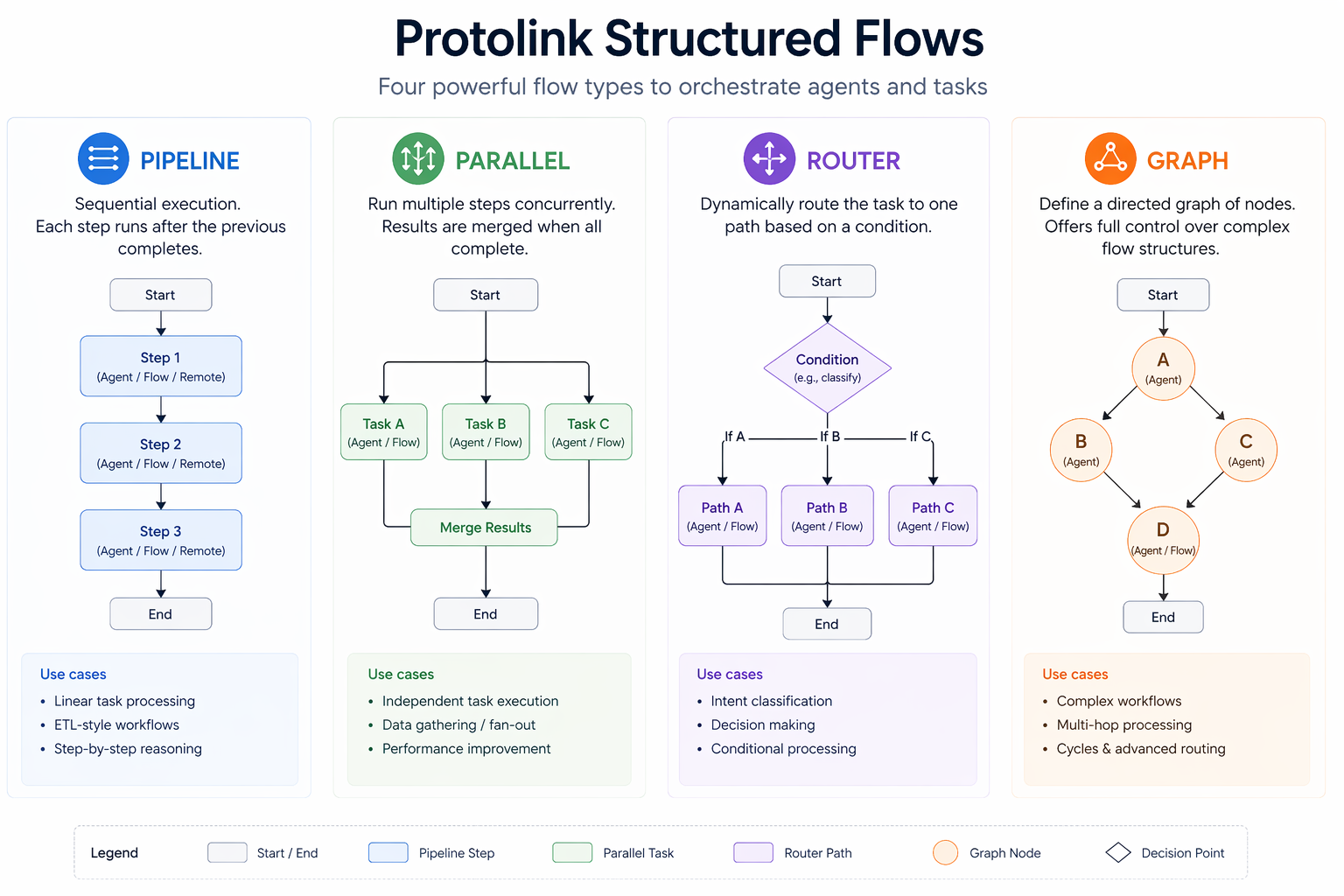
This lets you build hierarchical workflows out of small, reusable pieces. For example, a parent Pipeline can draft a response, run a Parallel review committee, route the reviewed output and then finish with a final formatter.
Every flow step, branch, route, or graph node supports three target types:
- Local Agent Instance: Executes directly in the same process through
agent.run_task(task). - URL / Registry Name (string): Resolves an agent name through a registry, or dispatches directly to a URL such as
http://...,ws://..., orruntime://.... - Flow Instance: Executes a nested sub-flow by calling its own
execute(task)method.
When a string target is not already a URL, the flow needs a Registry or RegistryClient so it can discover the agent by name. Remote dispatch also needs an AgentClient; if the registry client exposes a transport, Protolink can infer the client from that registry.
⚙️ Execution
You can run every flow asynchronously with .execute(task). This is the normal API for servers, async scripts and agents that are already inside an event loop:
from protolink.flows import Pipeline
from protolink.models import Message, Task

task = Task.create(Message.user("Research this topic and summarize it."))

pipeline = Pipeline(registry=registry)
pipeline.add_step("researcher").add_step("summarizer")

result = await pipeline.execute(task)
For scripts, CLI commands and notebooks without async support, use the synchronous wrapper:
result = pipeline.sync.execute(task)
The sync wrapper calls asyncio.run() internally, so do not use it from inside an already-running event loop. In async applications, always await flow.execute(task) directly.
🧩 Core Flow Patterns
All flow primitives share the same contract: they accept a Task, execute one or more FlowTarget objects and return the updated Task. They differ only in how they choose the next target.
1. Pipeline (Sequential)
A pipeline runs a predefined list of agents in sequential order, passing the output of one agent as the input to the next.
pipeline = Pipeline(registry=registry)
pipeline.add_step("researcher").add_step("summarizer")

await pipeline.execute(task)
Use a Pipeline when each step depends on the previous step's result: research then summarize, draft then edit, extract then validate, plan then execute. The order is stable and before each step Protolink looks at the next step to generate the right flow_state["prompt"].
If the next step is an agent, the prompt can include that agent's AgentCard so the current agent knows who will consume its output. If the next step is a Router, the prompt includes the available route keys and the routing instructions. If the next step is Parallel, the prompt describes all branch receivers so the current agent can produce an output useful to all of them.
Pipelines support a fluid API via the .add_step() method, allowing you to chain steps together dynamically during initialization.
pipeline = Pipeline(registry=registry).add_step("researcher").add_step("fact_checker").add_step("summarizer")
2. Parallel Execution
If multiple agents can act independently on the same task without needing each other's output, you can execute them concurrently. Their resulting parts are appended to the task outcome simultaneously.
When a preceding agent passes its output to a Parallel flow, Protolink's Semantic Context Injection automatically informs the agent that it is broadcasting to a committee of concurrent receivers. The agent is fed the AgentCards for all parallel branches, allowing it to formulate a single comprehensive response optimized for all downstream consumers!
Parallel execution uses ID-based merging. This ensures that the unified task only includes strictly new messages and artifacts from each branch, preventing duplicates even in complex nested structures.
Under the hood, Parallel deep-copies the incoming task once per branch. Each branch gets an isolated task, so one branch cannot accidentally observe another branch's in-progress metadata or artifact changes. After all branches finish, Protolink merges newly created messages and artifacts back into the original task in branch order.
Metadata from each branch is also merged into the final task. If two branches write the same metadata key, the later branch in the configured branch list wins. For data that must never collide, prefer branch-specific metadata keys or artifacts.
from protolink.flows import Parallel

# Executes Editor and Reviewer at the exact same time
parallel = Parallel(branches=["editor", "reviewer"], registry=registry)

task = Task.create(Message.user("Please analyze this draft."))
result = await parallel.execute(task)

for art in result.artifacts:
    print(f"- {art.parts[0].content}")
Parallel is most useful for independent review, scoring, enrichment, extraction, or validation steps. It is less useful when branch B needs the exact output of branch A; use a Pipeline for that.
3. Conditional Routing
A Router allows conditional branching based on LLM decision-making while keeping the actual branch transition explicit and inspectable. The Router injects your routing_prompt into the preceding agent, asking it to choose one of the named routes.
The preferred contract is a structured route part:
from protolink.models import Message, Part

task.add_message(
    Message(
        role="agent",
        parts=[
            Part.text("This draft needs editing."),
            Part.route("editor", reason="needs polish"),
        ],
    )
)
Part.route(...) round-trips through normal task serialization, appears in traces and gives tests an exact branch key to assert. The Router also accepts JSON-shaped decisions such as {"route_key": "editor"} and the older [ROUTE: editor] text tag as compatibility fallbacks.
The route key must match one of the keys in routes. If the preceding agent emits an unknown key, the router raises a ValueError instead of guessing. Every successful route decision is appended to task.metadata["route_decisions"], which makes routing behavior easier to inspect in tests, traces and replay tooling.
Use Router when the content of the task should choose the next branch but the allowed branches should remain controlled by the developer. If the branch decision should be pure Python logic instead of a model-generated route decision, use a Graph conditional edge.
from protolink.flows import Router

router = Router(
    routes={"editor": "editor", "quality": "quality"},
    routing_prompt="If the text is poorly written, choose 'editor'. If it is perfect, choose 'quality'.",
    registry=registry,
)

# Place the router in a Pipeline:
pipeline = Pipeline(registry=registry)
pipeline.add_step("writer").add_step(router)

# The 'writer' agent will automatically receive the routing instructions and choose the path!
task = Task.create(Message.user("Write a very short poem."))
await pipeline.execute(task)
In this example, the writer agent receives the routing instructions before it runs. The Router itself does not ask the model again; it reads the route decision already present on the task and dispatches to the mapped target.
4. Graph Flows (State Machines)
For creating highly complex deterministic workflows with loops, complex conditional branching and a state-machine architecture, you can use the Graph flow.
from protolink.flows import Graph

graph = Graph(registry=registry)

# 1. Add Nodes
graph.add_node("entry", "writer")
graph.add_node("process", "editor")
graph.add_node("final", "quality")

# 2. Add standard edges
graph.add_edge("entry", "process")


# 3. Add conditional routing edges
def review_logic(t: Task) -> str:
    return "approved"  # Normally you'd inspect the task artifacts here


graph.add_conditional_edge(
    "process",
    review_logic,
    {"approved": "final", "rejected": "process"},  # Loops back on rejection!
)

graph.add_edge("final", "__END__")
graph.set_entry_point("entry")

result = await graph.execute(task)
Graphs are useful when the workflow has named stages, loops, or code-defined branch logic. Each node is a normal FlowTarget, so it can be a local agent, a remote string target, or an entire nested flow. Edges come in two forms:
add_edge("a", "b")creates a fixed transition from one node to the next.add_conditional_edge("a", condition_fn, path_map)evaluatescondition_fn(task)after nodeafinishes and uses the returned key to choose a destination.
Graph validates that referenced nodes exist, requires an entry point and uses the reserved "__END__" destination to terminate. A node can have either a fixed edge or a conditional edge, but not both. To protect against accidental infinite loops, graph execution stops with an error after 50 iterations.
For deterministic edges, Graph can inject downstream context just like Pipeline. For conditional edges, the next node is not known until after the current node executes, so Protolink clears the transient flow prompt before running that node.
Choosing The Right Flow
| Need | Use |
|---|---|
| Strict ordered stages | Pipeline |
| Independent work over the same input | Parallel |
| Model-assisted branch choice with fixed destinations | Router |
| Named state machine with loops or Python conditions | Graph |
| A reusable sub-workflow inside another workflow | Any Flow as a nested target |
Flow API Reference
FlowTarget accepts an Agent | str | Flow. A string can be a direct URL or a registry name.
Constructors
Flow is abstract; construct one of its concrete subclasses in application code.
Flow
Flow(
  client: AgentClient | None = None,
  registry: Registry | RegistryClient | None = None,
)Base contract and shared dispatcher for deterministic workflows. It owns remote-client and registry wiring, the synchronous facade, semantic-context generation, target resolution and nested-flow dependency propagation.
Parameters
clientAgentClient | Nonedefault: None- Client used for string targets. When omitted, remote dispatch can infer one from a configured RegistryClient transport at execution time.
registryRegistry | RegistryClient | Nonedefault: None- Discovery source for string targets that are names rather than direct HTTP, HTTPS, WS, WSS, or runtime URLs. A Registry contributes its client.
Attributes
syncSyncFlow- Blocking facade bound to this exact flow instance.
Pipeline, Parallel, Router, or Graph. Subclasses implement only traversal; shared target execution stays in Flow.Pipeline
Pipeline(
  steps: list[FlowTarget] | None = None,
  client: AgentClient | None = None,
  registry: Registry | RegistryClient | None = None,
  *, max_steps: int | None = None,
)Execute an ordered sequence against one evolving Task. Before each step, Pipeline clears transient flow_state and compiles instructions for the known downstream target; the final step receives terminal-output guidance.
Parameters
stepslist[FlowTarget] | Nonedefault: None- Initial ordered targets. The list is retained as
pipeline.steps;Nonecreates an empty pipeline. clientAgentClient | Nonedefault: None- Remote-dispatch client inherited by unconfigured nested flows.
registryRegistry | RegistryClient | Nonedefault: None- Optional name-resolution source.
max_stepsint | Nonedefault: None- Stop before dispatching more than this many pipeline steps.
Parallel
Parallel(
  branches: list[FlowTarget],
  client: AgentClient | None = None,
  registry: Registry | RegistryClient | None = None,
)Fan one Task out to independently deep-copied branches, await every branch concurrently, then merge new messages, artifacts and metadata back into the original Task in configured branch order.
Parameters
brancheslist[FlowTarget]required- Concurrent local Agents, strings, or nested Flows. An empty list is valid and returns the original task without additions.
clientAgentClient | Nonedefault: None- Remote branch client.
registryRegistry | RegistryClient | Nonedefault: None- Optional name resolver.
asyncio.gather(..., return_exceptions=False) propagates a branch exception and skips fan-in. Successful results merge in branch-list order, so a later branch wins metadata-key collisions.Router
Router(
  routes: dict[str, FlowTarget],
  routing_prompt: str,
  client: AgentClient | None = None,
  registry: Registry | RegistryClient | None = None,
)Dispatch to one developer-approved target using a route decision already written by the preceding step. Router prefers structured route parts, accepts JSON-shaped decisions and retains the historical text tag as a compatibility fallback.
Parameters
routesdict[str, FlowTarget]required- Allowed decision keys mapped to targets. Router never guesses an unknown key.
routing_promptstrrequired- Criteria injected by a preceding Pipeline into that preceding Agent's prompt; Router itself does not make another model call.
clientAgentClient | Nonedefault: None- Remote-route client.
registryRegistry | RegistryClient | Nonedefault: None- Optional target-name resolver.
Graph
Graph(
  client: AgentClient | None = None,
  registry: Registry | RegistryClient | None = None,
  *, max_iterations: int = 50,
  max_node_visits: int | dict[str, int] | None = None,
)Create an initially empty named state machine. Nodes, edges and entry point are added separately; "END" is reserved as the terminal destination.
Parameters
clientAgentClient | Nonedefault: None- Remote-node client.
registryRegistry | RegistryClient | Nonedefault: None- Optional node-name resolver.
max_iterationsintdefault: 50- Total node-dispatch bound.
max_node_visitsint | dict[str, int] | Nonedefault: None- Common or per-node visit limit, including application repair attempts.
Attributes
nodesdict[str, FlowTarget]- Named execution targets.
edgesdict[str, str]- One fixed destination per origin.
conditional_edgesdict[str, tuple[Callable, dict[str, str]]]- Condition function and route map per origin.
entry_pointstr | None- First node, initially unset.
finish_pointstrdefault: "__END__"- Reserved terminal sentinel.
Public Methods
Flow.execute
async execute(task: Task) -> TaskExecute one concrete flow's topology against a Task.
Parameters
taskTaskrequired- Mutable task passed through targets. Concrete flows return the same logical task, enriched by target outputs and flow metadata.
Returns
taskTask- Final task after the topology terminates.
agent.handle_task(task), not agent.run_task(task). Remote targets go through AgentClient. Applications needing the Agent live-cancellation/run-store wrapper for local steps should account for that distinction.Flow.sync.execute
execute(task: Task) -> TaskBlocking equivalent of the concrete flow's execute(), implemented with asyncio.run().
Parameters
taskTaskrequired- Mutable task to pass through the concrete flow's topology. The wrapper forwards this exact object to the asynchronous implementation.
Returns
taskTask- Final task after every selected target finishes and the topology terminates.
flow.execute(task) there.Pipeline.add_step
add_step(step: FlowTarget) -> PipelineAppend one target to steps and return this Pipeline for fluent chaining.
Parameters
stepFlowTargetrequired- Local Agent, direct URL or registry name, or nested Flow.
Returns
pipelinePipeline- This same Pipeline instance, allowing calls such as
pipeline.add_step(a).add_step(b).
Graph.add_node
add_node(
  node_name: str,
  target: FlowTarget,
) -> GraphAdd or replace a named target and return this Graph. The reserved terminal name cannot be used as a node.
Parameters
node_namestrrequired- Unique identifier used by edges and the entry point. Reusing an existing non-reserved name replaces that node's target.
targetFlowTargetrequired- Local Agent, direct URL or registry name, or nested Flow executed when traversal reaches this node.
Returns
graphGraph- This same Graph instance for fluent construction.
Raises
ValueErrornode_name == "END".
Graph.add_edge
add_edge(
  from_node: str,
  to_node: str,
) -> GraphAssign a fixed outbound transition. Both nodes must already exist, except that the destination may be "END".
Parameters
from_nodestrrequired- Existing origin node whose next transition should be deterministic.
to_nodestrrequired- Existing destination node, or the reserved
"END"sentinel to terminate traversal.
Returns
graphGraph- This same Graph instance for fluent construction.
Raises
ValueError- A node is missing or the origin already owns a conditional edge.
Graph.add_conditional_edge
add_conditional_edge(
  from_node: str,
  condition_fn: Callable[[Task], str],
  path_map: dict[str, str],
) -> GraphEvaluate a synchronous Python function after the origin finishes and map its returned key to the next node.
Parameters
from_nodestrrequired- Existing origin node.
condition_fnCallable[[Task], str]required- Synchronous decision function. Async callables are not awaited.
path_mapdict[str, str]required- Decision keys to existing nodes or
"END".
Returns
graphGraph- This same Graph instance for fluent construction.
Raises
ValueError- An origin or destination is missing, the origin already owns a fixed edge, or execution later returns an unmapped key.
Graph.set_entry_point
set_entry_point(node_name: str) -> GraphSelect an existing node as the traversal start and return this Graph.
Parameters
node_namestrrequired- Name of an existing node that should execute first.
Returns
graphGraph- This same Graph instance for fluent construction.
Raises
ValueError- No node with
node_namehas been added to the graph.
Concrete execute behavior
Each concrete method implements the traversal described earlier on this page. Pipeline mutates sequentially; Parallel copies then merges; Router records and dispatches one decision; Graph traverses named edges with a hard limit of 50 executed nodes.
Pipeline.execute
async execute(
  task: Task,
) -> TaskRun the task through steps in declaration order. Before each step, Pipeline clears transient flow state and injects context for the known downstream target; the last step receives terminal-output guidance.
Parameters
taskTaskrequired- Initial task that every sequential step reads and enriches.
Returns
taskTask- Fully processed task containing the accumulated messages, artifacts, metadata and final flow context.
Raises
ValueError | RuntimeError- Target resolution fails, a target type is invalid, or a remote target has no usable client.
target error- Agent, nested-flow, registry and transport exceptions propagate immediately; remaining steps are not executed.
Parallel.execute
async execute(
  task: Task,
) -> TaskDeep-copy the input task for every branch, execute all branches concurrently and merge only newly added messages and artifacts into the original task. Successful branch results are merged in configured order, regardless of completion order.
Parameters
taskTaskrequired- Source task copied independently for each configured branch.
Returns
taskTask- Original task enriched with deduplicated branch messages and artifacts plus merged metadata.
Raises
branch error- Any branch exception propagates through
asyncio.gather(); fan-in is skipped instead of returning a partial merge.
Router.execute
async execute(
  task: Task,
) -> TaskRead the route decision already produced by the preceding step, validate it against the configured route map, record the decision and dispatch the task to exactly one developer-approved target.
Parameters
taskTaskrequired- Active task whose latest output contains a structured route part, JSON-shaped decision, or legacy route tag.
Returns
taskTask- Task returned by the selected route after the decision has been recorded.
Raises
ValueError- The decision is missing, malformed, or names a key absent from
routes. target error- Resolution, nested-flow, Agent, registry and transport failures from the selected route propagate.
Graph.execute
async execute(
  task: Task,
) -> TaskTraverse from the configured entry point until the reserved "END" destination is reached. Fixed edges allow downstream context injection before a node runs; conditional edges select their destination from the node's resulting task.
Parameters
taskTaskrequired- Initial task carried from node to node and passed to each condition function after its origin node finishes.
Returns
taskTask- Final enriched task after traversal reaches
"END".
Raises
ValueError- A conditional result has no destination in its path map, or shared target resolution rejects a target.
RuntimeError- No entry point is configured, a remote target lacks a client, or traversal exceeds the 50-node safety limit.
target error- Agent, nested-flow, registry, transport and condition-function exceptions propagate.
Practical Notes
- Keep long-lived workflow state in
Task.metadata, messages, artifacts, or storage. Treattask.flow_stateas short-lived execution context. - Prefer structured
Part.route(...)decisions for routers. Legacy[ROUTE: key]tags are supported, but structured parts are easier to test and replay. - Use registry names for portable flows and explicit URLs when you want the topology to point at a concrete service.
- Keep branch metadata keys distinct in
Parallelflows if multiple branches may write similar information. - Test flows by asserting the final
Task: message count, artifact IDs, metadata, route decisions and terminal state are usually better assertions than checking only the final text.