Developer Tools
Protolink includes local devtools for the same runtime contracts that power agents in production: RunContext, RunEvent, RunReport, local TraceRecord JSONL, registry discovery and the SQLite RunStore. The tools are intentionally dependency-light and application-neutral. They inspect what your agents already emit instead of inventing a separate tracing format.
The important idea is that devtools are not a separate observability product bolted onto the framework. They are a small projection layer over Protolink's core design: an agent is an autonomous runtime entity and its execution can be described through typed context, events, reports, registry cards and stored task state.
protolink doctor
protolink dashboard --store runs.db --open
The CLI is included in the base package. Point --store at your application's SQLiteRunStore file; add --registry-url for live agent discovery or a trace path for local telemetry. Execution checkpoints use a separate store for resumption.
The current surface has four command groups, including the dashboard and its Studio builder:
protolink doctorchecks local installation, optional extras, run-store readability and optional agent/registry endpoints.protolink registry listandprotolink registry inspectinspect a running HTTP registry.protolink run list,protolink run replayandprotolink run diffinspect durable task snapshots and run reports.protolink dashboardserves or writes a local HTML dashboard for runs, local telemetry, registry state and visual Studio blueprints.
When To Use Each Tool
| Tool | Use it when | Reads from | Executes agent code? |
|---|---|---|---|
doctor | You want to confirm installation, optional extras, store readability, or live endpoints. | Python environment, optional HTTP endpoints, optional SQLite file. | No |
registry list | You want to see what agents a registry currently advertises. | Registry /agents/ endpoint. | No |
registry inspect | You want one full agent card by name or URL. | Registry /agents/ endpoint. | No |
run list | You need recent task snapshots and run-report IDs. | SQLiteRunStore. | No |
run replay | You need a readable timeline for a stored run. | SQLiteRunStore. | No |
run diff | You need a normalized regression comparison between two stored reports. | SQLiteRunStore. | No |
dashboard | You want a local visual summary of registry, run-store and local telemetry state. | Registry, SQLiteRunStore and/or local trace JSONL. | No |
| Dashboard Studio | You want to compose agents, LLMs, tools, registries, flows and modules visually, then export code. | Declarative Studio blueprint. | Only when you click Run in a served dashboard. |
The inspection commands do not execute stored runs, so replay and comparison never re-call tools, prompts, or model providers. Studio execution is a separate, explicit action: Run starts the generated project and can therefore contact the transports, providers, tools and modules you configured.
Why This Exists
Agents are autonomous runtime entities in Protolink. You plug in an LLM, tools, telemetry, storage, policy, transport and registry participation. Once those modules are attached, the runtime emits enough structured data for command-line inspection and UI projection:
This keeps devtools modular: a CLI can render text, a notebook can call the collectors directly and a web surface can reuse the same HTML renderer without coupling to private agent internals.
The Runtime Data Model
The devtools become useful because Protolink separates runtime facts into stable layers:
AgentCarddescribes identity and capability: name, URL, transport, skills, tags, role, auth and metadata.RunContextdescribes one logical execution boundary: run ID, session ID, trace ID, workspace URI, parent run, agent chain, permissions, budgets and cancellation state.RunEventdescribes one point in execution: task status, context preparation, LLM call start/completion, tool action, policy decision, approval, artifact, delegation, budget warning, or final result.RunReportturns a sequence ofRunEventobjects into a durable summary suitable for replay, tests, dashboards and support bundles.TraceRecord,TraceSpanandTraceEventdescribe the detailed local telemetry hierarchy for completed Agent tasks.LocalTraceTelemetrycan append one task record per line to JSONL.SQLiteRunStorepersists task snapshots and run reports in a local database with searchable indexes.
The CLI and dashboard sit above these layers. They do not need to know whether the agent used OpenAI, Anthropic, Ollama, a mock model, runtime transport, HTTP, WebSocket, or a custom tool implementation. As long as the runtime emits and stores the public contracts, devtools can inspect the result.
This is also why the tooling scales from simple scripts to larger systems. A local script can write one runs.db; a hosted application can implement the same RunStore protocol against another backend later; a separate dashboard can reuse the collector and renderer patterns.
Doctor
Run the local readiness checks:
protolink doctor
The default report checks:
- The installed Protolink version.
- Optional HTTP modules used by HTTP, SSE and WebSocket development.
- Optional LLM provider SDKs.
- Optional metrics dependencies such as token estimators.
- Optional telemetry integrations.
Emit JSON for scripts or CI:
protolink doctor --json
Use JSON when the output will be read by a script. For example, a project-specific CI check can treat error as a failure while allowing warn if the project does not require every optional extra.
Probe an agent, registry and run store:
protolink doctor \
  --agent-url http://127.0.0.1:8010 \
  --registry-url http://127.0.0.1:9010 \
  --store runs.db
Doctor reports missing optional extras as warnings, because core Protolink remains usable without every LLM, telemetry, metrics, or HTTP dependency installed. Endpoint probe failures are errors, since the user explicitly asked to verify those endpoints.
Interpreting the result:
- Missing
http extrameans local HTTP/WebSocket registry or agent serving may not work, but runtime/in-process agents can still work. - Missing
llm api extrasmeans provider SDK clients are unavailable, but mock models, local server clients, or tool-only agents may still work depending on your install. - Missing
metrics extrameans token estimates are more approximate. - Missing
telemetry extrasmeans external telemetry sinks are unavailable, but local tracing and run reports can still be used. - A run-store warning usually means no run database has been created yet, or the file is not a Protolink
SQLiteRunStore.
Registry Inspection
List agents from a running registry:
protolink registry list --url http://127.0.0.1:9010
This returns the registry's current advertised agent cards. It is the quickest way to verify that registration worked and that the registry is exposing the URL/capability data other agents will use for discovery.
Filter by discovery fields:
protolink registry list --url http://127.0.0.1:9010 --role orchestrator --tag research
Inspect one agent by name or URL:
protolink registry inspect planner --url http://127.0.0.1:9010
The registry commands currently target HTTP(S) registry URLs, which matches the standard local development and dashboard workflow.
Registry inspection is especially useful before delegation. If an agent is expected to call a peer, the caller needs a usable peer card: URL, transport, skills, capabilities and any auth metadata. Looking at that card from the CLI catches many integration mistakes before the model or agent logic is involved.
Use --json when you need the full card. The table output is intentionally concise; it is for scanning, not for preserving every field.
Run Store Replay
Persisted runs come from SQLiteRunStore, RunRecorder and RunReport. List recent records:
protolink run list --store runs.db
The output has two sections:
- Recent task snapshots: final or intermediate serialized
Taskrecords. - Recent run reports: durable summaries built from normalized runtime events.
Task snapshots are useful for "what state did this task end in?" Run reports are useful for "how did the task get there?"
Replay a run report or task snapshot:
protolink run replay run_devtools_demo --store runs.db
run replay prefers a full RunReport when one exists. If only a task snapshot is available, it falls back to a one-item task timeline. This makes the command useful both for rich recorded runs and for simpler applications that only persist final task state.
A good replay should answer questions such as:
- Did the task move through the expected lifecycle states?
- Was a
RunContextattached with the expected run/session/trace IDs? - Did the runtime prepare the expected amount of context before the LLM call?
- Which LLM provider/model was called?
- Did a budget warning or policy decision happen before an action?
- Did the agent produce artifacts or a final task state?
Replay is not deterministic re-execution. It is a read-only reconstruction of recorded facts. That distinction is important for debugging: you can inspect a run without causing side effects, making provider calls, or repeating tool actions.
Run Regression Diffing
After executing and recording a candidate separately against the same controlled inputs and dependencies as a baseline, compare the two stored reports offline:
protolink run diff baseline_run candidate_run --store runs.db
The comparison canonicalizes known ProtoLink runtime-envelope identifiers, timestamps, sequence counters and runtime-derived timing fields before reporting path-level differences. Application-owned tool payloads and report metadata remain exact. It does not execute an agent, contact a provider, or repeat a tool action. With live models or external services, the result shows what changed; it does not make those dependencies deterministic. Regression suites normally compare final reports, but report lookup does not enforce a task lifecycle state.
run diff requires two RunReport records in the same SQLiteRunStore. It deliberately does not compare task-snapshot fallbacks because a snapshot does not contain the full event, action, approval, artifact and metric record.
The command exits 0 when the normalized reports match, 1 when they changed and 2 when either report is missing. Add --json in CI or custom tooling to receive status, missing_run_ids, changed_sections and structured differences in addition to the baseline and candidate selectors. Both terminal and JSON output mask sensitive baseline/candidate values with the default redaction policy while retaining their JSON Pointer paths.
Dashboard
Durable run controls
Configure protolink dashboard --factory myapp:application to add a durable execution panel to Runs. The synchronous factory returns configured durable Agents or a RunManager; it reconnects the application's own models, tools, policies and private checkpoint store. The configured roster is fixed at startup.
The panel lists bounded status records, displays pending questions/approval previews and sends answers or approval decisions with the current request ID and fingerprint. A continuation can complete or produce another pending request; refresh and inspect the updated state. Stopped runs can be canceled when no effects remain unresolved. Uncertain actions expose their identifiers and accept a JSON result only after the operator verifies the outcome externally. The UI does not automatically repeat an uncertain operation.
Controls require a client on the dashboard machine. The server validates Host, same-origin requests and JSON payloads and uses ordinary lease/configuration checks. The local dashboard is intended for trusted local development; external applications must authenticate and authorize their own users before invoking RunManager. Private checkpoints are distinct from the diagnostic --store source and management views omit full model histories and raw tool receipts.
These HTTP endpoints support embedded tooling: GET /api/durable, GET /api/durable/RUN_ID and POST /api/durable/RUN_ID/resume, /cancel or /reconcile. Resume accepts only request_id, fingerprint and either answer or approved; cancel requires {}; reconcile requires action_id and result. No request can supply an application factory. See durable management for recovery semantics.
Serve the local dashboard:
protolink dashboard \
  --store runs.db \
  --traces traces.jsonl \
  --registry-url http://127.0.0.1:9010 \
  --open
--telemetry traces.jsonl is an alias for --traces traces.jsonl.
Write a static HTML snapshot instead:
protolink dashboard --store runs.db --output dashboard.html
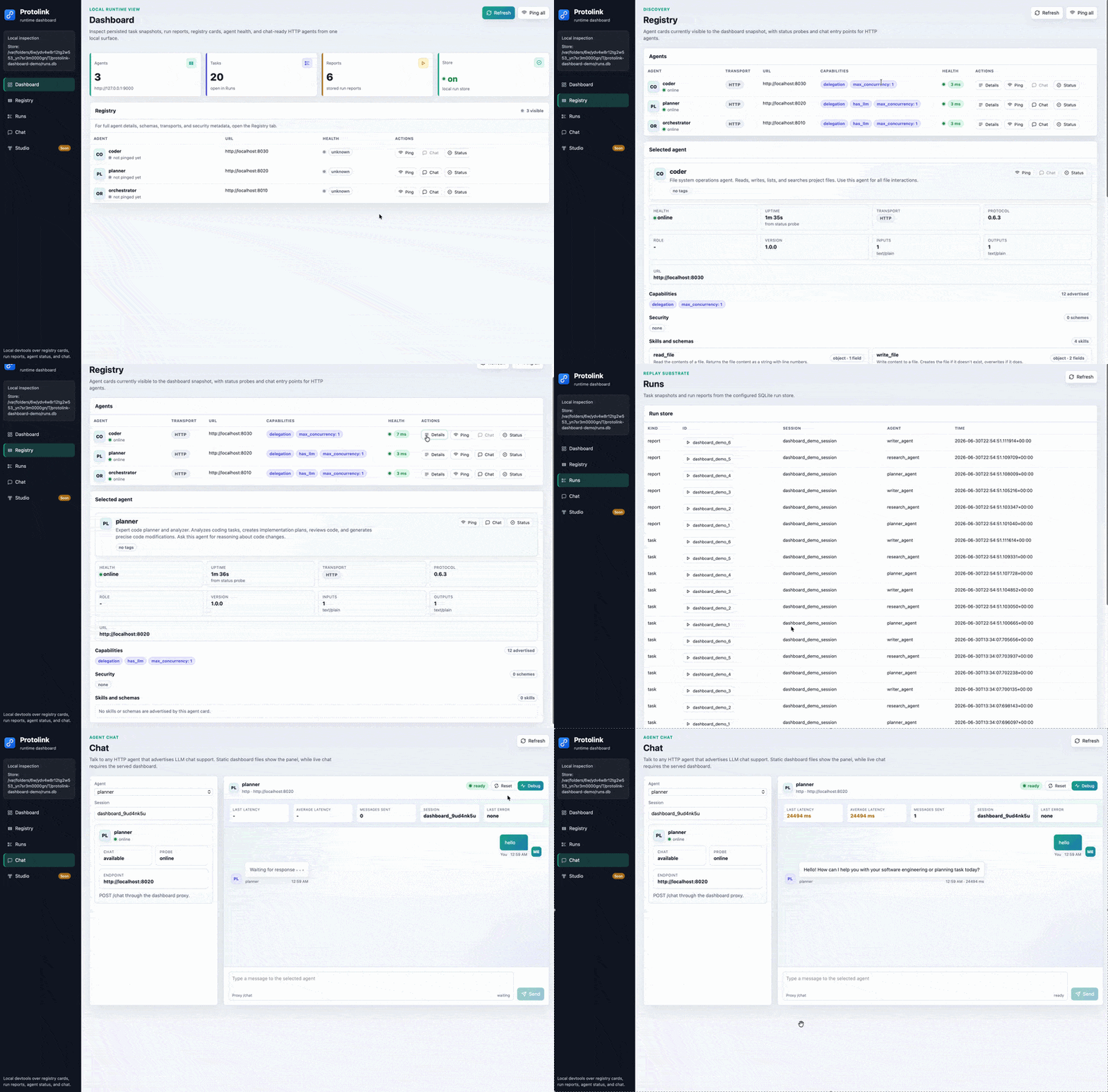
The dashboard is deliberately small: no build step and no frontend dependencies. It serves a local page with branded navigation, top-level runtime cards, registry agents, agent health probes, a chat panel for HTTP LLM agents, run replay, a Telemetry trace explorer and the Studio visual builder. The sidebar shows the active Protolink version. The JSON endpoint at /api/snapshot uses the same collector as static rendering and /studio opens the same page with Studio selected.
Use the served dashboard when you want live refresh against a local registry or run store, or bounded access to the trace file supplied with --traces. Use --output when you want a portable snapshot for a demo, issue, notebook, or support handoff. The Telemetry view also has an Open JSONL control, so either served or static HTML can inspect a file selected in the browser without first configuring a CLI path.
The distinction between served and static mode matters:
- Served mode can refresh
/api/snapshot, connect a registry URL or existing SQLite run store for the current process, replay runs through/api/runs/{run_id}, page through the configured telemetry file, load selected trace details lazily, ping HTTP agents through/api/agents/ping, proxy chat messages through/api/agents/chatand validate, generate, run, stop and monitor Studio projects. - Static mode embeds the current snapshot in the HTML file. It is excellent for demos and handoffs: Studio canvas editing and blueprint import/export stay in the browser and the Telemetry file picker can inspect local JSONL. Python generation, live Studio execution, server-backed refresh, ping, chat, run replay and CLI-configured telemetry paging need the local dashboard server.
The dashboard currently focuses on:
- High-level counts for agents, task snapshots, reports, loaded telemetry records and store availability.
- A registry-first dashboard body and second-position Registry tab, because discovery and live agent health are usually the most important development questions.
- A searchable Runs workspace with compact report/task cards, loaded-window metrics, correlation details and a vertical replay timeline.
- Registry card summaries with selected-agent details, transport badges, capability badges, schemas and security metadata.
- Ping controls for HTTP agents with latency/status feedback.
- A chat panel for agents that advertise
capabilities.has_llm=trueand expose the standardPOST /chatendpoint. - Chat-side diagnostics for served dashboards: last response latency, average latency, message count, active session ID and last proxy/agent error.
- A chat reset control that clears the visible conversation, starts a fresh dashboard session ID and resets the local latency/debug counters.
- Run replay buttons that load the same replay projection used by
protolink run replay. - A Telemetry view for filtering completed task records, inspecting nested task/LLM/tool/agent-call spans, replaying chronological events and opening redacted inputs, outputs, metadata and raw JSON only when selected.
- An active Studio canvas for composing, configuring, exporting and locally testing a supported topology.
It intentionally avoids provider-specific visualizations. Provider details belong in the structured run events and reports; the dashboard should remain generic enough for any Protolink agent system.
Connecting dashboard sources
The served Registry and Runs pages include source controls when a source was not supplied on the command line and they can also change an existing source. Without --store, the CLI uses an existing ./runs.db but does not create one when it is absent. Registry input accepts an HTTP(S) base URL. Runs input accepts the path to an existing Protolink SQLite database on the dashboard machine; inspection is read-only and a typo does not create a new database. These selections live only for the dashboard process.
Source-changing requests retain the dashboard's Host, same-origin JSON and request-size checks and are additionally limited to loopback clients. A dashboard exposed with --host 0.0.0.0 can display CLI-configured data to allowed clients, but remote clients cannot make the server connect to another registry or local file. Static HTML keeps the controls disabled because it has no local server process.
Telemetry JSONL
Start the dashboard with a local telemetry file:
protolink dashboard --traces traces.jsonl --open
The Telemetry view reads recent records first and keeps its working set bounded. Summary pages contain compact task and span counts; the full record and potentially large payload fields are loaded only when you select a record. Moving to older pages therefore does not require embedding the entire file in the initial dashboard snapshot or creating one DOM row for every trace ever recorded. Once the 500-summary browser window is full, loading older pages rolls newer summaries out of that window; Latest returns to the head of the file. The browser file picker follows the same bounded, lazy-detail model for a locally selected file.
Explicit tool rejections close their local trace span with status rejected and a “nothing changed” summary.
Run replay records action.rejected separately from completion, denial and execution failure; the structured
rejection code and correction details remain available in the payload. A recovered run can complete successfully
while retaining those rejection events. See tool validation.
One JSONL line represents one completed Agent task record. A trace_id is a correlation key, not a unique line ID: nested or delegated tasks can share it and an application can deliberately assign the same trace ID to several related tasks. The dashboard groups those task records under the shared trace ID while retaining task ID and record position as the distinct record identity.
Trace files can be observed while another process is appending to them. Blank or malformed lines are reported and skipped instead of making the whole source unreadable. An incomplete final line is treated as a partial write; it is ignored for the current page and can become visible after the writer completes it and the dashboard refreshes.
The server reader also treats JSON deeper than 256 object or array levels as malformed, consistently across supported Python versions.
Each server page has a byte and line scan budget, each detail record has a 16 MB safety limit and span/event/JSON rendering is separately capped. If one physical line is larger than a scan page, the reader returns an opaque continuation cursor and skips across that line over bounded requests, so an unusually large payload cannot make every older record unreachable. The source diagnostics show malformed lines, oversized records, partial tails and pages that reached a scan budget.
Default redaction masks common secret-bearing fields, but captured prompts, tool arguments, outputs and custom metadata can still be sensitive. A file chosen with Open JSONL is read locally by the page and is not uploaded to a hosted service. The served dashboard binds to 127.0.0.1 by default, rejects unexpected HTTP Host names and limits browser action POSTs to same-origin JSON requests. Changing --host to a non-loopback interface can still expose trace details, registry data and dashboard proxy actions to other network clients. With a wildcard bind, open the dashboard through an IP address; arbitrary DNS hostnames are rejected. Only broaden the binding on a trusted network with controls appropriate for the data.
The chat panel is meant for fast local probing, not for becoming a production chat product. Select an HTTP LLM agent from the registry, keep or edit the session ID and send a message through the dashboard proxy. Pressing Enter submits the message, while Shift+Enter keeps editing a multi-line prompt. The Debug toggle opens a small live diagnostics strip so you can see whether a slow response is coming from the dashboard proxy, the agent endpoint, or the model/tool path behind that agent.
Agent health indicators follow the same idea as the terminal renderers: runtime-only agents are clearly marked as local/runtime, unprobed HTTP agents stay unknown, active probes show a pending state, successful probes show online latency and failed probes show the last error. Transport and capability fields are rendered as badges so the registry can be scanned quickly without reading a dense JSON card. When an HTTP agent's status page exposes a start timestamp, the dashboard can also show uptime after the agent is pinged.
The selected-agent panel is intentionally more than a name/URL preview. It shows role, version, protocol, transport, input/output formats, security schemes, capability flags, tags, skills and advertised input/output schemas for each skill. The dashboard overview points users to this Registry tab instead of duplicating a Details button in the landing table. Empty schema sections are explicit so users can tell the difference between "not advertised" and a dashboard loading issue.
Protolink Studio
Studio is the dashboard's active visual builder. It ships with the standard Protolink package: run protolink studio [blueprint.json], or start protolink dashboard and select Studio (or open http://127.0.0.1:8765/studio when using the default host and port).
For a complete workspace tour, every node and module setting, connection and Flow semantics, generated-code guarantees, execution controls, blueprint format and security limits, see the dedicated Protolink Studio guide.
The palette separates runtime topology from operational modules:
- Agent, LLM, Tool, Registry and Flow are the core nodes. The inspector exposes the relevant card, model, transport, schema, flow, state and lifecycle settings for each kind.
- Module covers storage (
memory,sqlite), telemetry (local,langsmith,langfuse), logging (console,file,quiet), SQLite run storage, capability policy, knowledge (memory,sqlite) and bearer authentication. - LLM choices are mock, OpenAI, Anthropic, Gemini, Grok, DeepSeek, Hugging Face, Ollama, LM Studio, OpenAI-compatible, vLLM and llama.cpp local/server adapters. Tool choices include calculator, current date/time, URL fetch, web search and a custom placeholder.
- Agent and Registry transports can use HTTP, WebSocket, gRPC, runtime, SSE, JSON-RPC, or SSE JSON-RPC. Flow nodes support pipeline, parallel, router and graph construction.
Add nodes from the palette, drag them on the canvas and select a node to edit it. On desktop, Studio stays within the available viewport: its canvas pans and zooms without visible scrollbars, while the palette and inspector retain their own contained lists. Drag empty canvas space or use a wheel/trackpad to pan; Ctrl/Cmd+wheel zooms around the pointer. The −, percentage, +, Fit project and Find selection controls keep large topologies easy to navigate. With the viewport focused, +/− zoom, 0 returns to 100%, F fits the project and the arrow keys pan. Camera position and zoom are view-only and never enter the blueprint, design history, JSON export, or generated code. Code and Logs open a fixed output drawer whose tabs switch between generated Python, Blueprint JSON and runtime logs. Restore starter returns to the packaged example, while Clear canvas creates an empty, persisted workspace and remains undoable.
Connections are typed-ish: Studio accepts only node-kind pairs the generator understands, including Agent–LLM, Agent–Tool, Agent–Registry, Agent–Flow, Agent–Agent, Flow–Flow, Flow–Registry, Agent–Module and Registry–Storage. Each edge retains a relation, label and order; ordered flow connections affect generated flow wiring. Validation rejects missing endpoints, duplicate/self connections, unsupported pairs and cyclic nested flows.
Generate Python validates the blueprint and returns a readable, directly runnable module built from Protolink's public APIs, then opens the output drawer on its Python tab. Studio resolves visual wiring while generating: the Python contains only logical registries, modules, LLMs, tools, agents, flows and lifecycle calls (never canvas nodes, coordinates, edges or blueprint JSON). Runtime collections use configured names such as agents["planner"] and flows["main_pipeline"], so the file reads and edits like ordinary application code. The code view shows warnings for incomplete topology and the result can be copied or downloaded under its generated filename. Generating does not execute anything. In a served dashboard, Run starts the generated module as the dashboard's single active Studio subprocess and opens the drawer on its Logs tab; Stop terminates it. Closing the dashboard also stops the child process and removes its temporary script.
Static and served Studio intentionally have different boundaries:
- A static
--outputpage can edit the canvas, keep the draft in browser local storage and import or export the declarative blueprint as JSON. It has no Python process behind it, so Generate Python, Copy Python, Download Python, runtime status, Run and Stop require a served dashboard. - A served page uses the local validation and generation endpoints. Starting and stopping projects is additionally restricted to loopback clients. The normal dashboard Host, same-origin JSON and request-size checks apply to every action endpoint.
Studio v1 stores bounded JSON, not arbitrary Python. It never evaluates snippets from the blueprint. Public built-in tools are generated directly; a custom Tool node becomes a safe placeholder handler for you to replace in the downloaded file. Only the provider, flow, transport and module implementations exposed by the Studio catalog are constructed automatically and selected optional integrations still require their normal Protolink extras. Agent, registry and module constructor settings are explicit Studio fields so unsupported keywords fail validation instead of producing broken Python. LLM advanced options remain available as bounded JSON and are checked against the selected provider's public factory arguments.
Do not put credentials in a blueprint. Secret-bearing keys are rejected; enter an environment-variable name in fields such as api_key_env, secret_env, or credentials_env, then define that variable in the environment that launches the dashboard. A running Studio project inherits that environment. Review downloaded code before running providers, tools, transports, or modules that can make network requests or write local data.
The served routes are:
GET /studioopens the dashboard with Studio selected.GET /api/studio/catalogreturns the supported node and implementation choices.POST /api/studio/generatevalidates a blueprint and returns Python, filename, normalized blueprint, warnings and a digest.GET /api/studio/statusreturns the active run state and recent output.POST /api/studio/runstarts one generated project;POST /api/studio/stopstops it by run ID.
Collector And Renderer APIs
The UI pieces live in protolink.utils.renderers.devtools:
The collector, renderer and Studio blueprint API for local dashboards, telemetry exploration, run replay and comparison, registry inspection, chat probes, code generation, terminal summaries and application-specific debug panels.
protolink.devtoolsbuild_dashboard_snapshot()DevtoolsHtmlRendererDevtoolsTextRendererping_agent()generate_studio_code()from pathlib import Path
from protolink.devtools import (
chat_with_agent,
default_studio_blueprint,
generate_studio_code,
ping_agent,
)
from protolink.devtools.server import build_dashboard_snapshot
from protolink.utils.renderers.devtools import DevtoolsHtmlRenderer, DevtoolsTextRenderer
snapshot = build_dashboard_snapshot(store_path="runs.db")
html = DevtoolsHtmlRenderer().render_dashboard(snapshot)
text = DevtoolsTextRenderer().render_run_list(snapshot["runs"])
generated = generate_studio_code(default_studio_blueprint())
Path(generated.filename).write_text(generated.source, encoding="utf-8")
probe = ping_agent("http://127.0.0.1:8010")
reply = chat_with_agent("http://127.0.0.1:8010", "hello", session_id="docs")
Use DevtoolsTextRenderer for terminals and logs. Use DevtoolsHtmlRenderer for static pages, local dashboards, notebooks, or application-specific developer portals.
The collectors and renderers are separate on purpose:
- Collectors such as
build_dashboard_snapshot(),list_run_store_records(),build_run_replay_view()andbuild_run_diff_view()return plain dictionaries or small dataclasses. - Agent actions such as
ping_agent()andchat_with_agent()call public HTTP agent endpoints. They are deliberately separate from the renderer so applications can reuse them in their own debug panels. - Text renderers turn those structures into terminal-friendly tables.
- HTML renderers turn those structures into standalone dashboard pages with registry health, chat, run replay, local telemetry inspection and Studio blueprint editing included. Server-backed Studio code generation and execution remain responsibilities of the local dashboard server.
This separation keeps the public API simple. You can replace the renderer without replacing the collectors, or use the collectors inside your own app while keeping Protolink's CLI behavior unchanged.
For example, a custom app can reuse the same run replay projection:
from protolink.devtools import build_run_replay_view

view = build_run_replay_view("runs.db", "dashboard_demo_1")
for item in view.items:
    print(item.event_type, item.summary)
The stored-report comparison collector returns a RunDiffView:
from protolink.devtools import build_run_diff_view

view = build_run_diff_view("runs.db", "baseline_run", "candidate_run")
print(view.status)  # "match", "changed", or "missing"
safe_payload = view.to_dict()  # diff values are redacted by default
build_run_diff_view() requires two report records and never falls back to task snapshots. RunDiffView.diff is the core RunReportDiff when both reports exist; otherwise missing_run_ids identifies the failed lookups. Passing redaction_policy=None to RunDiffView.to_dict() returns raw values, so keep the default or supply a policy when the payload can leave the process.
Provider-Free Example
The example script creates several mock-LLM agents, registers their cards in an in-process registry, runs a small task loop, saves reports to SQLite and writes dashboard HTML:
python examples/devtools_dashboard.py --output-dir .protolink-devtools
protolink run list --store .protolink-devtools/runs.db
protolink run replay dashboard_demo_1 --store .protolink-devtools/runs.db
protolink dashboard --store .protolink-devtools/runs.db --open
Because it uses create_llm("mock"), it does not need provider credentials. The static dashboard HTML generated by the example includes the demo registry snapshot plus the same offline-safe Studio starter blueprint and catalog used by the served dashboard. The default demo agents use RuntimeTransport, so the dashboard shows them as runtime agents.
To click the dashboard ping and chat controls, run the same example in live HTTP mode:
python examples/devtools_dashboard.py --output-dir .protolink-devtools --serve-live
Live mode starts provider-free HTTP agents, an HTTP registry and the local dashboard. It still records the same task loop to SQLiteRunStore, but now the registry advertises HTTP agent URLs that the dashboard can probe and chat with. Studio's Python generation, copy/download and local Run/Stop controls are available in this served mode.