Protolink Studio
Protolink Studio is the local visual builder included in the standard protolink package. It lets you compose agents, LLMs, tools, registries, structured flows, and operational modules on a canvas, configure their public Protolink parameters, and turn the result into ordinary runnable Python.
The canvas is an editor, not a second runtime API. A generated file contains only normal Protolink imports, object definitions, connections, and lifecycle functions. Canvas coordinates, node IDs, edge records, and blueprint JSON are not emitted into the Python program.
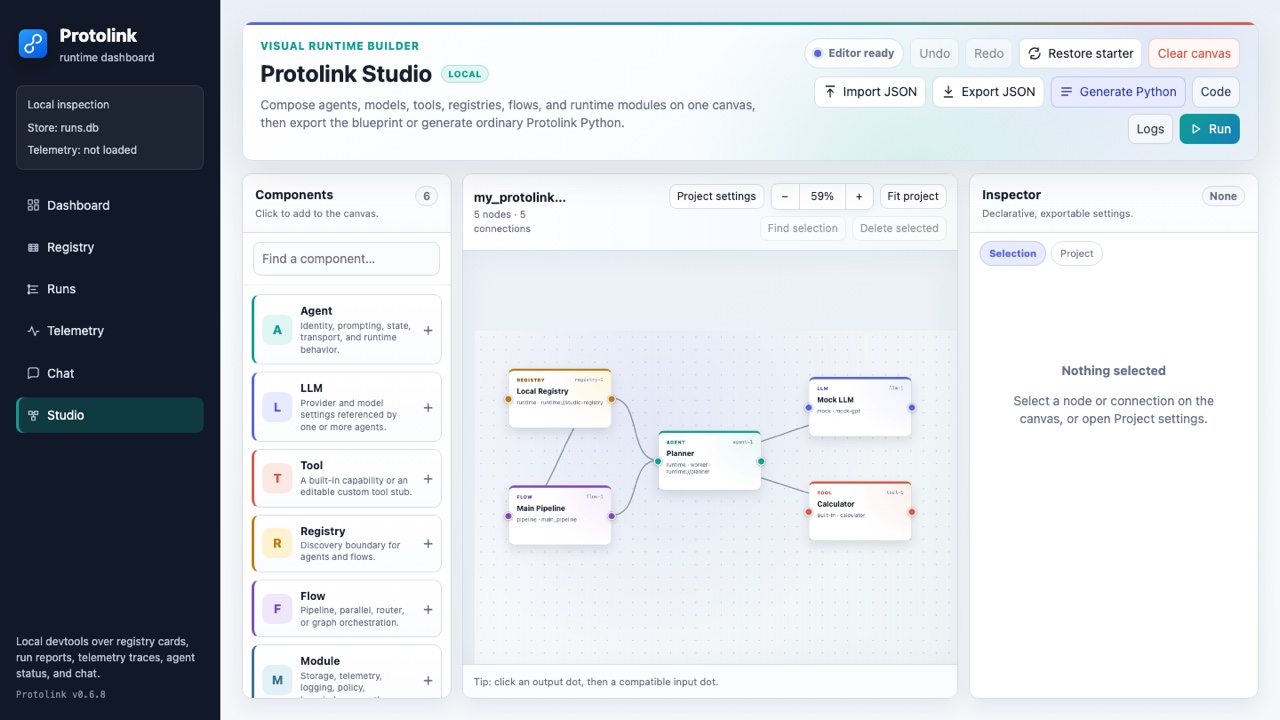
Start Studio
Studio needs no separate frontend installation or JavaScript package. Install Protolink and launch the local server:
pip install protolink
protolink studio
The default address is http://127.0.0.1:8765/studio. The process stays in the foreground until you stop it with Ctrl+C.
Load a previously exported blueprint, or choose another local address:
protolink studio customer_support.json
protolink studio --host 127.0.0.1 --port 9000
You can also open the same builder from the complete dashboard:
protolink dashboard --open
| Mode | How to open it | What is available |
|---|---|---|
| Served Studio | protolink studio [blueprint.json] | Edit, persist, import/export JSON, generate/copy/download Python, run/stop, and inspect logs. |
| Served dashboard | protolink dashboard and select Studio | The same Studio surface alongside Registry, Runs, Telemetry, and Chat. |
| Static dashboard | protolink dashboard --output dashboard.html | Edit, browser-local persistence, and blueprint import/export. Python generation and local execution are disabled because no Python server is present. |
The initial project uses runtime transport, a runtime registry, MockLLM, a calculator tool, one Agent, and a Pipeline. You can generate and run it without provider credentials.
Build a project
The shortest complete workflow is:
- Choose Agent, LLM, Tool, Registry, Flow, or Module in the component palette.
- Drag each node to arrange the topology.
- Select a node and edit its settings in the Inspector.
- Click a node's right output port, then a compatible node's left input port.
- Select a connection to set its relation, label, and order.
- Click Generate Python and review the generated module.
- Use Download Python for a standalone file, or click Run to test it locally.
- Open Logs to follow the process and Stop when finished.
Workspace anatomy
| Surface | Purpose |
|---|---|
| Command bar | Undo/redo, restore the starter, clear the whole project, import/export JSON, generate code, open outputs, and run/stop the project. |
| Components | Search and add the six supported node kinds. New nodes receive safe defaults and stable IDs. |
| Canvas | Pan and zoom through the topology, arrange nodes, create directed connections, and fit the project or current selection. The summary shows the current node and connection counts. |
| Inspector | Edit the selected node or connection. The Project tab edits the generated project name and description. |
| Output dialog | Switch between Python, Blueprint JSON, and Runtime logs without leaving or scrolling away from the canvas. |
Canvas and connections
The canvas uses a pan-and-zoom camera instead of visible scrollbars. Drag empty canvas space to pan; with the canvas focused, hold Space while dragging when you want to move the view without disturbing a node. A mouse wheel or trackpad pans in two dimensions, while Ctrl/Cmd+wheel zooms around the pointer. Use − and + for stepped zoom, the percentage control to return to 100%, Fit project to frame all nodes, and Find selection to center the selected node or connection. The palette, canvas, inspector, and output dialog remain contained, so the Studio page itself stays fixed on desktop.
To create an edge, click the output dot on the right side of a node. Compatible input dots glow; click one to finish the connection. Press Escape or choose Cancel connection to stop. Select the edge itself to edit its fields.
Studio accepts only pairs for which the generator has concrete semantics:
| Pair | Generated meaning |
|---|---|
| Agent — LLM | Attach the selected LLM to the Agent. |
| Agent — Tool | Add the Tool to the Agent. |
| Agent — Registry | Give the Agent a registry and optionally register it on start. |
| Agent — Module | Attach storage, telemetry, logging, run store, policy, knowledge, or authentication. |
| Agent — Agent | Define a directed Graph transition when both Agents are targets of that Graph. This edge does not configure autonomous delegation by itself. |
| Agent — Flow | Place the Agent inside a structured Flow or nest a Flow beside an Agent. |
| Flow — Flow | Nest flows. The directed flow dependency graph must remain acyclic. |
| Flow — Registry | Give the Flow a registry. When several are connected, generated code uses the first and reports a warning. |
| Registry — storage Module | Use the storage Module as Registry persistence. Other Registry–Module pairs are rejected. |
Every edge keeps these settings:
- Relation is a readable semantic name such as
llm,tool,registry,storage, orstep. - Label names a Router route and can document any other connection.
- Order controls ordered Flow children. Pipeline and Parallel members are sorted by order, then edge ID and runtime name for stable output.
Connections cannot point to missing nodes, connect a node to itself, repeat the same source/target/relation triple, use an unsupported pair, or create a nested-flow cycle.
Inspector reference
Every node has an editable canvas label and a stable, read-only node ID. The label is for the visual workspace; runtime names determine keys such as agents["planner"] and flows["main_pipeline"] in generated code.
Agent
An Agent node generates an AgentCard, a transport, and an Agent built through public APIs.
| Group | Available settings |
|---|---|
| Identity | Runtime name, description, role (worker, orchestrator, gateway, interface, or observer), version, tags, input formats, and output formats. |
| Runtime | URL, transport, credentials environment-variable name, verbosity, discovery TTL, registry heartbeat interval, register on start, and expose chat. |
| Behavior | System prompt, skills mode (auto or fixed), state modules (conversation, tools, task, flow), retrieval (auto, always, required), and override-system-prompt. |
| Protocol | A2A toggle, capabilities JSON, security-schemes JSON, and AgentCard interfaces JSON. A2A currently requires HTTP transport. |
| Transport detail | TransportConfig JSON and transport-specific options JSON. |
Supported capability keys are streaming, push_notifications, state_transition_history, delegation, has_llm, max_concurrency, message_batching, tool_calling, multi_step_reasoning, timeout_support, rag, and code_execution. All are booleans except max_concurrency, which is a positive integer.
LLM
An LLM node generates a call to create_llm() and can be shared by connected Agents.
| Setting | Behavior |
|---|---|
| Provider and model | Select the adapter and its model ID or local model path. |
| API key environment variable | Stores the variable name, such as OPENAI_API_KEY; it never stores the key. It appears only for providers that accept an API key. |
| Base URL and headers | Available for applicable server adapters. Headers must not contain credentials. |
| Mock response | Default response used by the dependency-free mock provider. |
| Model parameters | JSON passed as provider model parameters, including values such as temperature or token limits. |
| Tool calling | Declares native model-side tool support for adapters where it is configurable. |
| Metrics and parse failures | Enable supported LLM metrics and set the maximum parse-failure count. |
| Advanced provider options | Bounded JSON restricted to arguments accepted by the selected provider's public factory. Unsupported keys fail validation. |
Provider choices are mock, openai, anthropic, gemini, grok, deepseek, huggingface, ollama, lmstudio, openai-compatible, vllm, llama.cpp-server, and llama.cpp-local.
The base package can construct the mock provider. Install the normal optional dependency for a provider before running generated code that uses it, for example pip install "protolink[llms]" for the packaged model adapters.
Tool
Tool nodes support two implementation modes:
- Built-in creates one of Protolink's public
calculator,current_datetime,fetch_url, orweb_searchtools. - Custom creates a safe, directly runnable placeholder handler that returns the configured stub response. Replace that handler in the downloaded Python file with your application logic.
The Inspector also exposes function name, description, tags, capabilities, default arguments, examples, input schema, and output schema. These values become ordinary Tool metadata and JSON Schema in the generated module. Studio never evaluates Python copied into a blueprint.
Registry
A Registry node generates a transport and Registry. Configure its URL, transport, optional credentials environment-variable name, verbosity, entry TTL, TransportConfig, and transport-specific options. Connect a storage Module to persist entries. If several storage Modules are connected, generated code uses the first and reports a warning.
Flow
| Flow type | Generated object | Connection behavior |
|---|---|---|
pipeline | Pipeline | Connected Agent/Flow steps run in edge order. |
parallel | Parallel | Connected Agent/Flow branches are emitted in stable edge order. |
router | Router | Each edge label becomes its route key; an unlabeled edge falls back to the target runtime name. The routing prompt configures selection. |
graph | Graph | Connected Agents/Flows become named nodes and directed edges. Set an optional entry node ID; otherwise the first connected node is used. |
Flow nodes expose runtime name, type, router prompt, and—when the type is graph—entry node ID. Generated projects also include run_flow(flow_name, prompt) when at least one Flow exists.
Modules
Modules are reusable operational objects. Connect a Module to an Agent; storage can also connect to a Registry. An Agent can have one module of each type except knowledge and telemetry, which may have multiple connected instances.
| Module type | Implementations | Settings |
|---|---|---|
| Storage | memory, sqlite | Name and namespace; memory supports optional TTL, while SQLite uses database path and table name. |
| Telemetry | local, langsmith, langfuse | Local trace file, maximum traces, and payload capture; or provider environment-variable names, project name, and host. |
| Logger | console, file, quiet | Console/file log level and optional file path; quiet logging ignores the shared level control. |
| Run store | sqlite | Database path and table prefix. |
| Policy | capability | Default allow/deny effect and rules JSON. |
| Knowledge | memory, sqlite | Description, sources, default result count, context character limit, and optional SQLite path/namespace. |
| Authentication | bearer | Secret environment-variable name, algorithm, issuer, audience, and leeway. |
Optional telemetry and other integrations still require the same Protolink extras and environment variables they require in handwritten code.
An Agent uses the first connected LLM and Registry, attaches every connected Tool and knowledge Module, and combines multiple telemetry Modules with MultiTelemetry. For storage, logger, run store, policy, and authentication, it uses the first connected Module of each type and reports a generation warning when extras are present.
Transport reference
Agent and Registry nodes expose every transport supported by the Studio catalog.
| Transport | URL form | Supported transport options |
|---|---|---|
runtime | runtime://name | No transport-specific options or credentials. |
http, sse, json-rpc, sse-json-rpc | http://host:port | timeout, backend (starlette or fastapi), validate_schema, log_level, and access_log. |
websocket | ws://host:port | timeout. |
grpc | grpc://host:port | timeout, channel/server option pairs, maximum concurrent RPCs, graceful shutdown timeout, health, and reflection. |
The Transport config field is passed through TransportConfig.from_dict(). The separate Transport options object contains implementation factory arguments. Invalid or unsupported keys are rejected before code generation.
Studio does not currently expose a concrete TLSConfig, so https://, wss://, and grpcs:// URLs fail validation. Generate the project first and add your application-specific TLS configuration in Python.
Project state and editing
Studio keeps the current draft in browser local storage under the dashboard origin. A blueprint explicitly passed to protolink studio blueprint.json takes precedence for that launch. Use Export JSON for a portable project file rather than treating browser storage as a backup.
| Command | Result |
|---|---|
| Undo / Redo | Move through a bounded 60-entry design history. Cmd/Ctrl+Z undoes; Cmd/Ctrl+Shift+Z or Cmd/Ctrl+Y redoes. |
| Restore starter | Replace the project with the packaged offline-safe example. The operation asks for confirmation and is undoable. |
| Clear canvas | Replace every node and edge with an empty untitled_studio project. It asks for confirmation, persists immediately, closes output, and remains undoable. An active run must be stopped first. |
| Import JSON | Read a blueprint file of at most 1 MiB, normalize it, reject embedded secrets, and replace the current project. |
| Export JSON | Download the current declarative blueprint, including layout and connection metadata. |
| Delete selected | Remove the selected node and its edges, or the selected connection. Delete/Backspace is the keyboard equivalent outside form fields. |
Changing a design marks previously generated code as stale. Run regenerates it before starting when necessary.
The camera is view-only state. Its pan offset and zoom are not written to the blueprint, browser draft, design history, exported JSON, or generated Python.
When the canvas viewport has keyboard focus, + and − zoom, 0 returns to 100%, F fits the project, and the arrow keys pan. When a node card has keyboard focus, the arrow keys move it by 8 pixels and Shift+Arrow moves it by 24 pixels. Escape closes the output dialog or cancels an in-progress connection. Inspector and output tabs support normal arrow-key tab navigation.
Generated Python
Click Generate Python to validate the complete blueprint and open the fixed output dialog. The Python tab shows its generated filename and any topology warnings; Copy Python writes the source to the clipboard and Download Python saves the file.
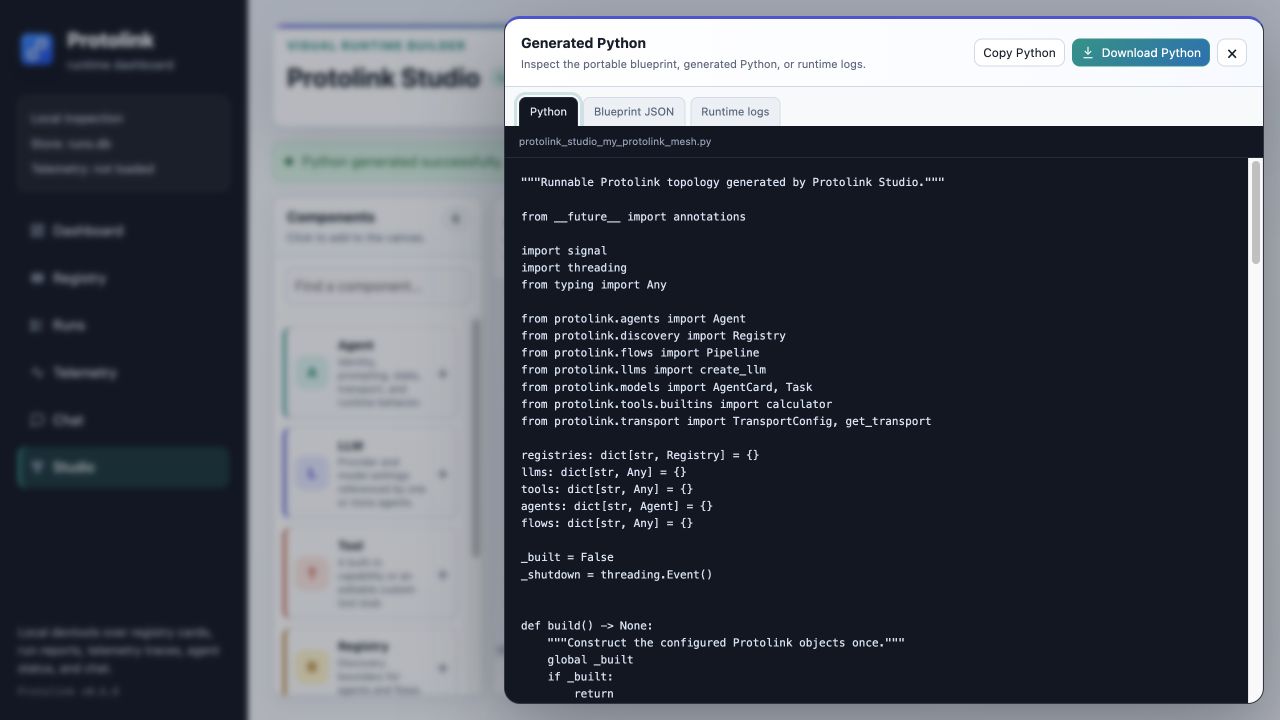
Generated modules are designed to be readable and editable:
- They import Protolink's public modules and construct Registries, Modules, LLMs, Tools, Agents, and Flows directly.
build()constructs the topology once;start()andstop()manage lifecycle in a safe order;main()waits for SIGINT or SIGTERM.- Collections use stable runtime names, for example
agents["planner"]andflows["main_pipeline"]. - Generated files do not import Studio, load a blueprint, or refer to canvas nodes, coordinates, or edges.
- Warnings identify incomplete but valid designs, such as an Agent without an LLM or a Flow without steps. Validation errors block generation.
Run a downloaded module like any Python script:
python protolink_studio_my_protolink_mesh.py
Review it first when the topology contains providers, tools, transports, or modules that can contact a network service or write local data.
Run, stop, and logs
In served mode, Run validates and regenerates the current blueprint, writes the generated source to a temporary directory, and starts it with the same Python interpreter and environment as the dashboard. Studio permits one active generated subprocess per dashboard.
The output dialog switches to Runtime logs when a process starts or stops. Status is polled while the dashboard is open, recent combined output is bounded, and the top status pill shows starting, running, stopping, idle, or error state. Stop terminates the active run by its run ID. Closing the dashboard server also stops the child process and removes its temporary script.
Run and stop requests are restricted to clients on the dashboard machine. Generating code does not execute it.
Run starts the configured Registries and Agents; it does not automatically execute a Flow. A generated project with flows exposes the async run_flow(flow_name, prompt) helper so your application can invoke a specific flow explicitly.
Blueprint format
The portable JSON format contains a schema version, project metadata, nodes, and connections:
{
  "version": 1,
  "project": {
    "name": "support_mesh",
    "description": "Routes support requests through a local agent."
  },
  "nodes": [
    {
      "id": "agent-1",
      "kind": "agent",
      "label": "Support Agent",
      "x": 320,
      "y": 180,
      "config": {
        "name": "support",
        "description": "Answers support questions.",
        "role": "worker",
        "url": "runtime://support",
        "transport": "runtime",
        "system_prompt": "Be precise and practical.",
        "skills": "auto",
        "state": ["conversation"],
        "retrieval": "auto",
        "register": true
      }
    }
  ],
  "edges": []
}
Coordinates are bounded to the Studio canvas and exist only to restore the layout. Node IDs and edge endpoints preserve connection identity. The server normalizes omitted supported defaults before returning or generating from a blueprint.
Validation and security boundaries
Studio accepts bounded JSON rather than arbitrary Python:
- Blueprints are limited to 1 MiB, 200 nodes, 400 edges, finite JSON values, and a bounded nesting depth.
- Node kinds, fields, providers, tools, flows, modules, transports, and advanced provider options are allow-listed against public Protolink APIs.
- Raw credential-bearing keys are rejected recursively. Use names in fields ending with
_env, then define those variables in the environment that starts Studio. - URLs cannot contain user-info credentials. TLS URLs remain unavailable until Studio can construct an explicit
TLSConfig. - The local dashboard validates Host headers, same-origin JSON actions, and request sizes. Run and stop additionally require a loopback client.
The default 127.0.0.1 bind is intentional. Binding to 0.0.0.0 can expose registry details, traces, generated code, and other dashboard data to your network even though remote clients cannot start or stop Studio projects. Broaden the bind only on a trusted network with appropriate controls.
HTTP and Python APIs
The served Studio routes are:
| Route | Purpose |
|---|---|
GET /studio | Open the dashboard with Studio selected. |
GET /api/studio/catalog | Return supported node kinds, transports, providers, tools, flows, and module implementations. |
POST /api/studio/generate | Validate a blueprint and return normalized JSON, Python, filename, warnings, language, and digest. |
GET /api/studio/status | Return active lifecycle state and recent output. |
POST /api/studio/run | Start one validated generated project; loopback only. |
POST /api/studio/stop | Stop the active project by run ID; loopback only. |
You can also validate and generate without the browser:
from protolink.devtools import (
    default_studio_blueprint,
    generate_studio_code,
    load_studio_blueprint,
    studio_catalog,
    validate_studio_blueprint,
)

blueprint = default_studio_blueprint()
normalized = validate_studio_blueprint(blueprint)
generated = generate_studio_code(normalized)

print(generated.filename)
print(generated.source)
print(generated.warnings)

# Or validate a previously exported file.
loaded = load_studio_blueprint("support_mesh.json")
StudioRuntimeManager is also public for local integrations that need the same single-process lifecycle contract, but most applications should use the CLI server or run the downloaded module directly.
Troubleshooting
| Symptom | Check |
|---|---|
| Generate, Copy, Download, Run, or Stop is unavailable | Open Studio through protolink studio or a served dashboard. A static HTML snapshot has no Python backend. |
| A connection target does not glow | The node pair is unsupported, or it is the source node itself. Use the compatibility table above. |
| Generation reports a missing or unsupported setting | Select the node and correct the Inspector field. Studio validates constructor arguments instead of emitting broken Python. |
| A provider fails when the generated project starts | Install its optional dependency, set the referenced environment variable, and confirm the model/server URL is reachable. |
| The saved browser draft disappeared | A supplied blueprint takes precedence, invalid/oversized drafts are ignored, and drafts containing apparent secrets are removed. Import an exported JSON file. |
| Run reports that another project is active | Stop the current Studio run before starting another one. |
| A TLS URL fails validation | Studio does not expose TLSConfig yet. Download the generated Python and add TLS configuration explicitly. |
For the surrounding dashboard, renderer architecture, and other local inspection commands, continue with Developer Tools. For the APIs produced by the generator, see Agents, LLMs, Tools, Flows, Registry, Transports, and Runtime.